Help? Alignment/spacing thrown off c/o Legacy Name...
Replies

It's been aaages since I last was on here- pre-Legacy Names sort of ages! As such, my newer pets' profiles are working fine, but I noticed my older pets have some spacing issues....
Temeraire, for instance, shows that he has a minion, but it overlaps awkwardly with his legacy name... whereas my newbie, Blackbeard shows up with normal looking spacing?
I'm certain that there's a super easy line to add in........... but I have no clue what? Does anyone have any advice? I'm rather fond of this simplistic and easy profile and not tech-literate enough to just come up with a similar one or whatnot...
Edit - Okay... so at my personal work computer and my home computer, it shows overlap... But at the shared work computer I've moved to since my job opened a short time ago.... there's no issue.... The screens are all 3 the same size and everything is set the same....? Now I'm just extra boggled. I'd still like to add a little spacing between Legacy Name and "Pet has a Minion" if that's doable, given the odd differences between computers....

The Subeta CSS Compendium is super helpful for anything pet or user profile related!
You can move the individual elements, including the legacy name, independently to set the spacing to your preference. This image (which can also be found in the compendium) shows the names for most of the elements you'll find. For the legacy name, you'd use .legacy-name
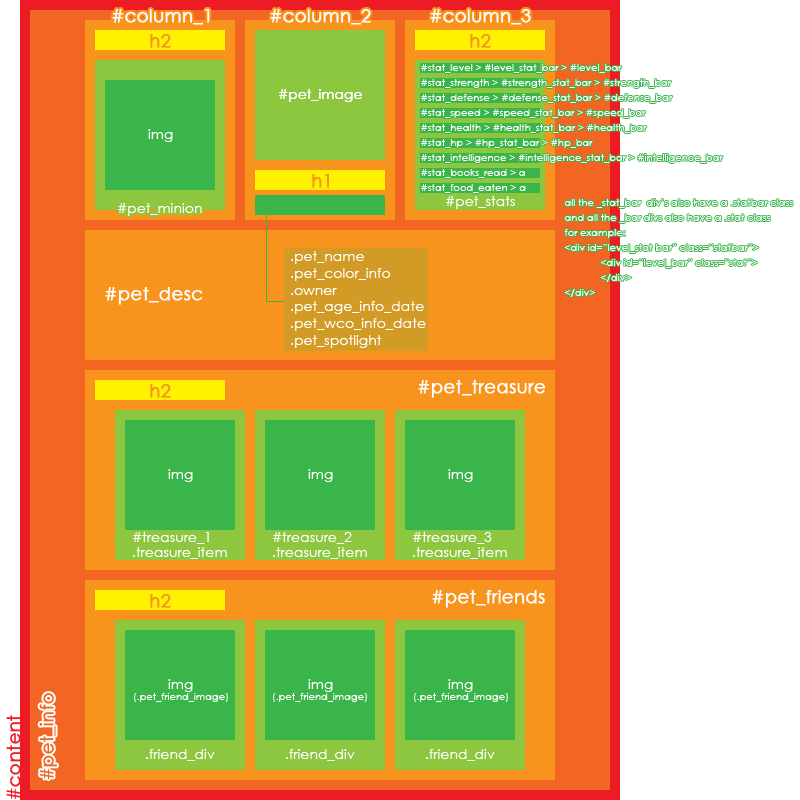
The compendium goes into detail about how to move elements around. If you look for this in the code you're using on Temeraire's profile you should find the positioning settings for the color info, owner info, and pet like.
.pet_color_info { position: relative; top: -15px;
In this section you can add:
.legacy-name{ position: relative; top: ; left: ; }
And then adjust the position values on everything until you like how it looks. Again, the compendium will go into detail on different types of "anchoring" (relative, absolute, fixed) and some may be better for certain codes, but I've found that playing with the values no matter the anchor type tends to be a workable solution.
everyday deeds of ordinary folk,
that keeps the darkness at bay.
Simple acts of kindness and love"
The Hobbit (film)
You're welcome! Oof year, I totally understand. I've been working on learning to code the pet profiles for a while and I still feel that way when I look at guides lol
everyday deeds of ordinary folk,
that keeps the darkness at bay.
Simple acts of kindness and love"
The Hobbit (film)
Absolutely! Happy to help :)
everyday deeds of ordinary folk,
that keeps the darkness at bay.
Simple acts of kindness and love"
The Hobbit (film)

Hi did you manage to fix it? I just checked in Chrome, Firefox and Edge and both profiles look fine to me. Let me know if there's anything I can do to help!
(PS: I'm looking into making a new Compendium as the old one is a bit out of date. Let me know if you feel the current one is missing any subjects!)
Hello! I actually got caught up with stuff after work and didn't get a chance to try it~! It's good to know they're overall looking right!
Thanks so much for following up, despite my slacking, ha~ I'm hopeful I'll get a chance to mess with it tonight after work~

it looks like this has also caused the pet like heart to appear a little lower on the page, causing it to overlap with the pet minion section. you can easily fix this by applying a margin-top to (30-40px looks about right, but you can set it to whatever you want) and then, if you like, you can also scoot the description down by adding a margin-top to .
