Pulldown menus in Dark Mode in Wardrobe are still white on white and hard to use.
Replies

Since the new wardrobe, my pulldown menus in dark mode (which I prefer due to vision stress) have been white on white. I was sure it was mentioned before but it hasn't changed.
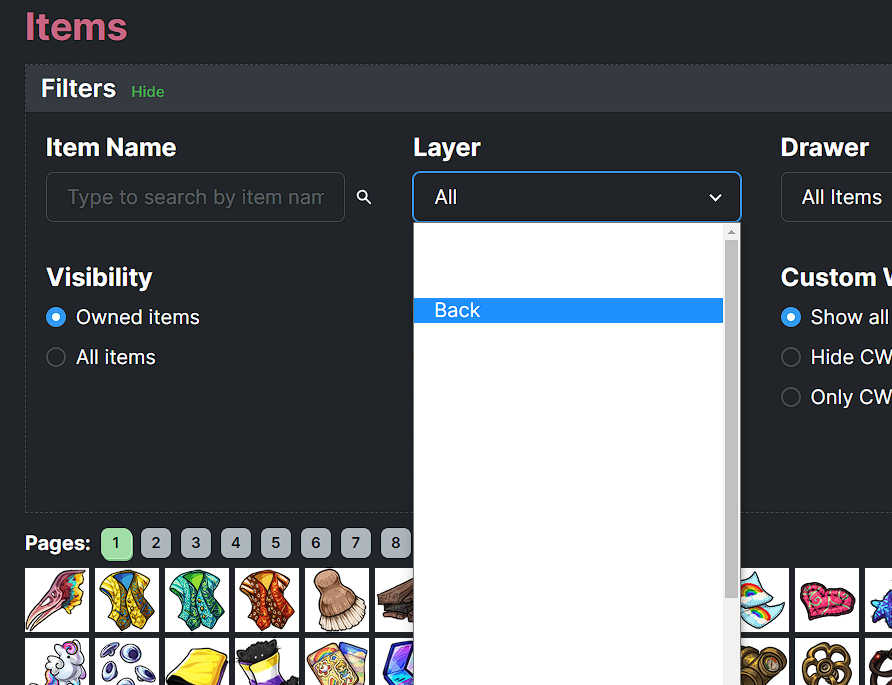
edit: also on CW's

[flower=Dracona]
[img align=right]https://media.tenor.com/images/54bd2e6450371a66f5ba295081c6bbac/tenor.gif[/img]
and I dance dance dance,
I dance dance dance
My Wishlistmy CWs[/font]

Mine is the same and it won't let me get out of dark mode.

Pat, Tracy, Gina, Karen, Grammy, Marreshaann, Georgie
My Guitar Gently Weeps...

I have the same issue. It's been like this for a month or so. It looks like this in the wardrobe only. All other pages are in light/normal mode which is what I like.
Yeah still the same for me, 3 years later. A lil disappointed it hasn't even been noted. I've had to use the white theme.
[flower=Dracona]
[img align=right]https://media.tenor.com/images/54bd2e6450371a66f5ba295081c6bbac/tenor.gif[/img]
and I dance dance dance,
I dance dance dance
My Wishlistmy CWs[/font]
That has to be frustrating! Maybe opening a ticket would help? I don't know what happened with mine. My wardrobe is dark but when I select a layer, everything is white, and I have to wave up and down over the layers to see which layer I want. Same thing if I click on, and try to search an item that's not in my wardrobe. Not sure if that makes sense or not, lol.