Weapon Modification Crystals Not Working
Replies

I noticed this issue about a year and a half ago in November 2020. At the time it was only affecting one weapon in my armory, none of my friends could replicate it, and I could work around it. The problem seems to have grown since then and is now affecting more of my armory.
When I use certain weapons together in battle, the mod crystals on the second weapon will suddenly stop working. If I pair them with other weapons, they will work as normal, but specific pairings will not work correctly and I have no idea why.
It started when I tried changing the mod crystals on my Maniacal Essence. Suddenly, when I used it in battle with my Panzer Hydra Gauntlet or Maniacal Slappy Hand, only the first weapon in the pairing would have its mod crystals activated. The second one listed would just have its basic stats.example 1

I later circumvented this by removing the ME from my armory and adding it back in with new mod crystals. That seemed to work, though I tried to avoid using it if I could because mod crystals can be expensive and one can’t really afford to keep replacing them every time a weapon stops working.
Then in August of last year, said she had the same issue when trying to use her Charged Tower Shield and Smoldering Slaglord Gauntlets together.
Last month I noticed the same problem when I paired my Rainbow Vortex and Hydragellos Possessed Eye together:Example 2


This leads us to today. I’m trying to use my Maniacal Essence against Careaper for Friday the 13th, but I’m encountering the same problem. I removed it and the weapon I intended to pair it with from my armory before adding new mod crystals to them and the problem persists. I really don’t want to waste more mod crystals trying to figure out how to make my weapons work correctly and need help.
(Currently using Safari on iOS 15 and was using Chrome on Windows 10 when I first encountered the issue.)

Example 1 Recreating the Issue
I can recreate the issue using these. When using both weapons - the 2nd weapon acts as if there are no mods.
In the same battle, if I click the 2nd weapon only it acts as intended.
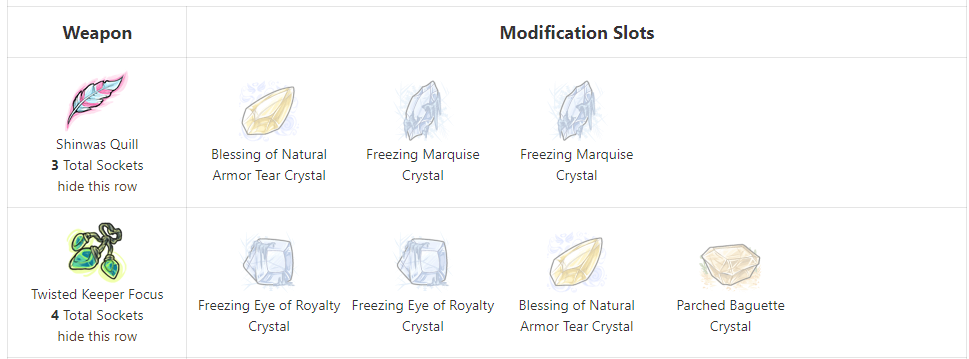
When I swap out just one of the freezing EoR's for a Marquise both weapons work as intended. It goes right back to recreating the issue if I stick back on the freezing EoR specifically.
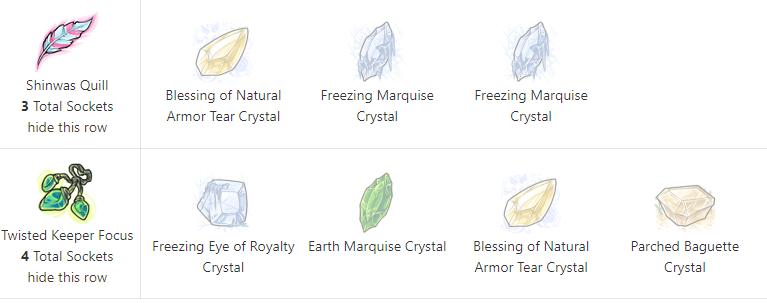
I wonder if it's tied to a certain level of custom coding in a given turn. All the weapons in the post pointed at are scaling or have a complex custom coding component to it.
Gunna test it out with a few combos of scaling weapons / mods and see how many times I can recreate it.
I had the same problem again today when using my Lambent Guardian Crystal and Shinwas Quill, only the modifications to the weapon listed first were activating:
New Issue


The issue did not seem to be with the Shinwas Quill, so I tried different combos on the Lambent Guardian Crystal. This one worked:
Worked

but these two caused this glitch to happen again:
Broken


Disclaimer: I wouldn't recommend testing this since it could start causing the issue for you to weapons you are testing with! [/b]
So I think it all starts from having multiple of the same weapon in your armory at some point in time which is why it's struggled to be replicated. There's always been an issue with the 2nd weapon using the exact mods as weapon .
I've recreated the issue for a few weapons. The steps are kind of confusing to follow so happy to break it down or send any screen shots if it helps narrow it down. I'm also not sure if this is the only way to get here.
1.) Add WEAPON to the Armory.
2.) Mod Weapon with any mod. I used a fire marquise for this example across all weapons so i don't think its BonA specific or scaling weapon specific anymore.
3.) Add a duplicate of step - now called WEAPON
4.) Remove the weapon from Step
5.) Mod WEAPON using the same mods and exact ordering (has to be the same order). This is now GLITCHED WEAPON . You will not notice an issue at this point.
6.) Repeat Steps 1-5 using a completely different weapon, - WEAPON and Weapon . This is now GLITCHED WEAPON in your glitched weapon pool.
7.) Use GLITCHED WEAPON#1 with GLITCHED WEAPON . The 2nd selected weapon in battle will act as if it has zero modifications.
- If you use GLITCHED WEAPON OR GLITCHED WEAPON by themselves or with a weapon NOT in your glitched weapon pool - it acts as expected.
There does seem to be a way to fix but not always. Working on narrowing down what doesn't.
[edit] Also seems Jess gets there a different way without having to have Duplicate weapons in there :

I'm now having this issue. Not a duplicate weapon. Volatile Energized Mecha has 3 Magma Eye of Royalty Crystal attached. Yet I'm not doing any magma damage/no magma icons show in the battle.
[Edit] Apparently the weapon it was being used with does matter. When used with Hydragellos Possessed Eye, no magma icons. When used with Captured Eternal Flame there are magma icons. I would think Flame would have custom code and Eye not or they both would have it. Shrug Doesn't seem to be a clear pattern.
Paramnesia
The unmatched power of the distortion of memory, arcane magic, and artisanal cheeses!
This just started happening again after removing several weapons from my armory to my inventory and then quickstocking them back into the armory. Strangely enough it had stopped being an issue for a while :(

 [tot=Poyo] |
I just gave it a try with my ME + MSH and it did seem to help, but I would need to confirm it a few more times to determine if that is the issue. Things seem to break or resolve themselves spontaneously so I don’t have another weapon pairing to test it out on right now.
Some people have told me their mods will break without having removed/added anything from their armory making it hard to say what exactly the issue is :( I just know that changing mods can be risky.
its such a confusing issue.
The Mods will break when paired with one other weapon but if I change up the 2nd weapon the mods work as intended.
I'm stumped on this one xD.
I didn’t use quick stock this time and they broke again :( The only thing I did was try to change crystals.
This is really frustrating because I just wasted two parched baguette crystals that could have helped me get a 5th win on Nightlady, but they just stop working.
I think somewhere in the code....a mod slot set is being duplicated or not deleted and it's causing problems in battle since it just pulls the first one so its not seeing your new mod slots.
For Example you equip: Bloodred Chelon Gem and equip a :dmg:water: Marquise Crystal - we'll assign it Weapon ID Bloodred Chelon Gem and equip a :dmg:earth: Marquise Crystal - we'll assign it Weapon ID Bloodred Chelon Gem and equip a :dmg:light: Marquise Crystal - we'll assign it Weapon ID
When looking at your armory - everything seems go to go and the correct MODS show on the Correct Weapon.
If you enter a battle with those 3 weapons, no matter what combination or Bloodred Chelon Gem you click, the first one will do the :dmg:water: If you use two, the first will do :dmg:water: (ID ) and the second will do :dmg:earth:. (ID )..... the :dmg:light: will never see the light of day since you can only use two weapons and it is the mod set ID - .
SO I think it just scans Mods for Bloodred Chelon....Grabs the First One and applies it.
I think some scenarios Weapon Mod Set is removed from a weapon but the actual Mod Set gets stuck. Everything looks kosher when you look at your armory....but when you go to battle things break because its pulling that broken mod set with the lower ID. I just used the same weapon to see how its pulling mods so i imagine theres a dupe for the single weapons having issues.
It might be impossible with the resources to find whats causing the specific problem....but maybe it would be a lot easier to scan for duplicate Mod sets to remove the invalid and make the mod slots shown on the weapon the only one left .
If you have a known glitched weapon, it might helpful to leave it and share the weapon ID (the # at the end of remove weapon in your armory just don't remove it so they have a sample pool to look at if this ever gets looked at).
After much trial and error, I think we’ve finally figured it out and it’s most likely a cache issue. If you mod your weapons and then try to remod them in quick succession, the new mods will glitch out. It seems that letting some time pass before remodding can prevent it. I’d still like to see it fixed, but I think this might be a reliable workaround for now.