Got a new monitor, now all my profiles are ruined..
Replies

I made all of my profiles on my 17 inch screen laptop, but now I've got something bigger and now all of my profiles are showing that the background is too small and there's a huge amount of space image here (it needs to be linked because the bg is white so you wouldn't be able to see the problem on the forums) the problem is other people are seeing my profiles fine... if i were to resize the images (which i can't at this point anyway, they're on another computer so i don't have them) then the images would likely be too big for other peoples computers. i know there has to be a way to fix this but i don't know how, and i also am not great at coding. my profiles are put together through random help and me copying and pasting one profile to another and just changing positions. so if there is a code to fix this i will need to know exactly where to put it at.... someone please help me fix this
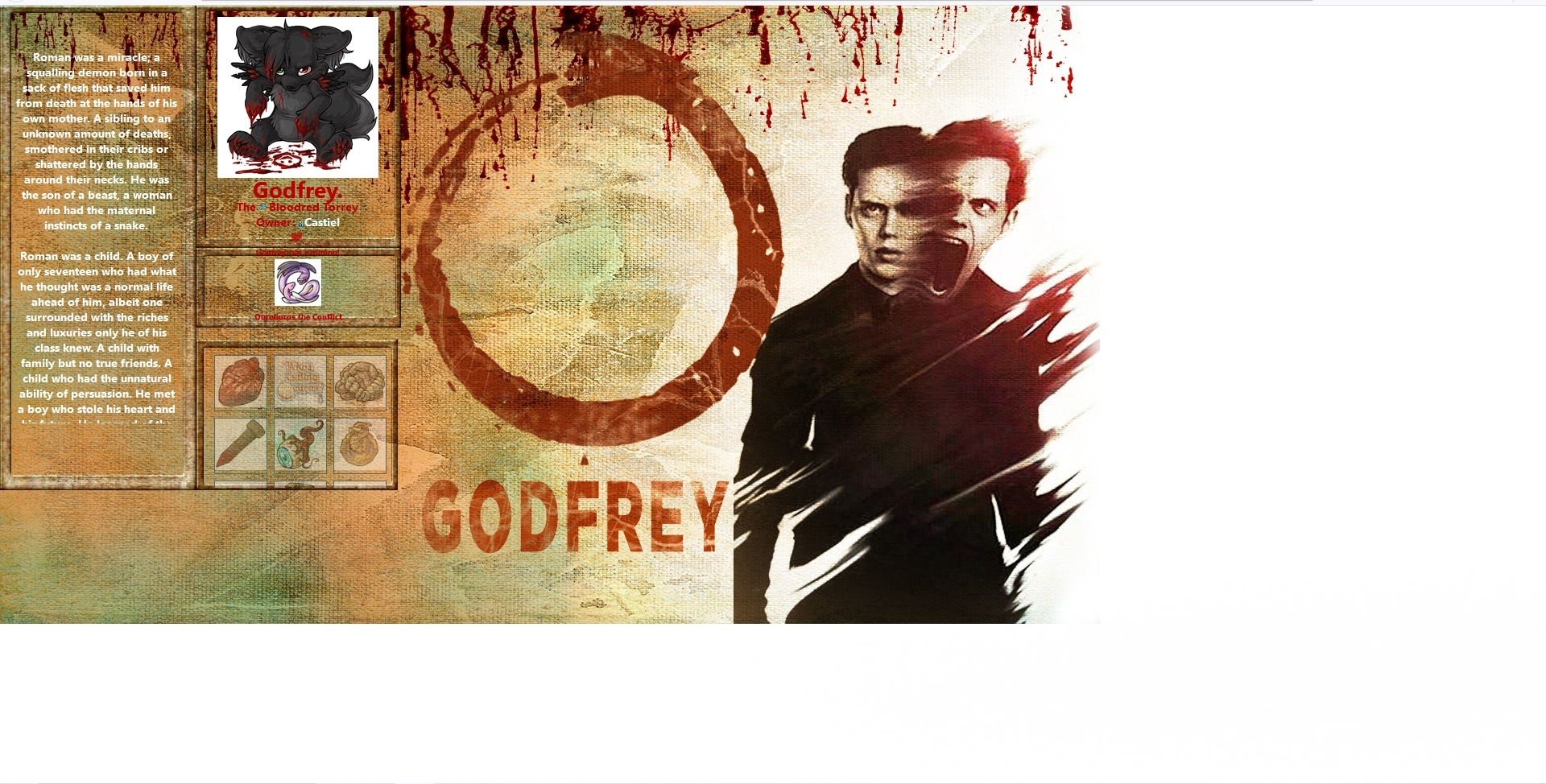


Since people are using all sorts of monitor sizes these days, you want to use coding that is dynamic (adjusts to the size) rather than static (has to be only a certain size to work). On the three monitors I have access to, your pet Godfrey's page looks okay on my laptop, but on my second monitor and on my smartphone it doesn't look the way you'd want it to look.
There are two ways to make a background dynamic:
background-size: cover;
background-size: 100%;
Depending on the orientation and size of the screen, these may not make a difference. For example, on my large external monitor they look exactly the same. However, on my smartphone, they look quite different when in portrait mode (landscape looks the same). This is "cover" and this is "100%".


(Just a note: "cover" and "100%" sizes work best with larger images (at least 1920x1200) because it will scale them down when needed, but smaller images will be scaled up and can get pixely and blurry.)
As you can see, this creates another problem: now the picture and text don't line up, not even on a large screen: [pet not found]. There are a couple of ways to fix this:
One way would be to mess with the width and positioning of each container until they scale in conjunction with the background. You'd want to specify percentages instead of a certain number of pixels. This can be a pain in the butt to get exactly right. I do something for this with my user profile, but I took the cheater's way by using Subeta's default code and making my background white where anything would be over it.
The other way that I think is preferable is to position things a bit more statically within a dynamic container. For example, on my pet profile codings, my is dynamically positioned but statically sized:
{margin-left: 10%; margin-right: auto; width: 600px;}
This allows me to control roughly where it is no matter what size screen I'm looking at, and accordingly I choose backgrounds that can be shown off around them. In my case, that means having most of the picture on the righthand side of the screen. (See [pet not found] or anybody in the "Within a Year" group on my profile for examples.)
It's much easier then to specify a specific background and borders for just that can match up with each individual container and keep them statically located.
In fact, you could even give the same background as the body and as long as they were both positioned center center they would scale with each other. I'm not completely sure of the benefits of that especially in your case when you have borders built into the background - and you'd again be stuck trying to dynamically position all the little containers, but it is an option.
Anyway I just threw a whole bunch of information at you which may or may not be helpful, depending on how much you know of coding, but I guess we can start there (because a lot of it will depend on what you want to do) and I'd be happy to help you figure out what direction to go in. :)
tl;dr You'll probably need to redo your current background, but it's not impossible to get a similar effect.

Kniga has given a lot of good advice! However if you plan on making that image layout bigger, it'll probably look stretched and blurry. If you'll be using an image, my recommendation is to make it "too big" then adjust the size with CSS. Another option is to make the boxes with CSS and leave the background as a pattern/person's image (so no matter the size, the boxes will fit well with the text/columns) if you want more help let me know. Maybe I can fix something up that you can copy paste, it would take time though.