Deer Lady Commision
Replies

Been commissioned to do some art for someone's pet and I need some major help with the lights and shades. I'm trying to emulate Subeta's coloring style but it's not working.
Using Photoshop 7. HERE

Whoa, that's amazing! How long did you take to draw that?
FYI, the art doesn't necessarily have to been subeta style if someone is using it for a custom image/overlay if I'm not mistaken.
The shading looks fine; what were you trying to do with the lighting in this image?
[tot=PiplupMagby34]
Wow, thanks!
I honestly don't know. I don't keep track but I know it takes me longer than it should because I get frustrated and burned out easily. I understand it doesn't HAVE to be Subeta's style but when I pictured the colored version in my head it was and I thought it looked good so decided to try it.
As for the highlights, I tried a couple tutorials and I guess it didn't work out. I know most Subeta characters don't have many highlights or they're REALLY light but it looked unfinished without them.
"when I pictured the colored version in my head it was and I thought it looked good so decided to try it."
I've had that happen to me too. Actual drawing doesn't match my vision, LOL. The best I've done with shading is this:

Was it done on a tablet?
Pinging some friends to help:
[tot=PiplupMagby34]

oo that's looking great! i really love how dynamic the pose is c:
i'm def not an expert on subeta style shading, but i think the main thing is that subeta shading is more...... like the shaded areas aren't all the same shape/size? idk what to call it lmao
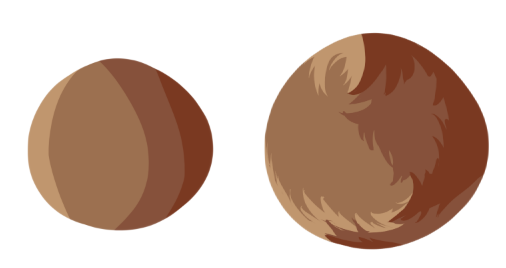
so basically more like the one on the right rather than the left! subeta shading also follows the shape of the fur
subeta also uses a lot more shading layers than 2. i think around 4-5 but i'm not sure asdfghjkl so you could def try adding more subtle shading to 'build up' to the darker one
you could also try shading more! since you have the shading mostly concentrated on the sides, you could try adding some more to the chest and tighs, to give more to the shapes and texture
since it's fur and not clothes/something shiny, i would also use highlights more to define and give contrast rather than it being an opposite to the shading (if that makes sense? lmao)
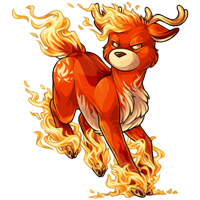 for instance see how the top of the foreleg pops out with how it's highlighted?
hopefully that helps, good luck! q v q shading is a pain at first tbh but i found that it?? got kinda relaxing once i figured it out 😂
Yeah. Intuos 3.
Yeah I though about trying to give the illusion of fur but I couldn't figure out how. I've tried using various antlephores for references but it's hard when they're not in the same pose or have the same lighting! It's one of the reasons it takes me so dang long to do these. I keep having to start over!
aa that's so valid!! lord knows my wip folder is just....... sad unfinished sketches i got frustrated with and gave up on asdfghjkl
as for the illusion of fur, have you looked at some custom photoshop brushes? i use sai and have 0 experience with photoshop but maybe there's some good fur brushes out there!
I have an Unfinished folder too and I hate it with a passion! I wish I could just hunker down and just DO IT but I always find something else I think is more important!
I do have some fur texture brushes but I don't think they'd work for this. It looks like Subeta artists give the illusion of texture with the lighting/shading.

Maybe you can try adding some “fur texture” around her chest, using the shading example Thespian provided? To be honest, I think all that’s missing is texture. Your art doesn’t have to be Subeta style unless submitting an overlay
🌹 Beloved Brother 1989-2018 (10/17 - 02/19)
Grammy 1937-2021 (11/14-10/28) 👼
Yeah, I understand it doesn't have to be Subeta style. It just when I was picturing the finished product in my head it looked like it so I decided to go with it. I'll mess with for awhile and see what happens.
I didn’t really read all the comments before replying. I just scrolled (I skimmed) and posted
🌹 Beloved Brother 1989-2018 (10/17 - 02/19)
Grammy 1937-2021 (11/14-10/28) 👼
Can you believe this took me over 2 hours? Anyways, not done obviously, but something like THIS?
That looks really good! Don't forget to do her face, arms and legs :)
The white wisps on the left side of the chest would look better if it was pointing downwards. I'll show you

I only have paint to work with xD
🌹 Beloved Brother 1989-2018 (10/17 - 02/19)
Grammy 1937-2021 (11/14-10/28) 👼
Wow, really? I wasn't sure I understood the instructions you all gave and kind of winged it lol. But yeah, I'll finish it and fix the white fur. Will get to it after some yardwork.
FYI: If you'd like a nice free art program FireAlpaca is great. It's at least better than Paint lol.
oo that's already looking better!! you nailed it 👌
whew How's THIS?
She's AMAZING!!! Now she has the right balance of everything!
🌹 Beloved Brother 1989-2018 (10/17 - 02/19)
Grammy 1937-2021 (11/14-10/28) 👼
Great!
Thanks for all your help! I think I'll wait a couple days before the final hand-in to make sure everything's in order. Nothing worse than handing in the product only to realize there's 5 things that need fixing.
I'll hire you to use FireAlpaca lol. I don't have anything to draw with and besides, I'm really not that great. I'll just doodle character art and find someone on here to make it come to life for me.
I do like helping people if they ask for art suggestions, tho :)
P.S. If you find her eyes "too evil" looking... round them a little more at the top and don't go so almond C8
🌹 Beloved Brother 1989-2018 (10/17 - 02/19)
Grammy 1937-2021 (11/14-10/28) 👼
Lol ok. I just thought you'd like it better than paint. It even has a feature that really helps with things like line art. I should practice more with it myself. I did the lines on this with it. I need to learn to control my pressure so the inks are more even.
Thanks but I didn't think she looked evil and Neferet likes them. Unless she specifically tells me to change them later I'm not gonna messing with it and risk screwing it up.