Page loading weird for anyone else?
Filter
Show Official Posts OnlyReplies

Don't know if anyone else is experiencing this but for the last few days, maybe longer I've noticed when questing once I've clicked on start quest etc the page seems to 'blink' like it's resizing. It's definitely only happening here on Subeta and it's not my computer as I've tested this out with other pages/sites to ensure that it isn't, I am running Google Chrome and nothing has been altered (besides window's updates) in any way that should have caused this effect.
While it isn't a major issue it is annoying and after awhile if it has a continual streak of occurring can actually become a little disorientating.
Thanks for any feed back.

yes. This has been going on for at least 4 days now. There's a cursor getting "stuck" - site reading input as tap?. There seems to be various issues going on that are all part of the same issue (maybe). People are having similar issues, some more of them, some less, but it all seems to do with pages not loading quite right.
Its really slowed down questing for me.
In loving memory of Need posting achievements?Then join Posting Frenzy Achievement Items - searchable list List of Borders and cutouts New at Fresh and Flavorful Ping Group
Thank you for the update, at least I know that it ISN'T me, well my PC lol
Yeah, for a while I thought it was my mouse dying. I've mostly seen the effect on the account search page. My quest pages seem stable except for Shinwas.
In loving memory of Need posting achievements?Then join Posting Frenzy Achievement Items - searchable list List of Borders and cutouts New at Fresh and Flavorful Ping Group

Yes, I am also noticing this. For me it's happening during Item hunt, regular questing, and collecting daily income. Other pages seem to load fine otherwise.
[img align=center]https://media3.giphy.com/media/v1.Y2lkPTc5MGI3NjExM2l0cGx3NGJ1ZjY0dndycmsxYnd4YmxoeWVyN3djZWk3djJocjZ5diZlcD12MV9pbnRlcm5hbF9naWZfYnlfaWQmY3Q9Zw/K1tgb1IUeBOgw/giphy.gif[/img]
Hide


Can chime in its happening to me too, its as if the page resizes itself? - really annoying, if i'm honest. hope it's fixed too, its very pronounced on mobile (i know subeta isnt a mobile friendly site to begin with but its even worse now)

I have the same and I'm glad I'm not the only one :x

Also noticing this. Thought it was just my pc since I updated it right before it started happening :P

I've been noticing this too the past few days or so. At least it's not just me, although I'm not sure what's causing it.
Perhaps this should be moved to the Problems & Bugs forum? Since it seems like multiple users are experiencing this issue.

oh yea this keeps happening to me fehsufhues it's super disorienting at times

It's been happening to me on practically every page on Subeta for several days now. I first noticed it shortly after the Gelatin War we just had. Didn't say anything because while I thought it was kind of odd-looking, the site still more or less worked for me - a minor annoyance more than an actual problem.
I'm not on a mobile device (Windows 10 laptop, latest version of Firefox). But if this is affecting people on mobile's ability to play, maybe it needs to be looked at after all.
(Sorry, could have sworn I finished this! Didn't mean to sound callous)

Today 9th Aug I'm getting page-boing that is vertical during battle. The page will seem to resolve, then it will go up half an inch. Instead of expanding out from the center of the screen like other pages do It doesn't happen during Battle Quest setup, only the fight itself.
Chrome OS and Browser

Hey everyone - To make sure I understand this correctly, what happens is the webpage "resizes" as if you've resized the window, except the window stays the same size?
Would anyone be able to provide a screenshot so I have a better idea?
Finally, could everyone who is still experiencing this please provide their operating system (and version), and browser (with exact browser version) - Please also specify if you're playing on a computer or on mobile.
🐝 ☕ bug (he/him) | your friendly neighborhood code wrangler. stay in the loop! join and check out the latest admin post highlights
It might be hard to explain, it's not quite resizing but it's like it "blinks" as if something has been changed even though nothing has. I'm also not sure really how to get a screenshot unless if someone is able to record their screen while it happens because it only does it for like half a second or so while it's loading and then everything is fine.
I haven't encountered it super frequently, but I have noticed it from time to time while questing. So I'll provide my browser info in case it's useful.
On desktop Google Chrome Version 76.0.3809.100 (Official Build) (64-bit) Windows 10
Yeah for me the window stays the same size, but it starts out with images and text smaller than what everything is set up for, and the page starts it's resolution in the middle of the page and expands outward to fill the window. This looks like the realignment a page might have if you do magnification or if you resize the window itself. It is hard to catch.

This is what I've been experiencing. Maybe it's my internet speed or something but I never see a "blink", the page just kinda...shimmies a bit to fit the window It's so fast though, I thought it was just my brain being dumb the first few times haha. The change in size is very small from what I've experienced.
I also wondered if it was my customCSS being weird, but I guess other people are experiencing it, too!
Windows 10 Google Chrome Version 77.0.3865.19 (Official Build) beta (64-bit) PC
[size=9px]
Ha! I was trying to catch screen grabs - its happens so fast that its really hard. I did discover that for me, on the account search page, its the search box that gets bigger. It loads with the smaller box, then milliseconds later the page appears to jump and the search box gets bigger.
Laptop, windows 10
Firefox Quantum.
image
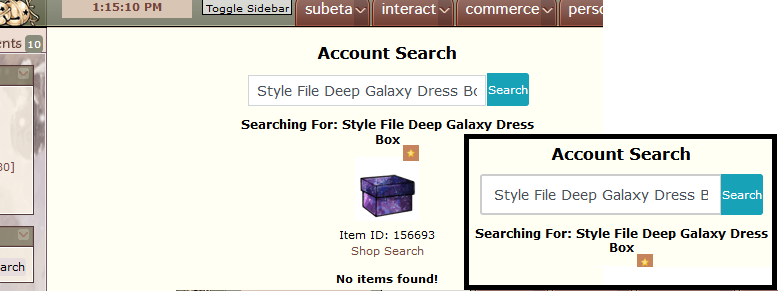
In loving memory of Need posting achievements?Then join Posting Frenzy Achievement Items - searchable list List of Borders and cutouts New at Fresh and Flavorful Ping Group

Here’s a video I screen recorded from my iphone8 in safari. LINK I use Adblock (sorry) but I’ve never had issues with the blinking so idt it’s that
this started happening for me around the end of the gelly war fyi
[edit] The resizing issue happens differently on my computer, I’ll try to screengrab that when I’m home
Omg I love you for making a video. <3 <3 <3 For your issue, it looks like what happens is the "Remove this Ad" shows up for a second and then immediately hides itself (causing everything below it to shift upwards) so that part is definitely the AdBlock. I'm not seeing anything weird other than that though? I don't see any blinking, I do just see the page shifting upwards/some images resizing slightly because when the ad gets hidden it causes everything to shift. Let me know if there is something I've missed in the video?
🐝 ☕ bug (he/him) | your friendly neighborhood code wrangler. stay in the loop! join and check out the latest admin post highlights