Can't purchase CSC on Chrome
Filter
Show Official Posts OnlyReplies

No matter what I do, I can't seem to purchase CSC from the cash shop on Chrome. When I go to the cash shop and select a credit tier to purchase from, the Paypal button and the card entry areas aren't clickable. The Paypal button does not toggle the pop-up that loads the off-site login for Paypal, and if I were to want to use a card, it's just static and won't allow any info entered. The Pay button seems to work, and it errors/highlights the card info in red if I click that, but I'm not able to do anything else.
I'm using 64-bit Chrome version 63.0.3239.132. Machine is running Windows 10. I switched to Firefox (downloaded the latest version) and it worked just fine, but I normally use Chrome so this was a strange happenstance.
Edit 1-27
Not sure why this was locked and dismissed. This is still a problem and I still can't purchase CSC on Chrome. Can I please be directed as to what to do next? Or can you please explain why this was dismissed?

You have a popup blocker or an ad blocker that may be stopping the pop up? I just tried on the same version of chrome and it worked.
Dexter by ❤
Even with ad block disabled it still won't work for me. The button for Paypal itself won't allow me to click it, as if it weren't a button but a static image, if that makes sense? I don't have any other features that disable anything, and was able to buy CSC earlier in the month.

I'm having the same issue as ! Was going to file a ticket but decided to check here first. I tried disabling adblock but the button is unclickable, and the fields to type the credit card won't allow anything to be typed in.
I'm also using 64-bit Chrome version 63.0.3239.132.
 ❤
❤🎉 | | | 🎉

Wrong Fray 😂 I was so confused for a moment why I'd gotten pinged
Hope you guys get it resolved soon.

I never noticed the typo I'm so sorry
❤🎉 | | | 🎉
I am not sure who locked the board (I lock so many when I am told to) but I am guessing they thought the error was fixed. I will see what I can find out though.
Dexter by ❤

Try checking these things:
- Clear any custom CSS you have
- Disable AdBlock (well I guess you already tried this one..)
- Disable any User Scripts you may be using (like via the Tampermonkey)
- Check your browser extensions, some of them may be interfering with the webpage.
If you rule out all of these, please do the following:
- Go to the page where you have the unresponsive button, and hit Ctrl+Shift+J to bring up the javascript console
- If you see any errors or output in this console, take a screenshot for us
- With the console still open, click the button, and see if any new errors show up in the console when you do the click.
Let me know.
🐝 ☕ bug (he/him) | your friendly neighborhood code wrangler. stay in the loop! join and check out the latest admin post highlights
how do I check user scripts? I already cleared custom CSS, disabled adblock & checked browser extensions but none made the button work
[edit]
Opening the javascript console I see this:
SPOILER (click to toggle)

❤🎉 | | | 🎉
If you're not sure, then you're probably not using any. They are usually done through a browser extension called Tampermonkey, so if you don't have that then you're fine.
And well, opening the JS console shouldn't affect the way the page behaves. Have you confirmed that the button is still unclickable when the console is closed, like right now?
🐝 ☕ bug (he/him) | your friendly neighborhood code wrangler. stay in the loop! join and check out the latest admin post highlights
yeah the button is still unclickable, and it only works for me when opening the JS console :(
❤🎉 | | | 🎉
Three more questions:
1- What is your screen resolution? 2- Could you try it again, but this time, "pop out" the console and see if the button continues to work.
To pop out the console, click the vertical dots icon on the top right corner:

The left-most option for Dock Side (the one with two rectangles) will make it pop out into its own window.
3- Can you also try simply making your browser window smaller (without the console open) and see if it's still unclickable? Like making it half-screen size for instance.
🐝 ☕ bug (he/him) | your friendly neighborhood code wrangler. stay in the loop! join and check out the latest admin post highlights
sorry I am late on this, I was working when you replied. I figured it was intriguing to post that I got different errors when opening up the Javascript console than Silvy did - plus the button didn't work even with the console open:
SPOILER (click to toggle)
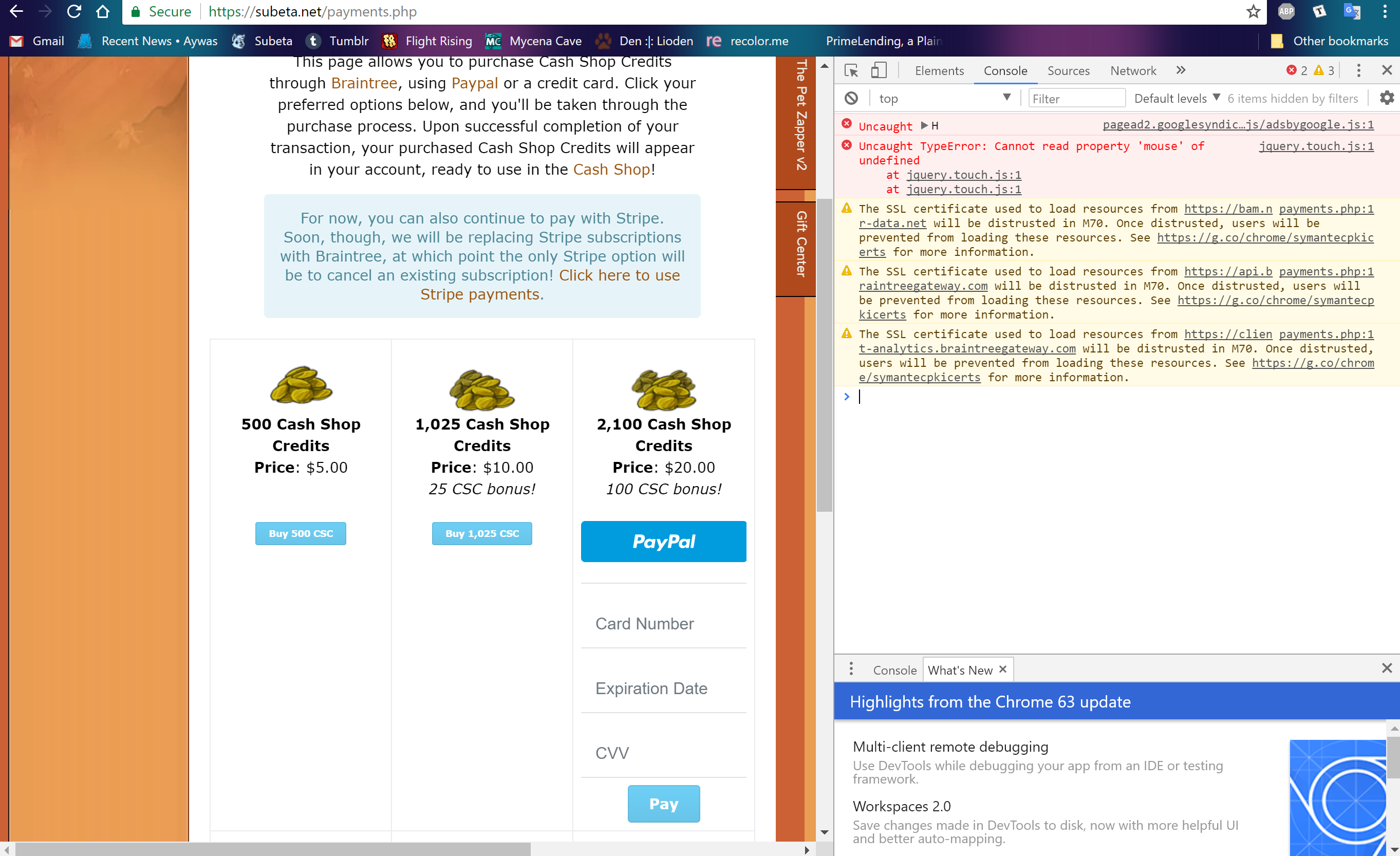
I tried the other things with your latest post too, still no go.
Thanks. One more question for both you and when they see this. When you hover over the button, does your cursor change to the little hand icon (like it's supposed to do for links) or does absolutely nothing happen at all?
🐝 ☕ bug (he/him) | your friendly neighborhood code wrangler. stay in the loop! join and check out the latest admin post highlights
Nothing happens when I hover over the Paypal button or the three credit card info lines. Only on the Pay button for me.
Sorry had a headache last night and it was time for bed.
- Screen resolution is 1920x1080
- The button works when I pop out the console.
- Making the browser window smaller does not make the button clickable :(
Also, the cursor does not change to the little hand icon (except when I'm at the JS console!)
❤🎉 | | | 🎉
Could you two please try updating your browser? This seems like it was a browser issue and may have been fixed in the latest version of Chrome. The new version is 64 and I notice you're both on version 63 so hopefully an update will fix it.
🐝 ☕ bug (he/him) | your friendly neighborhood code wrangler. stay in the loop! join and check out the latest admin post highlights
That seemed to do it for me! All works great now. I guess v63 had some glitch in it affecting the page, I'm assuming? Sorry you had to go through the ringer for such a quick fix.
That did the trick thank you as always for your help and your patience ❤️
❤🎉 | | | 🎉
Awesome, I'm glad that's all it was. What a strange error. I'll lock this up as resolved :)
🐝 ☕ bug (he/him) | your friendly neighborhood code wrangler. stay in the loop! join and check out the latest admin post highlights