Need help (again) with profile
Replies

I made tihs layout but of course it won't fit right. I want it to take up the entire screen but it ends up small. What is the code I need to make this fit? The image is 1366x768, which I was told to do, but it still won't fit right link to the pic ps it's a pet profile



The image you linked to is 1,200 x 674. If you need it bigger I guess you'll have to make it bigger? I believe there's a way with CSS to stretch a background image to fit whatever browser size is viewing it - but I don't think this will work if you're gonna have your sections positioned the way you want them.
Maybe you could consider just making your image bigger and centering it in the page.

If you need it bigger I guess you&;ll have to make it bigger? I believe there&;s a way with CSS to stretch a background image to fit whatever browser size is viewing it - but I don&;t think this will work if you&;re gonna have your sections positioned the way you want them.</p>
<p>Maybe you could consider just making your image bigger and centering it in the page.
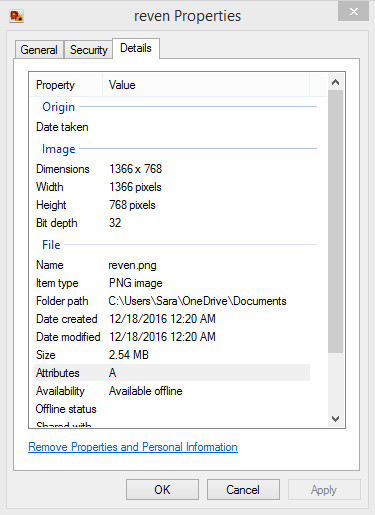
Maybe your image host resized the image when you uploaded it? Check your settings when you're uploading or try another host?
I've never heard of that so I can't really help you regarding settings, but I used TinyPic. I'd suggest giving that a go and seeing if it still resizes.

Yeah, that's the size you said originally. :)
Well, its 1362x765
<p>Well, its 1362x765
Can you tell me what you mean when you say it's not fitting? If you refer to it not taking up the entire screen space - that's gonna be impossible to do, and everyone's screen is different so even if it fills your screen it may not fill another larger screen.

the problem with doing the background like this is that everyone has a different screen or browser window size, so it's not always going to be centered or take up the whole screen for everyone. the best thing to do is use multiple background images: one repeating pattern that will always take up the whole page no matter what, the main image itself, and then the layout boxes. or you could just make the background image scale with the page (css for that in a second) and then add the layout boxes as a separate image.
so to use the first method, you would create and upload all three images, then do this. the images layer with the first image in the front and the last image in the back.
html {
background-image: url(FIRST IMAGE URL), url(SECOND IMAGE URL), url(THIRD IMAGE URL);
background-repeat: no-repeat, no-repeat, repeat;
background-position: 700px 50px, top left, top left}
and of course the positioning might need to change depending on what you're going for. the number values refer to the horizontal and vertical position of the top layered background image (in this case, the layout boxes) - first number is counting from the right, second number is counting from the top.
the second method is similar, but instead of three images you would only need two. the first (front) image can stay the same, but the second (back) image will scale with the window so it should work at most sizes.
html {
background-image: url(FIRST IMAGE URL), url(SECOND IMAGE URL);
background-repeat: no-repeat, no-repeat;
background-position: 700px 50px, center center;
background-attachment: scroll, fixed;
background-size: auto, cover}
you can see an example of the "layered backgrounds method" on my pet aphasia's page. the icicles at the top are the first background image, while the pattern on the whole page is the second.
does any of that help?

the problem with doing the background like this is that everyone has a different screen or browser window size, so it&;s not always going to be centered or take up the whole screen for everyone. the best thing to do is use multiple background images: one repeating pattern that will always take up the whole page no matter what, the main image itself, and then the layout boxes. or you could just make the background image scale with the page (css for that in a second) and then add the layout boxes as a separate image.</p>
<p>so to use the first method, you would create and upload all three images, then do this. the images layer with the first image in the front and the last image in the back.</p>
<p>
html {

background-image: url(FIRST IMAGE URL), url(SECOND IMAGE URL), url(THIRD IMAGE URL);

background-repeat: no-repeat, no-repeat, repeat;

background-position: 700px 50px, top left, top left}
and of course the positioning might need to change depending on what you&;re going for. the number values refer to the horizontal and vertical position of the top layered background image (in this case, the layout boxes) - first number is counting from the right, second number is counting from the top.</p>
<p>the second method is similar, but instead of three images you would only need two. the first (front) image can stay the same, but the second (back) image will scale with the window so it should work at most sizes.</p>
<p>
html {

background-image: url(FIRST IMAGE URL), url(SECOND IMAGE URL);

background-repeat: no-repeat, no-repeat;

background-position: 700px 50px, center center;

background-attachment: scroll, fixed;

background-size: auto, cover}
you can see an example of the "layered backgrounds method" on my pet aphasia&;s page. the icicles at the top are the first background image, while the pattern on the whole page is the second.</p>
<p>does any of that help?
make sure the positioning is correct for each image. it looks like you used the "700 px 50px" positioning for what you ended up using as the first image; try changing it to "top left" instead.
make sure the positioning is correct for each image. it looks like you used the "700 px 50px" positioning for what you ended up using as the first image; try changing it to "top left" instead.