Divine Discs Broken and Memory Broken!
Filter
Show Official Posts OnlyReplies

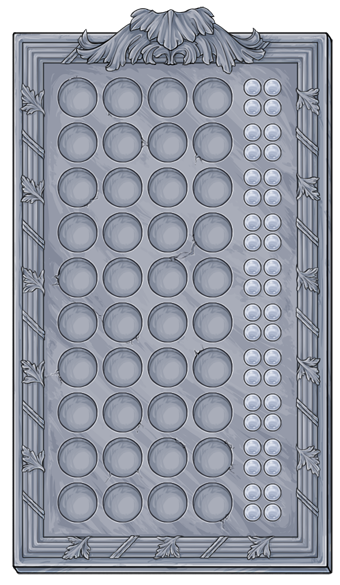
Since yesterday, whenever I click on Divine Discs I get this:
[URL=http://s706.photobucket.com/user/Cresenta_Lark/media/gdghdhfhjfjj_zpsbkk0qfvq.jpg.html][IMG]http://i706.photobucket.com/albums/ww66/Cresenta_Lark/gdghdhfhjfjj_zpsbkk0qfvq.jpg[/IMG][/URL]
The table is missing and it won't load even after refreshing multiple times. ;_;
Memory appears like this: [URL=http://s706.photobucket.com/user/Cresenta_Lark/media/tujgtutu_zpsiovghq9g.jpg.html][IMG]http://i706.photobucket.com/albums/ww66/Cresenta_Lark/tujgtutu_zpsiovghq9g.jpg[/IMG][/URL]
All the tiles are missing. -_-

I just tried playing Memory and yep, same issue. :(

Oh thank goodness. I thought it was my glitchy internet or old computer. Yeah, tried to play Memory and while the backs of the tiles are showing, clicking on most of them gives me a broken image. I'm using the Google Chrome browser.

Both games are working for me (I just tried them when I saw this thread); I'm using a Chrome derivative.

My memory is fine but my Divine Discs isn't working. Everything shows up but nothing happens when you try to input the discs
❤️
I'm using the latest Firefox and none of them are working for me at all. -_-

I'm using Google Chrome Version 41.0.2272.89 m on a Windows 7 machine. For me, Divine Discs shows up just fine - it even lets me play. I can click on colors and I get results. The problem is none of the colors match at all, neither in the correct or incorrect places. Every result for every color says 4 non-matches. After trying all the colors, the game just sits there until I reset it.
I get the above results when I try clicking on each color four times for a guess. When I try guesses with more than one color, I seem to get more random results. Sometimes I get nothing and sometimes I get an incorrect match light. Trying combinations of two colors for a guess in a game I see: yellow yellow blue blue - one incorrect match, green green yellow yellow - no matches, blue blue purple purple - one incorrect match (and just to see what would happen) blue blue yellow yellow - no matches. Gray yellow red blue - two incorrect matches. Hope that is useful data.


For me it seems that Divine Discs has lost its yellow and grey. It is fully functional, seems to be an "visual" problem. The buttons are there, if you chose them the result is calculated, but the slots on the game board don't fill with the selected colours if yellow or grey.
(Using Firefox 33.1)

I have a different issue with divine disks. I can play the game fine, but the gray/black lights that light up when you have a disc in the correct position are not popping up while the yellow lights pop up no problem.
I'm using Safari on a Mac.
[tot=superferretlover]
July group!

I am not seeing the images on Memory, I have not tried Divine Discs.
I am using Chrome on Mac.
❄️ Seeking Elsa or Olaf inspired CWs ❄️

I'm on a Windows 8 Surface using the latest versions of Chrome and Firefox (I even tried IE in my desperation). Divine Discs game is showing up. When I click on the discs, it looks like nothing happens, but if I click on the discs enough, I get a 'you lose' message, so the clicks are registering on some level, but aren't showing up.
Memory is working fine on all browsers.
[tot=bapkate]

Alright kinda sad... Memory was working fine yesterday and now when I played some tiles when you turn them over are just broken images.... :(

No one has posted here for a while, so I thought I'd say that I'm having the same trouble: broken images in Memory & disc option in Divine Discs, but no 'board' to play on, identical to the image that Cresenta posted on the first post. Windows 8, Firefox 37.0.1

UGH when are they going to fix Divine Discs? I really miss that game
👻[tot=msbehavin] 👻