Art Program Recommendations
Replies

I have tons and tons of sketches, doodles, and even some actual art, but it's all from pencil an paper. I would really like to get a digital drawing program, so I can start getting a hang of drawing on the computer and maybe even post some of my works on my DA account. Problem is this is not really something a know a ton about. I have dug around on several sites who tell you their top favorites or user reviews, but I thought that maybe I could get some more/better ideas from here considering the amount of people I see who practice digital art.
I prefer free or cheap (I'd rather not break the bank), and please no GIMP suggestions. (I don't like the program personally). So what do you use or recommend?
Please ping! Thank you. :)
[tot=Abaven] [egg=Abaven] [tp=Abaven]

You might want to look at this chart, I think it's a very nice summary of the most used art programs.
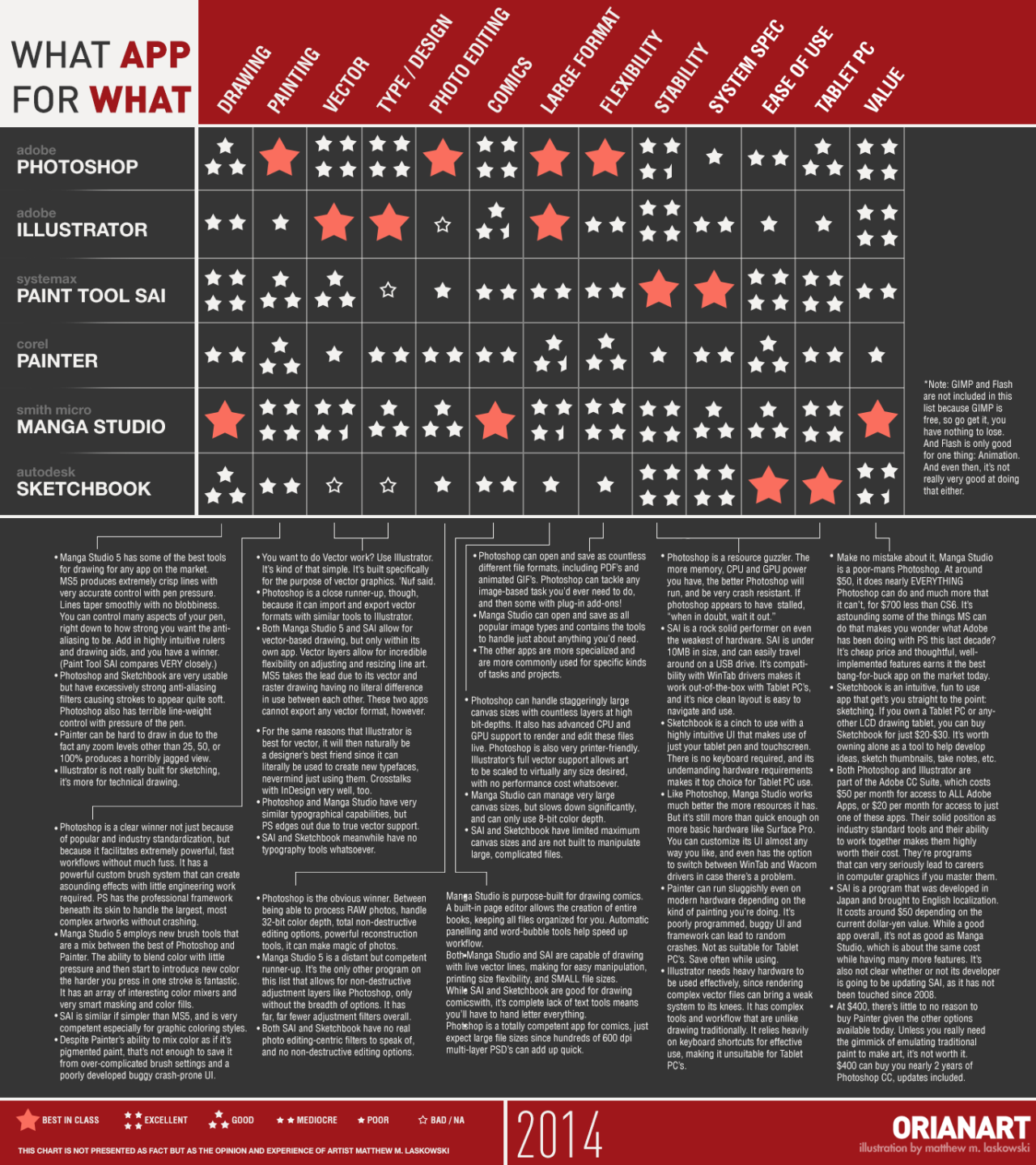
I'm partial to photoshop but it isn't exactly cheap (and likely isn't an option if you aren't into illegally downloading stuff). Paint Tool Sai is a really cheap drawing program and has at least the same amount of actually useful features for drawing/painting as photoshop does, you might want to check it out.
Then there's also a few completely free options, I haven't tried them myself but they might be really good too: Krita, FireAlpaca and Autodesk SketchBook Copic Edition
I hope this helps!

I personally prefer Paint Tool SAI, but that costs around $50. A friend of mine has told me that opencanvas is good, but that also costs money. I've tried FireAlpaca and Krita and I'd say both of them are pretty good.

If you want an art program that doesn't cost money, unfortunately your choices are limited :( When I started, I used SmoothDraw which is decent but still not that great. SAI technically isn't very expensive, and it's a great investment if you decide to spend money on a program!
Good luck with your art ' 7 '
and
Thank you, both very much for your help. I've read a ton about SAI, Kitra, and others, but based off the chart and some extra research, I think I'm going to go with Manga Studios. Cheap, good functionality, seemingly user friendly, and considering my type of computer - it seems to be the best choice.
[tot=Abaven] [egg=Abaven] [tp=Abaven]

There's a program called Mischief aswell. It offers a free trial and is pretty cheap at 25$. It has one really great feature which is the fact that it's vector based which is amazing if you work on details a lot since you can zoom in as much as you like without anything getting pixelated.^^
I have tried Manga Studios before and I'm not sure if I'd call it user-friendly, but it does make the best inking imo. I suggest you try some free trials first ^-^

Really it's going to boil down to what you want the program to do, and what your computer can handle. System load wise, SAI is probably the lightest graphics program I've ever used. It's also one of the closer to traditional art, but it's JUST illustration. It's not for typography, graphic design, or photo editing. It's pure illustration, and I frankly love that about it.
Cost wise, there's also other programs like mypaint, which is fairly nice and easy to pick up + free. There used to be some other's, but I haven't heard about them in a long while, and I basically stopped looking after I picked up SAI. Personally I use SAI for as much as possible, and then use PS CS6 for more graphic art things (like the typography, when needed. Let it be known SAI 1 does NOT have a text tool, but I hear SAI 2 is getting one)
You can find Open Canvas 1, but honestly there's better free drawing web chats out there functionality wise.
Actually, it's kinda hard to suggest anything without knowing mac or windows, because I know some are only on windows such as SAI.
Like some other's have said, you might want to just pick up trials of ones you want to mess with, and see what does best for you. If you want Manga Studios, I do know if you pick up one of the slightly older versions you can save a lot on them c: (I've just never personally used them, so I can't say if they are good or what from my exp XD )
Hmm. Mischief? I haven't heard of that one. I'll definitely have to check it out.
Is there anything in particular about the program that you would consider "non-user friendly" or is the whole thing difficult?
I'm hearing so much about SAI now that I'm wondering if I should reconsider it. I'll probably will get the free trials and test each one to compare them like you all have mentioned.
[tot=Abaven] [egg=Abaven] [tp=Abaven]
If you're wanting a sketching/lining/painting type program its definitely one to check out.
From the sounds of it that's all you are wanting. PS is really powerful, but IMO it's too much to just do illustrations. It's got way more of a learning curve, and you have to fight it to do some fairly simple tasks. SAI is basically the total opposite, low learning curve, but also less functions (it's really bare bones). However, an upside is a lot of things you learn for traditional art will transfer over to how SAI works (it was programmed with the idea of being as close to traditional media as possible)
Another up side is the brushes. I know with PS & GIMP it's downing brushes! All the brushes! Because without you become really crippled on what you can do with he basic ones. And again, it's just the opposite on the SAI program, and most other artist (including myself) who use it only have slightly modified versions of the default brushes, or just the defaults themselves that they use c:
The trial for SAI is about 30 days I think, which is a pretty good time to test it out. And honestly 60usd (unless it's changed) is really cheap for an art program. Honestly for my own line work & sketching I use the same exact brush tool, and I use it for some colouring as well. here is a basic set up on how I go from a sketch-> lines. It's not any different to scan in a traditional media sketch and line it on there either. You can get more crisp lines, painterly, thick, or thin all depending on your settings (I personally like mine a little more traditional art looking/sketchy XD )
Honestly I have the most exp in SAI any more, I used to be all GIMP, but I got angry with their 2.6 changes and decided to mess with the neat little sai program and just never went back XD I only got PS because I was able to cut the price way down buying through my school + splitting the price with some other students, and just felt like I needed something to do very minor things like typgraphy, or minor tweaks.