Lineart
Replies

Sooo~
How do you artist out there do your line art?
Do you do ink the line art and then scan it and fix it up? Do you do it completely digitally?
I'm just having some real difficulty with line art. I usually don't use lines, although I used to. And I want to go back to lining some art and trying cell shading. But my lines come out...all...shakey like. ;-; I'm probably just an idiot...

I'm actually not that great at lineless art so kudos to being able to do it.
As for lining, I do all my art digitally, I've tried doing it by scanning in past artwork before and just wasn't that great at it.
Usually I work in layers with the initial sketch being done in sketchbook pro as well as the lineart and then doing the actual coloring in photoshop. I do use a tablet though, so if you're not using a tablet I can't really help you because really all I do with a tablet is draw and then re-trace the lines on another layer usually.
I've always been really bad at mouse drawing.. --_--;
I don't use a mouse. And that's what I usually do as well. But like I said, my lines come out...horribly shakey. I tried looking to see if I could find some of my older artwork, and all I could find was this:
See how the lines suck? Even after all these years, I still...am having trouble with it. Only mildly gotten better. ;-;
which size brush are you using?
I usually use a size 3 brush when I draw, it's easier to re-size once it's scaled back down and doesn't look quite as shaky.
I wouldn't necessarily say I'm the greatest at linework either though, but if you're doing the re-draw over another layer method it mostly has to do with how steady your hand is and manipulating tablet pressure sensitivity.
The other method, if you have photoshop or flash is to use the pen tool, but I've never actually mastered how to do that though.
As for examples:
uh:
there's an image of a sketch that was done in sketchbook pro in it.
My forumset art was also done by me.
I donnu what size I used for that drawing. But I've been using various for a test sketch I've been working on. I normally don't go anything over five though depending on the size of the canvas. That's another thing, do you normally start with a certain size canvas?
I've been screwing around with the pen tool as well, and I do love love love that the lines are way better, however, I dislike the fact that it's not very good for small curves or angles. But that's probably just me being inexperienced with it too.
It seems like my new tablet takes any little shift in my hand too. It's annoying. Our older one was way more steady than this. Sometimes I don't wonder if it partly the tablet.
I work huge.
I think the one on the right was around 500x500 or larger when I drew it and then I just re-sized it once I was finished to the correct forumset height/width.
I do work on a larger resolution though: the one on the right was around 200 or so resolution and the drawing in my blog was around 100 or 200( I don't remember exactly how big the resolution was).
I've noticed that at 72, a lot of detail tends to get lost when it's resized and usually the canvases I work on are huge.
the supergirl in the blog is around 900x1000 pixels or so.
The most I would say in regards to line art is just being very slow and steady.
zoom in, zoom out and be very careful. That's what I do, though admittedly with sketchbook pro it's easier.
The lineart in general in sketchbook pro is pretty good because it emulates pen so there's not as much trying and it's mostly just drawing.
When I used to do photoshop lineart it was mostly just zooming, zooming and re-correcting and re-correcting lineart so that when scaled down it at least looked somewhat clean.

I am inking digitally, but in the past I did my LineArt the traditional way. It just is a bit sloppy and was't straight enough to use on sites liek Subeta, so I tried learning drawing digitally. I can draw either with tablet or when I use the mouse I pick the pen/path tool to work to. It's pretty useful. <3 And your lines won't be shaky as hell. You might as well try it out. It needs a bit of practice and figuring out, but it might help you in the beginning?

My linearts used to be pretty shaky but my hand got steadier with time. I suggest using the program called PaintTool SAI as you can use the "vector" linework tool that auto steadies your line and if you're not satisfied with the steadiness you can always change the curves in the line by pushing the control key of your keyboard. I'm bad at explaining. You can always change the thickness of the line once it's done if you want it thicker or thinner.
here's a nifty image found on google of what i'm saying : click me
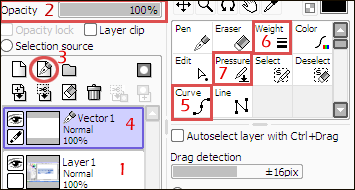
oh and here's an example of a thin lineart i've done using SAI here

[img align=right]http://i460.photobucket.com/albums/qq323/Naff-Naff/subetasignature-2.png[/img]
Chia~ Well, I'm giving it a try tonight at work, so I'll see about implementing some of the things you said. It might help ease a little bit. I never thought about changing the resolution. I'm still very much learning little things about digital art. x.x My forte was always pencil.
Yeah, I've been playing around with that pen tool. My only problem with it, thus far, is I'm having trouble getting the right line size. Does that make sense? I've been going through tutorials for it, so I've been getting better and better at it. And yeah, I know practice is going to make me better, I've at least improved from that old drawing even though I haven't down lined art...since probably about then.
Ah. I use a pretty outdated version of photoshop. I haven't tried any other programs yet. I'll have to give SAI a shot. That's some really nice lineart. o:
Line size? Well, the line size depends on what your brush size is. :D When you want to change it, pick up the brush tool and choose the size or brush you want to use, and switch back to the pen/path tool. When the line is too thick, just make the brush smaller.
I've heard some pretty good stuff about Sai but have never actually used it myself , mainly because I'm on a Mac and Sai hasn't been ported well to Mac yet.
I would say though that in terms of programs.
Sai works well autodesk sketchbook pro works well simply for lineart as the emulation of different mediums like pen allows for much cleaner lines.
Sai however from what I have heard is amazing for lineart but I've never actually used the program.
Also, in regards to digital art a lot of it is mainly just practicing as you go. I used to be pretty bad at lineart as well and over time I just got better once I started learning the ropes of how to use the digital programs and how to work with them.
Pffft.
SAI is like...a friggin...heaven sent. It's way better then using the pen tool on photoshop and the lines come out far better. It's amazing how much fun I've been having doing line art. At first I didn't understand the pressure tool, but now that I do it looks even better. Even just doing it without the lineart layer the lines come out smoother and better controlled then PS.

This does look much much better 8D YAY SAI.
[img align=right]http://i460.photobucket.com/albums/qq323/Naff-Naff/subetasignature-2.png[/img]

Since you're working in SAI now, not sure if you'd caught a tutorial or anything that made mention of the Stabilizer function. (In case you don't feel like spending longer manipulating the linework layer haha) See here! Set it to S-1 through S-whatever you feel suits your strokes best. Now enjoy linearting, because Stabilizer is a godsend for those of us with shaky hands rofl.

I'm also going to second working at a huge resolution/DPI, I do my big pieces at ~2100x2700/Print size and resize down. Seems daunting but when resized it really smooths out nice/is best for coloring as well.
Your lines are looking MUCH better now, though, good luck and have fun! :D
No, I haven't found a tutorial yet that mentioned it. But I'll give it a try. :3
Yeah, I usually start with some pretty big sizes too regardless. Although, I don't remember what I used to do when I used to do lineart. I can't wait to re-do some of my old drawings.
Thanks, though. :3

I had no idea about the stabilizer and I need you to know that I friggen love you!

For quicker drawings, I just use the ink tool at 4 pixels. On not-very-quick drawings, I make a silhouette of my sketch. Then I carve out pieces of it (using the free select tool) that don't go in the lineart. It can be a bit painstaking, but the result looks kinda nice :3