Peeka-boo food vans
Replies

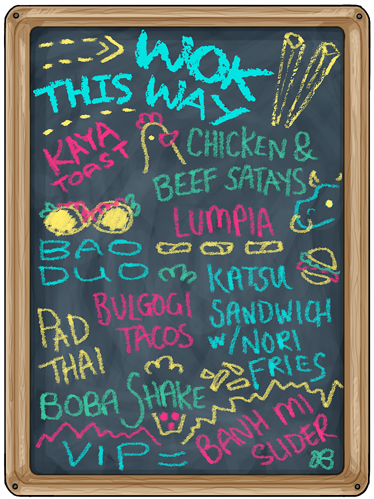
Since the beginning of Peeka-boo I've had the image below for the food van(s). It's a messed up board for all the trucks. If I can see part of a foods name I can click it but it's taken me til today to think that there might be more hiding out of reach that I am missing out on.
[IMG]http://i162.photobucket.com/albums/t256/lullsub/screen%20shot/wokthisway_zpsba013d17.jpg[/IMG]

- Yeah, that's definitely not right.
THIS is what the full image is supposed to look like. I think some other people have mentioned this issue before, not sure why it hasn't been fixed though. Or why it only affects some people and not others, because they all look fine for me.

- There was another thread on this, and basically said it's because Subeta doesn't support lower resolutions, so nothing official will be done about it.
You can try this custom CSS though:
/* Prevents foodtruck menus from being cut off /
div[style="pekaboo_chalkboard"]{
min-width:374px;
min-height:499px;
}
{display:block;}


Lots of other people have reported that issue in the other thread, which I just wanted to post on, but failed to find... I've looked into a truck again right now, and still only see part of the menu. Would like to finally start buying foods...
I cannot understand, why this problem still persists and nobody takes care of it! Please fix, before the festival is over. I for one cannot find the scode solution posted on the other thread and really refuse to use it, anyway, when this is an issue for everybody (?) and Subeta needs to take care of it.
edit:
o.k., thanks for the code but: LOWER RESOLUTIONS ?!? 1920 x 1080 is a lower resolution? How high do you want them ?!!!