Lineart help please?
Replies

I've gone through a lot of tutorials, and still can't seem to find the answer, so I thought I'd ask you guys (and gals)....
When you create the lineart for Custom Wearables, is there a particular brush / setting you use, to help those lines appear nice and smooth, rather than blurry?
Each time I've tried recently, my lines either really fuzzy around the edges, or pixellated and jagged 👀 so any advice would be welcome! :)
Thanks :)

My CW shop ~ forumset by [/font]

i draw on photoshop, and these are my brush settings:
 hope that helps, if you are using photoshop? xD
i don't use any special setting or anything, everything is default.
hope that helps, if you are using photoshop? xD
i don't use any special setting or anything, everything is default.
perfect! Thanks :D
And yeah, I've tried in SAI (although it refuses to save now), and also in photoshop, and my lineart always ends up looking really blurry and nasty, so I'll give that a go with the settings you use :)
My CW shop ~ forumset by [/font]
hm yeah, maybe you can show me what you mean by blurry! ^^
uploads the one I was struggling with
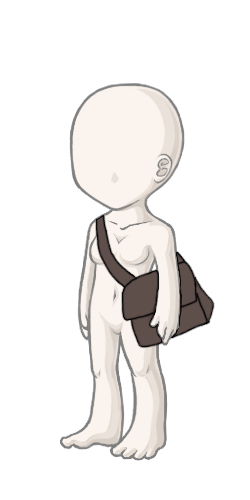
Especially on the side panel of the bag (back right), it just looks quite fuzzy & blurry .... unless of course that's just my eyes making it seem like that when it isn't! 😊
My CW shop ~ forumset by [/font]
i see what you're saying, but it looks fine xD
when it's resized, you definitely won't be able to tell at all!

in that case, I'm obviously just being too picky with things laughs thanks!! :D :D
My CW shop ~ forumset by [/font]
yeah, it definitely helps to keep zooming out to see if the little buggy stuff will even appear in a resized version xP
likewise, it's important to keep in mind that some things you are drawing in the large version just may not be very visible in a small version!
Thanks :D And another quick question - you'd use the same default brush for the item image as well, yeah?
My CW shop ~ forumset by [/font]
yep same thing ^^

~ I understand your frustrations completely. I have run into the same issues with line art and have found it very difficult to keep them uniform when switching programs. I guess the best bet might be to zoom out once and while and see if it looks okay. I know that if you get rid of the 'lighter' pixels around the edges it changes the 'style' completely, or at least is has with me. Good luck!