👑 New Feature: Redesigned Hover Card (opt-in). The little card that pops up when other players hover your username has had a glow-up. Opt in from Dashboard --> Preferences → Cosmetics → Hover Backgrounds to switch your card to the new layout: a cleaner identity card with your paw, status, and stats up top; your active pet front-and-center; and a featured-achievements row where the medals grid used to be. Other players still see the classic card on anyone who hasn't opted in — nothing changes for free until you turn it on.
👑 New Feature: Featured Achievements.
The achievements that appear on your hover card are the ones you've starred on /achievements.php — hit the ⭐ next to any achievement to feature it. If you haven't starred enough, your most recent earns fill in the rest. Hovering an icon in the card shows its name, so you (and the people peeking at your profile) can finally tell what each one is.
🎨 Visual Update: Pick a Background Gradient. With the new style on, you also get six curated background gradients to choose from — Warm Parchment, Soft Mint, Twilight, Berry, Sandstone, and Greyscale — all chosen so the text stays readable on any theme. Click in Cosmetics → Hover Backgrounds to set one (or click the active one to clear it).
👑 New Feature: Pet Borders. Any avatar border you've unlocked can now also frame the pet preview in your hover card. Each border in Cosmetics → Avatar Borders has a new "Use on pet" toggle — flip it on a different border than your avatar's, or the same one, or neither. The borders panel even shows your headshot crop and a side-by-side pet preview so you can see how the pair will look together before you commit.
👑 New Feature: Inline Profile Comments. Hovering a friend who's on the new card style now shows a small "Leave a comment" disclosure right inside the card — drop a quick note without leaving the page you're on. Posts the same way the full profile composer does, just without the round-trip.
🔍 Improvement: Live Preview For Hover Backgrounds. Cosmetics → Hover Backgrounds now shows the actual card other players see — your avatar, title, status, pet, and featured achievements — right above the swatch grid. Hover any background to try it on; click to apply. The page also makes it crystal clear that this card is what shows up to everyone else who hovers your name around the site.


Nice! I'm going to set this up for myself. :)


This is fun, I like having another use for the avatar borders! But would it be possible for us to choose some select trophies to show off instead of only having the option to show achievements? I use the save/star achievements feature to keep track of achievements I'm currently working towards, which isn't exactly what I would want to show off on my user hover.


ooooh thats super neat, thank you for this change


Good call! I separate out the old 'save' system from the new 'choose favorites to be in the hover'!

ohhh this is really neat, ty!


f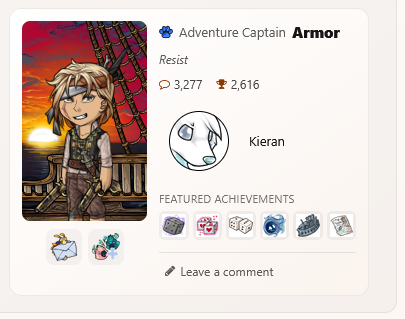 My HA's feet are cut off in the preview for the new style, at least on the preview on the cosmetics page. Is that how it's showing up for everyone, or is it a bug?


I can see your entire avatar when I hover.


I love this!!! Just one thing, the border I applied to my active pet on the hovercard also shows up on my leashed pet in the forums (:


Love this feature!
I do have a question about it. I have 8 backgrounds to unlock by having the certain colored pets. If I change a current color (say sweetheart) to another color that I don't have yet, would I still be able to keep the first one or is it pet related?
Oh, I see, the color choices were changed to be associated with pet colors! Two things on that:
- There are achievements for owning every pet color except for Riftborn & Wild - I feel like it makes sense to tie unlocking these hover backgrounds to those achievements?
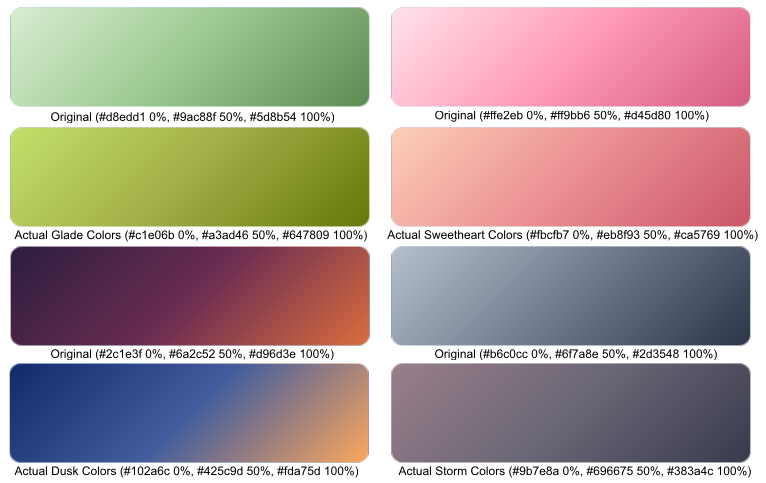
- To be a little nitpicky, these background colors really don't match the pet colors they're getting paired to. The green option that is now called Glade, for example, is a minty green, but Glade isn't mint green nor is any other pet color. Here's a quick little example comparison of some of the colors. The 'actual' colors were selected directly from pet images.


even more colors have been released! I'm happy I get more than one option now, even though storm was pretty. I do have the same question has LilBoo. do we need to actively have a pet that color to be able to use the associated background, or is it something we can unlock and keep indefinitely?

Just a Heads Up for people changing pets like me to unlock the colors: You need to check (or refresh) the Hover Card page after you change the pet. If you take a pet, change it, then change it AGAIN before you check it will NOT unlock the color. Just saw that happen with Dawn.
(For everyone asking if you keep the colors, read all the information on the page itself, it answers that for you. It does indeed stay when you change the pet that unlocked it.) I have been using a single pet to unlock many colors.
I don't think that text was there before, and I'm pretty sure it wasn't there when the first batch of colors were released. this seems like it's updating pretty quickly, since we've already gotten double the colors from yesterday. I think we just got to keep checking back to that page, Keith probably can't keep up on giving us updates on every small change he is making to make this new feature run smoothly.


This is a nice feature! I love that we can now use avatar borders for our pet's headshots. While the avatar system is a mass ton of fun and I greatly enjoy it, I do feel at times that it has overshadowed the pets so it's great to see little things like the avatar borders helping to bring our pets back into focus. The background cosmetic effects are also lovely and I think it'll be a fun activity trying to unlock them like achievements while further boosting playability without having to add new items to the site. :)


Thank you so much for all this work you've been doing <3
If you want to see an example, hover over me 💗