Effects Overhaul: Layerable Filters 🎉
Filter
Show Official Posts OnlyReplies

Try it out: https://kumos.subeta.net/wardrobe/effects
If you've been trying the Kumos wardrobe, you know that you could add a background color and have it go at the bottom of the image generation pipeline. I've rebuilt that into what I think might be one of the biggest steps in customization on the avatar in.... a very long time!
You can have up to 3 effects layers, and right now those layers are "simply" a solid color or gradient, but you can then layer them with the rest of your outfit.
You can choose from four blend modes, and transparency, which really gives you some cool options

 and overlay layer to make the dark lines darker
 three 'color blocks' stacked on top of each other
 my avatar + wearing
As you can see, it creates them as layers to drag around with the rest of your items. I'm really excited to see the kinds of things people created with this!
💖 ✨ 🤗

Neat! I went to go try it out but it says:
Access Denied
You don't have permission to access this page. Access denied. This feature is currently in beta testing.
EVENT ACTIONS
[egg=Synth] [tp=Synth]
Ditto. Same for me as

I am also denied access to the wardrobe.
 [flower=jersey]
“Justice will not be served until those who are unaffected are as outraged as those who are.” - Benjamin Franklin
"Woe to those who make unjust laws, to those who issue oppressive decrees, to deprive the poor of their rights and withhold justice from the oppressed of my people, making widows their prey and robbing the orphan." - Isaiah 10:1-2
[flower=jersey]
“Justice will not be served until those who are unaffected are as outraged as those who are.” - Benjamin Franklin
"Woe to those who make unjust laws, to those who issue oppressive decrees, to deprive the poor of their rights and withhold justice from the oppressed of my people, making widows their prey and robbing the orphan." - Isaiah 10:1-2

The irony of making a "this is in beta!" error message page when the users are the beta testers XD

As someone who loves the backgrounds but never uses them (I forget :'D) this is great. Can't wait to try it.


this is great, thank you for this fix! i did notice there is still a bug when typing in a search term to the search bar, it filters, but when you remove the keyword from the search bar, it doesn't refresh again with the full list of your items. i tried pressing enter after removing any search terms to see if that triggers it to reset, but it doesn't.
Sorry folks, I realized I didn't put the "this is for the Kumos wardrobe beta!"
You have to opt in here: https://kumos.subeta.net/wardrobe
You can opt out afterwards - but opting in will make it so that the avatar you build on Kumos shows up on legacy and Kumos. Opting out reverts you back to your legacy avatar!
Please sign up, I'd love to get more feedback on the wardrobe overall and think there are some really cool improvements!
💖 ✨ 🤗

Sorry this isn't about the effects exactly, but since you said you wanted more feedback on the wardrobe overall... Something about the kumos wardrobe feels.. really bad trying to navigate. There's just so much scrolling. With the way the kumos wardrobe fits into the page with the rest of the content (sidebar etc), the items somehow take up more room than they would in the older wardrobe (which was full width).

In the old wardrobe I can fit all the items per page on my screen and comfortably and quickly scan through the pages.

On kumos the items are just taking up so much room and I have to scroll up and down constantly. Everything apart from the items (worn list, filters etc) just feels so cramped that I collapsed the sidebar, but then the items got even further apart and took up even more space.

idk, could there be less padding or whatever between the items or maybe let people set how many items per page they want to display?
he/him / 31 / EST |  | My best friend is |
That's great feedback, thank you! I'll add some options - i'm going to add a preferences panel in the next few days.
The reason I'm going to make it an option is because I've got the exact opposite feedback from other folks (that they feel like it has more space to breath and they can navigate their items better!) so I want to make space for both.
Making it possible for you to reduce the gap, and increase the number of items per page (and have those preferences stick) shouldn't be hard!
💖 ✨ 🤗

I'm loving some of these things! One thing (not related to the color block! I finally got that to work and that's so fun!) that I'm struggling with in the new wardrobe is that when I migrate outfits, most of them don't show up correctly as I'm selecting which ones to move. They either show an entirely different outfit, or just some random nekkid HA. I tried to migrate one of those so that I could see if it would correct its self once migrated but it did not. However now I can't migrate it again and I can't delete it.
All of the outfit names vanished, which isn't a huge deal, but I can't seem to edit/save the name.
Nothing urgent, except I'd love to be able to make sure all my outfits migrate correctly, and I didn't mess it up by trying to selectively migrate and test one of the mistaken ones that now is stuck without being the outfit I saved on legacy.
[flower=springblom] My CW Shop | Subeta Pepper News | FairylyBookish | Daily Tea Report
Someone reported that in another thread, I'm wroking on that importer today!! You didn't mess anything up - and i'll make a way to overwrite imports if it becomes an issue. Thank you for testing!
💖 ✨ 🤗

Dittoing luck here. The padding between items is a lot right now. This is such a bean soup thing, but the more I have to move my mouse, the more irritating it is to my wrist hahaha.

Whoa! The ability to add customizable gradient backdrops and change the opacity is a game changer for the wardrobe! So many customization options unlocked with this feature :o I love it!
Only problem is, as Luck said, the layout of the wardrobe in Kumos needs some adjusting.. Not only is everything too spaced out, but the currently equipped section on the left is really difficult to adjust.
1.) It's too narrow (compared to current wardrobe) 2.) It needs an iframe with a scrolly bar (like the current wardrobe) as it is currently very difficult to drag wardrobe items up and down to layer them. 3.) If there is a way to make the title of the wardrobe item clickable to drag instead of just the two horizonal lines on the left, that'd be great (as it currently is in the wardrobe). Having to specifically click on the 2 little horizontal lines to drag something is annoying. 4.) Being forced to pick a name for an outfit when saving it sucks. Sometimes I save drafts temporarily and delete them as I work on an HA and don't care to name them each and every time.. I prefer when it would generically save it as "Outfit" and I could go and edit it later.
Overall feedback, unfortunately, is the new Kumos wardrobe as it is right now is very un-navigatable and I'm nervous for when it changes bc the current wardrobe layout is so compact and perfect for creating HAs..

~~Yay, turning off limbs is working! Thanks for fixing that, Keith.
looks like I spoke too soon, limbs are still showing wrong behind image. :(
~~ Ordering is like old wardrobe now, with bottommost item visually on the bottom, that's a HUGE HELP thank you.
-- Color block effect is very cool.
Still not working:
- new items added to outfit still show Item# and broken image
- can't save current outfit to saved outfits - have to save "unsaved changes" and wear it on site before we can save the outfit - this is a problem for contests! also a problem for work in progress outfits one does not want to wear half an outfit on the site to save one's progress. It instead just saves what you're already wearing on site, so then you have to delete that and try again.
- the "show more" with a row of buttons of the first alphabetical drawers and then the rest in a more section is not fun to use. We should either go back to a normal dropdown where the currently selected one is shown, or we should get to pick our most commonly used drawers for the buttons (maybe this can already be done, I haven't checked organize yet... ok checked organize, don't see a way. There is a hand icon over the two bars that makes it look like maybe you could move them around and reorder, but it is not letting me do that)
- when scrolling, it's too hard to put items in the right place in the ordering, some get hidden under the outfit
- hovering to see what worn items look like only works for the top item for me, the others the hover doesn't pop up.
- migration! improvement, migration is loading for me. still not usable though - it's loading incorrect images for most outfits so I have no idea what I'm choosing. it's not showing outfit numbers, just dates.
image of what migration wrong-image-copies-of-others-instead-of-all-different (6) looks like:

a couple of those are named so they're pretty easy to find what they 're supposed to look like in the old wardrobe:
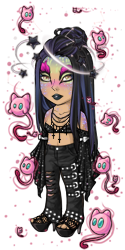
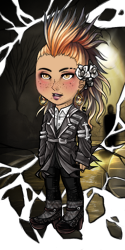
Awesome to hear, . I'm totally fine with patience on this. I know you've gotten a lot of grief over things taking a while or a few tries, but truly appreciate whatever you do, and knowing it's being worked on is good for me for now.
[flower=springblom] My CW Shop | Subeta Pepper News | FairylyBookish | Daily Tea Report

Hi ! So, I currently use the wardrobe on kumos, the one to which the "vintage" Subeta directs me to (I like to play there). To join this beta wardrobe, it tells me that I will have 20 unlocked hairstyles. Currently I have 4 pages of unlocked hairstyles, and some of them are from past site events. My question is: What will happen to the currently unlocked hairstyles, do they stay or do they get deleted? -please explain like i'm 5, XD
I really have to update my blog ObscureJourney and my review site BeingObscure. French speakers can read my reviews here.