Kumos Forum Layout & Usability Feedback
Replies

I find that the current minimal styling of the kumos forums makes them difficult to read & engage with. In particular, the lack of color and defined structure on the forum category pages cause them to become a wall of text with no clear focus for the user's attention.
Images under the spoiler cause they're kind of big
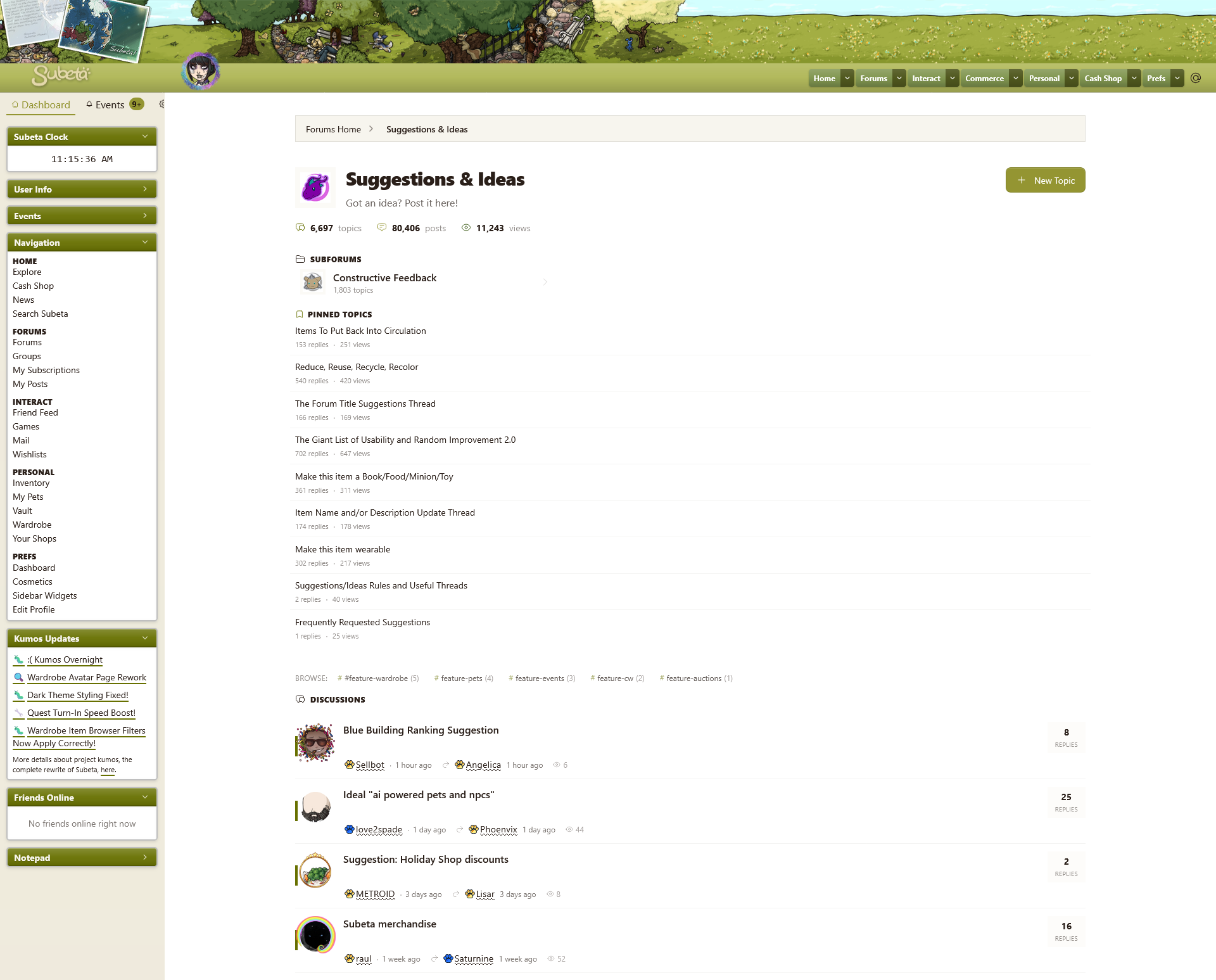
Current:
Revised:
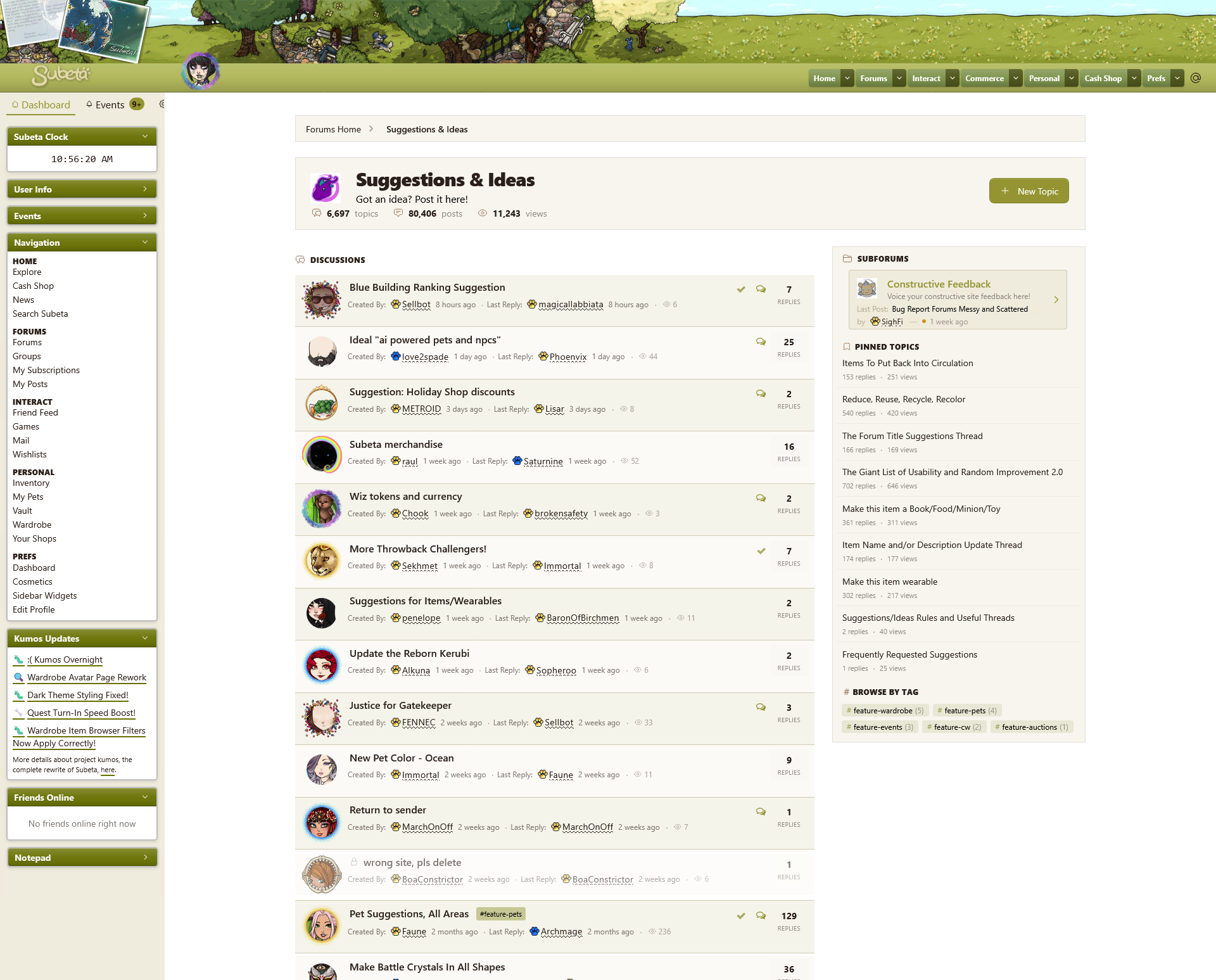
(I want to note that I made these screenshots taller than my screen in order to show each of the different sections of the page. In both screenshots, the cutoff point for the bottom of my screen is right around the pinned thread "Make this item wearable.")
Most important alterations:
- Using the styling already established in the breadcrumb navigation, visually separated the different sections of the page by boxing them in with a border & relatively neutral background color.
- Returned the two column layout that kumos forums originally had, so that currently active threads can be closer to the top of the page.
- Added an alternating background color to the list of threads, again to help make the different blocks of text more visually distinct.
- Re-added the indicator icons from the legacy site - a checkmark for a thread that you've posted in and the speech bubble icon which indicates unread posts as well as links to the last read post - this time in their own column. (& on mobile, these could maybe go on a line along with the post & view count?) I really think these indicators need to get added onto the kumos forums because they greatly help with following along with conversations. Having a tooltip explaining what they mean like on legacy would also be preferable.
List of more minor changes
Top Banner
- The category subheader which explains the category's subject: changed this text to black because it is providing unique information, so I do not think it should not be the same "fade into the background" grey as all the repeated words throughout the page.
- Reduced the padding around the information in the forum's header (category title, subtitle, and stats) as it seemed unnecessarily large and created just that much more white space to scroll past originally.
Icons
- The svg icons were originally a variety of colors - changed them all to the same color for uniformity. Chose brown in this case just to try to have a secondary color that wasn't green.
Subforums
- Added a box around the subforum information to make it stand out more - gives it a bit of a simple button look.
- In the subforum section, replaced the number of threads with the description of the subforum, because I think that provides more important/relevant information.
- Also added the latest post below the subforum info, using the styling from the forum front page. Without this, the subforums feel much more forgettable & significantly harder to keep track of.
Tags
- Changed the text "Browse" to "Browse by Tag" and changed the styling to match the other subheaders throughout the page, for consistency.
- Again trying to add more color, changed the tags to always have a pale version of the primary accent color as their background (this was originally only the case upon hovering over them.) This also helps them stand out much more in the actual list of threads.
- In the list of threads, moved the tags next to the topic title. This could potentially be a problem with a very long thread title plus a very long tag name but since it seems like threads will probably only have one tag (I assume, due to the types of tags that currently exist), it doesn't seem worth it to give them their own line - especially since it makes the information about who's posted in a thread end up closer to the title of the /next/ topic rather than the one it actually applies to.
Thread List
- A lot of padding reduction all around on the list of forum threads - there is a tremendous amount of white space in the current kumos layout that severely hinders the readability of this list.
- A bonus of the two column layout is that it pushes the number of replies closer to the other thread info. Currently on kumos, these are very far apart which also makes it much more difficult to scan through the list.
- Added "created by" and "last reply" labels next to usernames. Although I do think it's easy enough to infer what's what in the current kumos layout, I also don't think it hurts to just be clear about it. Plus this also kind of helps make the list easier to read by creating a more consistent anchor point for your eye to jump between.
- Super minor: in the current layout, there's a dot between the original poster & their posting time only. Moved that to be between the original poster info & last reply info and added a second dot between the last reply & views - turning it into more of a break between the three different chunks of information here & being more consistent with its use.
- Removed the green bar indicating that a thread has unread posts. It is definitely not clear enough what this is indicating, plus it gets hidden behind the different avatar borders.
Pinned Threads
- I just want to also mention that I think fully separating the pinned posts with different styling from the standard posts does make them more forgettable. That's fine for static threads like rules or lists of helpful links or such. But some categories, such as the one pictured here (suggestions) have pinned threads that could/should be actively used. I can think of three possible solutions to this:
- Go back to the legacy system (pinned threads at the top of the thread list with just a marker to distinguish them as pinned)
- Use a hybrid system (static threads use the new, different styling and active threads go on the top of the regular list as before)
- Or keep the different styled list but also have pinned threads appear in the standard thread list chronologically as normal (So a pinned thread could potentially be listed twice on a page, but if they haven't been posted in in a while, they'd only be in the sidebar on the first page, etc.)
(And a last positive little note is that I think adding the HA headshots to the thread lists is a great way to get more use out of avatar borders!)
Also, a few issues I've noticed on the forum category pages:
- The wording for posts on a thread ("replies") becomes a little confusing because the original post is counted. This is also true on legacy, but there they are labeled as "posts." On kumos, a post with "1 replies" (sic) is actually a post that no one has responded to yet, but the wording implies that someone has.
- There is an issue where posting in a thread does not bump it to the top of the thread list; this happens fairly frequently. Also when this happens, the last read link will show up on legacy but it will only link to the first post irregardless of your actual last read post; just mentioning this for when that link hopefully gets added to kumos. (This seems to have been fixed?)
- There is a delay of several seconds when trying to get to another page of a forum category on kumos. You also remain at the bottom of the page after moving to the new page, which means you have to scroll up to look through the list of threads and then back down to change pages again. Or, if you're on the last page of a category & it's not very long, you're suddenly looking at just the background color of the page because there's no content at the bottom of the page anymore.
- When you change pages in a forum category, the user hovers continue to show the users on the front page - the username changes, but when you hover over it, it will display the information for the user that was originally in that position.
- On mobile, you cannot see page numbers - the only option is to go one forward or one back, which makes navigation a bit tedious.
- On mobile, if a thread title takes more than one line, the first line gets an ellipsis as if it's being truncated even though nothing from the title is actually omitted.
- The date for when a thread was created is not currently working on the forum category page - it seems to always match the date of the last post. (As an aside to this, I think at a certain point - like maybe 1 year? - the dates shown in forum categories should switch from "xx long ago" to the actual date so it's easier to tell exactly when a post was made.)
I do think the forum main page as well as actual threads also need some (more minor) styling changes, but unfortunately this wall of text is all I have time for at the moment, so I'll have to come back to those later. Hoping this can be helpful again and sorry it's so long haha 😅
Alright, I have a bit of time to give feedback on another part of the forums, threads themselves.
More mockup images
Current: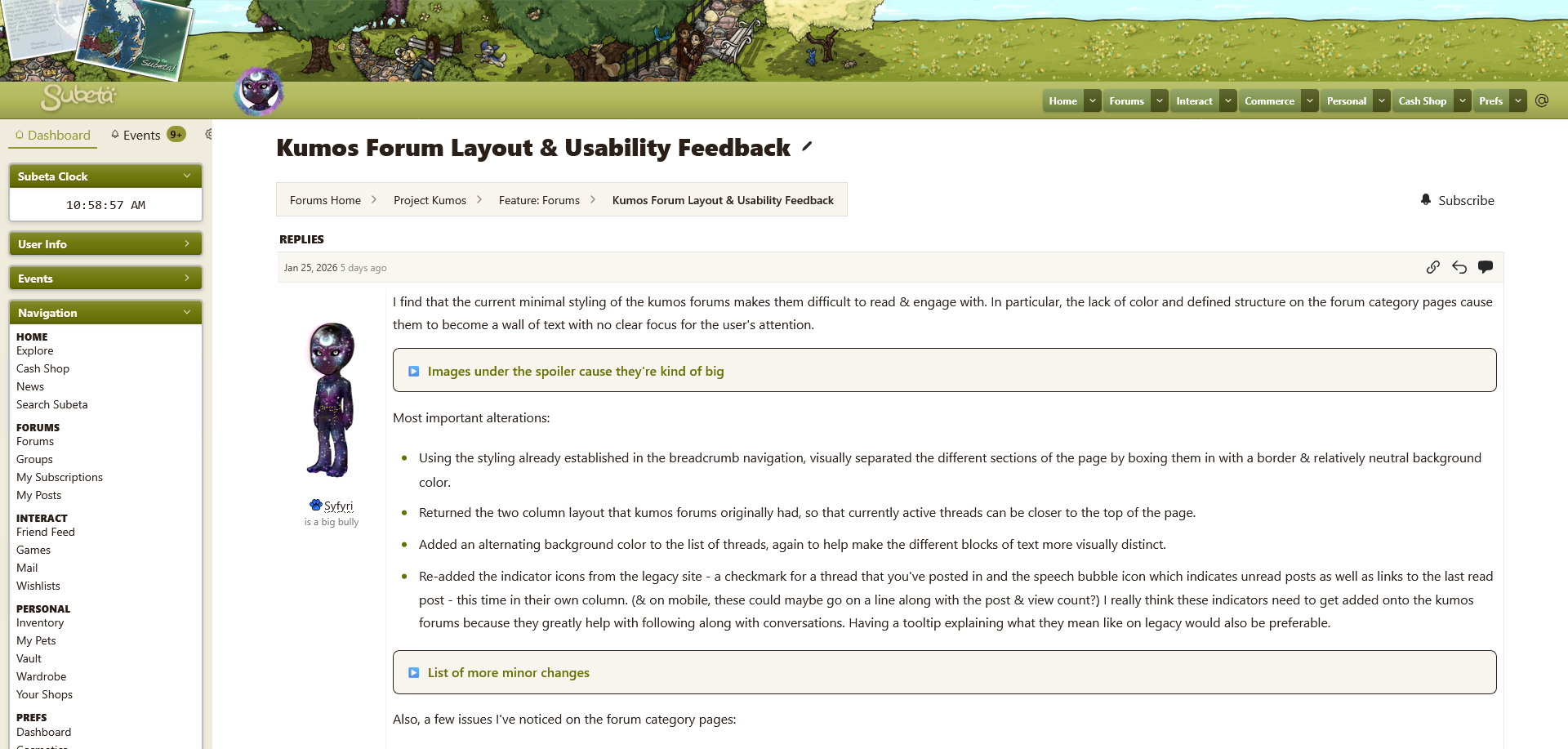
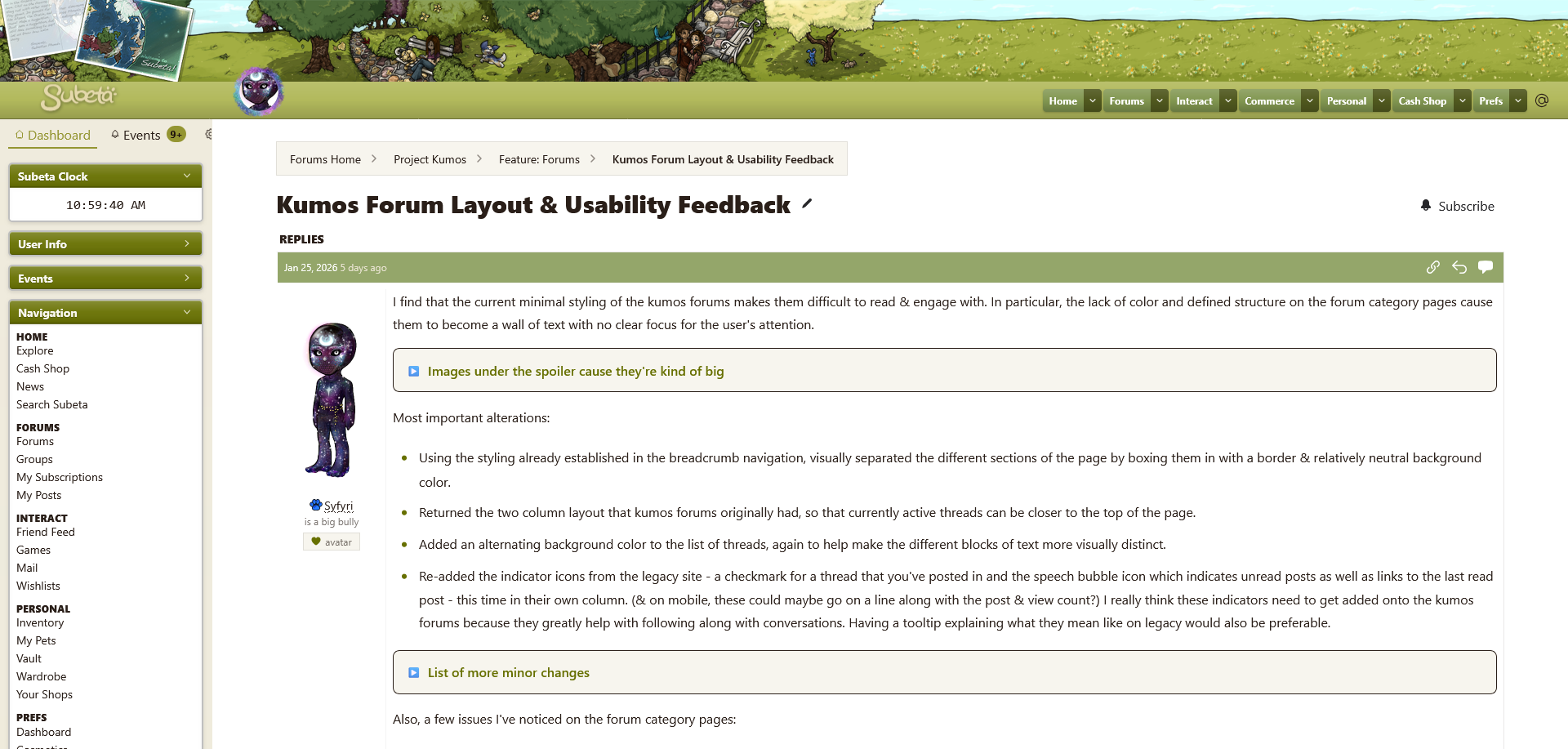
Rework:
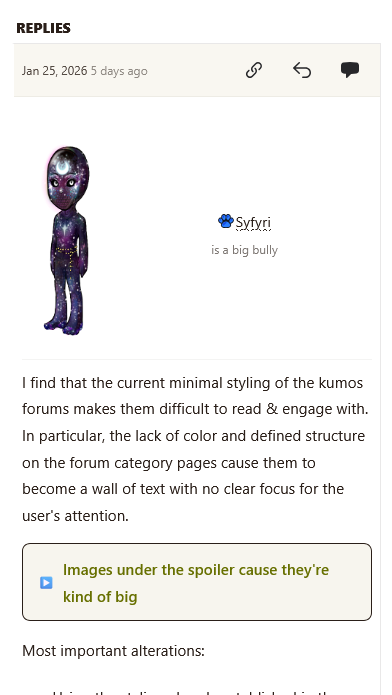
Mobile Current:
Mobile Rework:
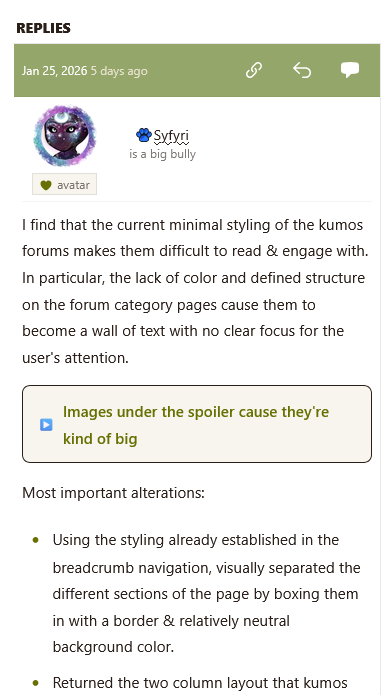
The main layout issue I see with threads is that I think the header for an individual post should be colored, like on legacy, to make the start of a new post that much more noticeable.
Secondly, I do think that showing the full HA on mobile wastes a tremendous amount of space and it seems like it would maybe be better to show headshots there. However, I also understand that plenty of users would like to always see the full HA on forums. Would there be any possibility of creating a preference toggle for this? So, if mobile defaulted to headshots there could be an option to "show fullbody HA in forums on desktop" - plus maybe also a matching option to "show HA headshots in forums on desktop" for people who might prefer that?
A little positive note is that I like that the textboxes stretch to fit all the text!
Two minor things:
- I think the thread title should probably go under the breadcrumb navigation.
- When viewing longer threads it shows you the amount of post & the post total on the same line as the page numbers, but it calls the posts "results" which doesn't feel quite right.
A few issues I've noticed within threads:
- User avatars are not displaying at the correct size - on desktop, they're at 116x250px & on mobile they're maybe about 90x250px. They should be 125x250px. (This was fixed on mobile but they are still not the correct size on desktop!)
- Longer user forum titles get truncated and do not display the full text - this definitely should not be the case because people work very hard to earn some of these.
- Spellcheck isn't working at all in the textboxes, nor does text auto-capitalize in textboxes on mobile.
- Previewing a post doesn't work properly - scode all seems to stay as code rather than render, and things like the asterisk for a bullet point just vanish when previewed.
- Is there still a character limit on posts? If so, it would be nice to have the live character count with the limit listed like on legacy, for both making a post and a topic.
- When responding to a thread, all users are able to see some of the staff options like "official post" and "reply & lock." I assume they work, cause I have seen a few odd posts around from random users with the red staff banner.
- I feel like the edit post button is potentially too small? Feels like it's easy to miss at the moment.
- The ping user and quote user buttons on a post do not work - they bring you down to the textbox, but nothing gets added to it.
- The link to like a user's HA is missing.
- Pets displayed with a pet leash do not link to that pet and they are also missing the little user-created blurb that accompanied them on legacy.
- The same as with forum categories, on mobile you cannot see page numbers and can only move one page forward or back. This issue combined with the fact that there isn't a link directly to the latest and/or last read post means it's very difficult to interact with long threads on mobile.
- There are also a number of issues with scode at the moment, which I talked about here.
- Also, posting on the kumos forums doesn't seem to increase your account's post count?
And a few random suggestions:
- I think it would be fun if the reaction images could also be used like emojis within a post! Though they would probably need to be scaled down a bit to fit more inline with the text, so it's possible this wouldn't work because they wouldn't be "legible" enough at a smaller size.
- I like the reactions on posts, but I also kind of miss the anonymous liking feature from legacy which is quite friendly to lurkers. Would there be any chance of having both?
- When creating a thread, is the intent for users to pick their own tags for it? If so, maybe there could be a list of options to choose from based on the applicable tags for the subforum being posted in.

Hard agree on all these points. Thank you for compiling them.
I'm finding Kumos forums very difficult to navigate on mobile.
Everything looks zoomed in - I believe it overrides my font size setting as I have mine set to the smallest, yet all text on forums is big.
It also overrides auto capitalisation and autocorrect. I am effectively typing totally manually which is pretty slow.
No page numbers / not being able to skip to the end of the thread / latest page means I haven't been able to engage in the Survival threads such as the strain progression one.
The options underneath the post box such as "official post" "highlight post" "event everyone" what do they mean?
I tried to edit a post and use the edit sCode - it doesn't appear to have worked on mobile.