Need help, don't know where else to ask
Replies

I have my homepage set on Yahoo in english. But lately I get it in german with a big, white popup, probably asking me to accept cookies. I have no idea what to do or where to ask, maybe someone here can help me with this SO annoying issue?

Not sure if this helps, but you can put the link to a website into Google Translate, and then you'll get the translated version of that link. If that doesn't work, could you maybe post a screenshot of what you're seeing so I can try to translate myself?
Thank you, here is the link to screenshot, hope it works. Mind you I got all my settings for english, cleared cookies, cache, history...fresh out of ideas...On latest firefox, desktop PC, win10
You're right and it IS a cookie-popup.
- Alle akzeptieren: Accept all
- Alle ablehnen: Reject all
- Datenschutzeinstellungen verwalten: Manage privacy settings (probably to set individual cookies)
First go to the top of the page and click "Weitere...":

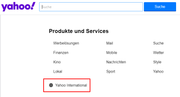
Then click on "Yahoo International":
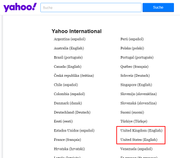
And finally click on either "United Kingdom (English)" or "United States (English)":
I hope this helps to fix things!
Thank you, it helps but doesn't save, have to do it every time I open my comp at homepage again. Still better then before, had to click "ablehnen", since I reckon the other one means accept :D
Hmm, the only other thing I can imagine to do, is to check which URL is currently set as your homepage in Firefox. Maybe a bug messed it up and set it to be the German link?
Yes, "ablehnen" is the Reject-option, while "akzeptieren" is the Accept-option.
(also omg thank you for the gift <3)
YAY! That worked, it was set to the german yahoo, got to settings and all is good now, thank you SO much! And you're very welcome <3 (2 more words I know in german now, win-win :D )