CW preview doesn't line up with avatar?
Replies

I'm new to making CWs and just finished making a commissioned dress for someone, but they sent me a preview when they were submitting it and this is what it looks like:

I downloaded the overlay base from the CW instructions and resized it from 250x500 to 125x250 and gave them the .PNG file. The sizing looks right, it's just shifted to the upper left more than it's needed for some reason. Anyone know what I can do on my end to fix it?

maybe you can help out with this?

Well Hell, what happened there. What program do you use ? There may be a specific thing about it and saving. First I want to note that it looks like both overlays are the same despite needing to differentiate between the boob-clad and non-boob-clad avatars. Now on to the issue:
- Try re-saving it to see if you accidentally moved it at the last moment (it's happened to me).
- Make sure to merge the layers you want. It looks like you did but that's usually the reason why things jump around, though generally not that dramatically.
- Make sure to have the layer you're saving selected while saving. Not sure if that has anything to do with anything, but you never know.

I used Photoshop Elements, shouldn't make any difference between regular Photoshop or Paint Tool SAI but I also have those programs at my disposal anyway. And yes you're right, the item is unisex (don't know how the CW owner submitted it tho). I'll go ahead and try everything you mentioned and see if that works (thanks!) though if not will the mods correct it for them or just deny it do you know?
EDIT: I just re-downloaded the base from the CW page and pasted it into my original file and from the looks of it I had the original base shifted to about the problem you see here! Bet that was it? I'll try it and see :D
Elements can be temperamental, or at least it was for me, ahahaha I don't know what you mean by it being unisex--- personally I see basically everything as unisex, but for these avatars sometimes things need to be altered to fit the male vs. female avatar.
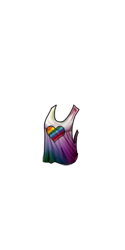
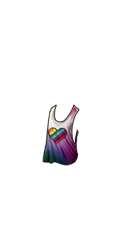 Not all chest items will need this, as some cover the boob area or are drawn in a way that it doesn't appear altered, but your CW does.
I am very glad you figured out the issue ! Hopefully you don't have any more issues :p
Oh goodness, thank you for pointing that out! I (incorrectly) was under the impression that it meant as long as it covered over both gender differences (waist/boobs) then it was good. Glad you caught that, saves me trouble down the road!