HA Item Preview Broken Image
Replies
Jul 4, 2017
8 years ago
shinta205

I know the cause of it, but I doubt it is something I can fix. I have tried this on other computers, and it seems to be an account issue, not a computer issue, as my friend can see the image just fine.
Basically, when I scroll over any item like so, it shows no image. After using Chrome's Inspect ability, I realized that the image it attempts to use (https://img.subeta.net/avatars2/_chest_plain_greenshirt.png) is broken. However, if you add an "f" before "chest" like so, you get 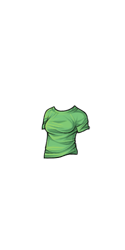 . This is a site code issue, however, and I am unable to fix it. Please help! Everything works in the wardrobe!
I am using chrome, windows 10, everything is updated, etc.


Please log in to reply to this topic.