Avatar help
Replies

Okay, so I'm fiddling around with my avatar and I got my eyeballs to look the way I wanted
example: https://gyazo.com/6504ab7ccd78adb8c4296b2adda2b103 (I don't know how to link pictures here.) I save it and everything goes great, but for some reason, it won't show the eyes correctly.
It'll either look like this: https://gyazo.com/4ce5fb85ac08d94f0560019edec40833 This: https://gyazo.com/c280268c8f2da8a517cdd4e7a5a6e01f Or, if I move the eye slot all the way up it'll look like this: https://gyazo.com/0691067231a6983997b668b97e2b714b
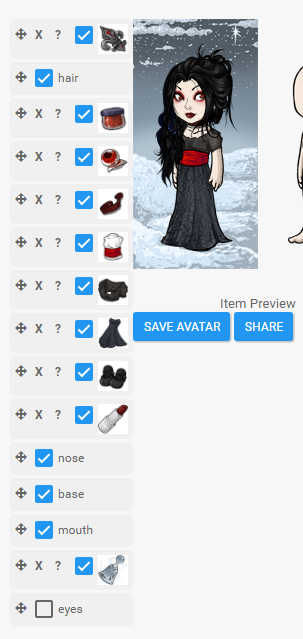
Here is the list when I have it the way I actually wanted it: https://i.gyazo.com/87d7956692308fd3e4a81c2ff27ec5a4.png
I'm sorry if this is in the wrong place, I haven't been here in a really long time.

To display pictures just use the following code.
[Code][/code]
In the last picture you have the eyes layer under your base layer, so your standard eyes shouldn't be visible at all. Try checking the box.
But it could also be that your avatar hasn't updated yet. You could try doing a hard refresh (ctrl + f5) on your profile, that helps updating my avatar usually.
Thanks
I had to go babysit so I ended up leaving it alone for a while hoping it would update,
I tried this
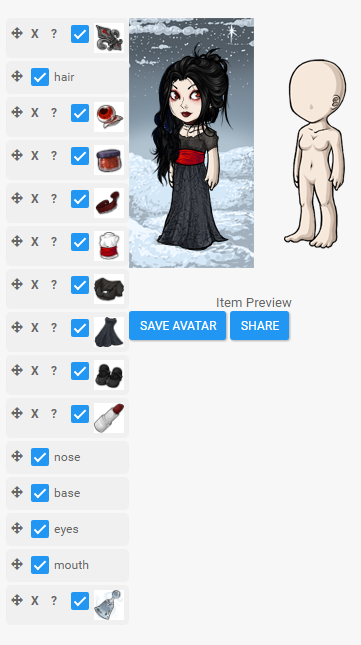
But now it looks like the eyes are gone again for some reason, (on the actual avatar when I hit share, it shows the same thing, even though in the wardrobe editor it shows the two eye sets visible. I'm sure I"m doing something wrong, I just can't quite figure it out yet.