Backdrops that cover everything
Replies

Is there some secret way to make it so that my avatar can actually show up on them?I bought a Diving Chelon Blooming Tea because of the awesome tie-dye effect but then I realized it was overlapping EVERYTHING. Looking at the other backdrops in my wardrobe, I notice there are others which now cover the avatar too, yet seem rather empty and void where said avatar should be. It just seems weird to me, and also a bit saddening because I'd like my avatar to show up but...

You need to use the beta wardrobe for those backgrounds. In the beta wardrobe you have the layer 'base' which is you human avatar and you just need to put the background below that layer.^^
Okay thanks! Now let's hope the beta wardrobe works for me. <<;
(I really don't see the need in making the base a layer but oh well.)
I think the base layer is a great addition because it makes those new backgrounds possible. Before we had that layer it was nearly impossible to make a HA without the base showing.

Pardon my intrusion but imagine if you will, you've made an HA-less HA like some are want to do on here (i.e. made one without ever touching the human base), you have everything you could possibly want for one and then you go to get a background only to be met with:
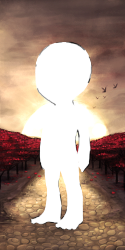
A big white glob where your HA is meant to be and there's nothing you can do to cover it.
This is just an example but this is why the beta wardrobe with its making the HA itself a layer was praised so highly. We don't have to worry so much about backgrounds doing that anymore.


The base as a layer is possible for HA's like mine (assuming it shows up properly). c: It allows for more creativity and honestly sometimes I appreciate the minimalism. It can be a bit confusing though to try and work out!
Edit: My HA hasn't been updating so it's very likely you can't see it, thanks Subeta for being so laggy. <3
Pardon my intrusion but imagine if you will, you&;ve made an HA-less HA like some are want to do on here (i.e. made one without ever touching the human base), you have everything you could possibly want for one and then you go to get a background only to be met with:</p>
<p>
</p><p>A big white glob where your HA is meant to be and there&;s nothing you can do to cover it.</p>
<p>This is just an example but this is why the beta wardrobe with its making the HA itself a layer was praised so highly. We don&;t have to worry so much about backgrounds doing that anymore.
In that instance, I can see it, because it's a very lovely picture. But the other two backgrounds I have which don't have the base-hole weren't much to look at by themselves lol.
I can see your avatar picture just fine.

It's not so much about wanting to use the background by itself, it's something like 's HA where you want to put animals and foreground items, etc. on without having your actual HA showing.
It also allows for new layering effects (like you could put on a dress, behind your HA, and then wear another outfit in front of it so the skirt of the dress becomes more like a bustle instead, etc.) And there are some older items that can be used more easily even with an HA now, the two that come to mind are CWs but items like this: You can put your HA in front of them now instead of having to have your HA behind them, but you could stilll use them with animals on a full background if you wanted since they don't have the HA cutout.
Basically it's really really nice to have if you like to play with layering.


I really need step by step instructions on how to get the HA to show on the backdrops. I don't really understand layering it.
[tot=Liliana]

wardrobe -> beta wardrobe -> drag your background to the very bottom below "base" -> click save
Necro
You shouldn't post on threads that haven't been posted on for over 3 months. Also you're able to drag your worn items around to relayer them in both wardrobes, only the base layer doesn't exist in the old one. It looks like you've got your background over some other worn items