*☆ Random Bold Headers
Filter
Show Official Posts OnlyReplies

[edit] The subeautique troubles were solved
this is still occurring:
This started happening last night: some headers are showing up really big and bold?
The date headers on the news page seem really big
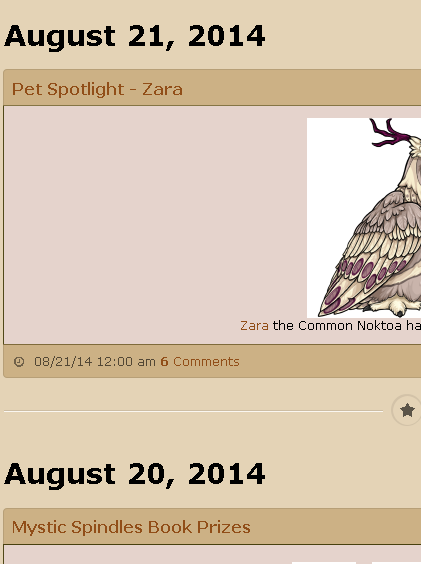 My shop and galleries titles are big and bolded too
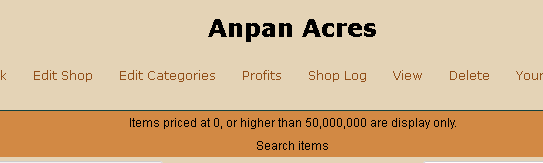
See other users posts with screenshots down below for more examples
he/him / 31 / EST |  | My best friend is |

The images are showing up properly in SubQ for me. Have you tried clearing your cache and browsing cookies?
I just cleared both and the images are still gone and replaced with dashes
he/him / 31 / EST | | My best friend is |

The Subeautique items are showing up fine for me, too. Is it possible that you've adblocked them or something?
I am having problems with the headings being larger than usual, though. The place where this bothers me the most is on the pet page, where each pet's name is supposed to be on the same line as its ranking, but now the ranking is pushed down below. It takes up a lot more space this way. 😕


Yes. I have adblock plus, but I just disabled it to see, and I still have the dashes instead of images 😞
I'm not really good at customcss so if I had something there that was somehow affecting this I wouldn't know better. Do you think I should paste my entire custom css in a code box?
he/him / 31 / EST | | My best friend is |
It's possible. The easiest way would be to copy and paste the entire code into a notepad or somewhere you can save it and then remove it from Subeta. If that doesn't fix it then we'll know it wasn't the CSS.
Okay I've done it. The images are here now and I feel so stupid. 😳 I really didn't think it would be my customcss since when this was happening years ago I didn't have any customcss at all. But now I know that is was the custom css causing it. I don't know which part exactly so I guess I'll just go without. 😅
I'll remove the parts about the subeautique from my OP but leave in the parts about the random bold headers, since others are experiencing it too, if that's okay.
he/him / 31 / EST | | My best friend is |
Glad you figured it out!
I'll let the programmers know about the bold headings. :)
@ Reya Thanks :)
[edit]
Just going to add this: I was slowly adding back my customcss piece by piece and I found what was messing up the subeautique.
.container-fluid > h1 + div,
.container-fluid > h1 + div > div { width: 37.21em !important; }
.container-fluid h1 + div > .row-fluid .span2 { width: auto; margin: 0; }
.container-fluid h1 + div > div :not(:last-child)::after { content: "2014�0a0"; }
.container-fluid h1 + div > div img { display: none; }
I have no idea what this is, but I had it added in with the rest of this css I found years ago (someone else made it) to re-arrange the pets.php page to be more similar to the old layout (before each pet had a dropdown menu and stuff)
Like I said I have no idea what this code is for but it doesn't seem to do anything on the pets.php page but it was causing the subeautique items to become dashes.
The header of this code was "/* Minimize top menu */" but I don't know what that means?
he/him / 31 / EST | | My best friend is |
I'm really not familiar with CSS :P
But it looks like it makes the top menu smaller and removed all the images.

I've been noticing this as well. Randomly huge bolded text, like this. the 'I want that!' buttons in SBQ look weird too (the text turns white when you mouse over it); and my pets now have boxes around them on the pets page. I don't know if any of this is intentional or not.
[ forum art by [userid=519517] ]

My "I want that!" text in Subq looks brown (following my Morostide theme, I suppose?) and white on hovering, too. I asked some friends who seem to be having the same issue x:
Also experiencing the random huge bold titles in quests, shops, pets page, pretty much everywhere. My pets page looks exactly like 's.
omg I'm having all of these exact same issues
he/him / 31 / EST | | My best friend is |


