🐛 Bug Fix: "Sonar reads 0 leviathans" no longer lies. The "Sonar reads 0 leviathans in that area" notice was popping up after every harpoon throw and every new game — even when you hadn't pinged anything.
👑 New Feature: Sonar Markers Stay On The Chart. asked if the sonar reading could stay visible on the board — on the bigger boards (Kraken's Maw and beyond) you have to zoom out to see the whole grid, and the brief flash was easy to miss. Each ping now leaves a soft parchment outline over the 3×3 area you scanned with a count badge in the corner, and they stick around for the rest of the hunt and survive a refresh, so you can plan your next throw against everything you've already scouted.


Hum, my first sonar pinged where I placed it but the 2nd was on the other side of the board, no where near where I picked. I am on level 9.


I also can't click inside the outlined 3 x3 area once I have pinged it now.
I am having the same issue. I'm also finding that if I place down a sonar ping after I've uncovered Leviathan squares, it shifts the Leviathan body parts around randomly to other squares. This actually makes it more difficult to finish the game as it seems to jumble uncovered Leviathan squares too, meaning that instead of having a line of squares, it will now just be a random head, tail or body square with nothing either end.


I'm confused by this game. I had 2 single boxes with just a head, 2 other boxes with just a tail and 1 box with just a middle section and there were no other parts above or below these. So there are parts of them hidden around with no rest of the leviathan to click on?
I too am not able to select squares within the sonar pin area. I then thought it must be around it but it doesn't appear to be that way. Also the leviathan that I did hit has it's body going out of the playing area. Example.

I just pinged above the area in my last post and everything jumped to the left


It's not just you, , same issue even using Chrome. Something definitely went wrong!

im getting the jump to side too. thought it was just me as mobile/using safari!


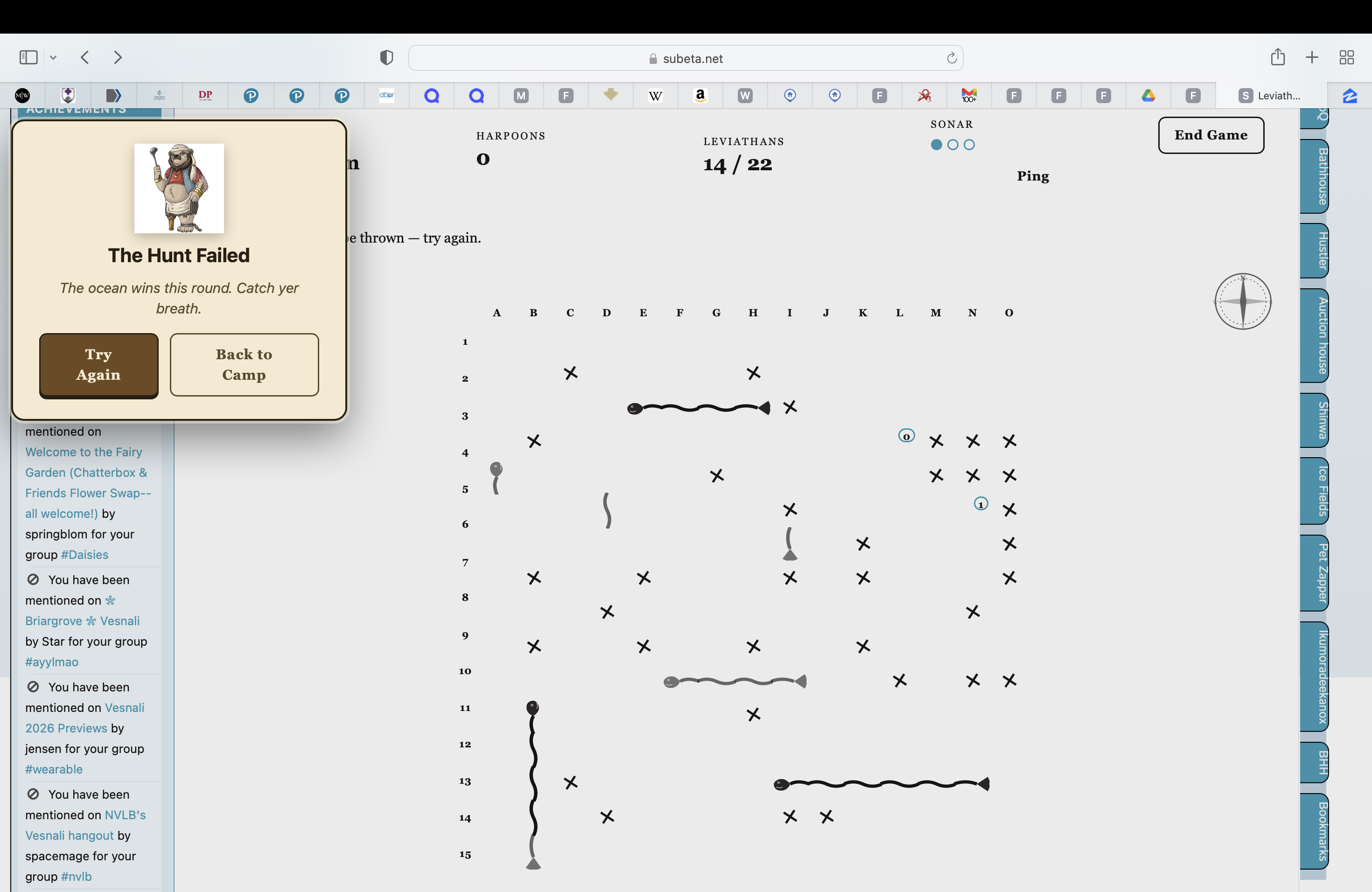 I too am having some issues figuring out what's up with the game. Sonar = can't click within those blocks any more; one of my leviathins went off the screen; and one of the leviathins was broken up into... three separate pieces?


I've been trying this game out for the past couple of days but i'm finding it unplayable.
- Can't click in ping zones.
- Leviathan body parts shift around on the board or become scrambled up after pings.
- Sometimes after making a ping a previous ping zone will shift elseware on the board.
- Bits and pieces of single square Leviathan parts scattered around making it impossible to find them all.
I don't know if it's just something on my settings (I'm using Edge) but I'm finding that I can't click on some squares if there are already squares crossed next to them. I also can't click inside the outlined 3 x3 area once I have pinged it now. I'm on Where Angrybeard Lost His Leg and the grid doesn't line up with the squares, but again perhaps my browser is at fault.
I like the new feature where we can see the locations of the creatures that we missed