Wardrobe+Avatar Problems: FIRST POST UPDATED 5/9
Filter
Show Official Posts OnlyReplies

Over the last few days I have been trying to change the outfit on my avatar with just my nude base coming up on the site after wardrobe has sited that I am wearing on subeta. I have cleared my cache and it still doesn't change on the site. I'm on an hp with windows 10. Thank you in advance for any help :D
UPDATE: user error. I'm an idiot. We will just leave it at that lol
[ToT=naynalovesmike]

I'm now getting the problem where I can't move layers around in the left hand column. I can turn item visibility on and off and add or remove items but I can't change their order.
Windows 10 - Firefox 60.0.2
I have no idea if this latest Firefox update has caused the problem for me because this is the first time I've tried to make an HA since the update.
PS: No problems at all with Chrome so it's due to Firefox
PPS: Just tried the wardrobe in Firefox again and I can move layers around now
[tot=Ciannwn]

My issue has been resolved with lots of determinated clicking and assistance from a wardrobe reset, thank you.
previously known as inconsistent

I converted some old drawers
I guess I should have backed up my data 😔 I noticed in Organize Items that items that used to be in "wigs" now had drawer "None"
I had my Wardrobe open in another window and "wigs" still had the correct items appear there. I didn't want to lose my work (a significant amount, unfortunately) so I looked at the items there, then started searching for them in Organize Items and assigning them to the wigs drawer. At some point in this process, I realized that even though the drawer said None, the items wouldn't appear if I narrowed the search to Not Sorted. But they don't appear if I limit the drawer to "wigs", either.
I opened up the wardrobe in a new tab to see how my changes were reflecting there. All the items from my old wigs drawer still show up if I look up "wigs". Items I had tried to "fix", that appear under "wigs" in organize items, ARENT visible there--but they don't show up if I search for drawer:None in wardrobe either.
To reiterate, the behavior is like there's two drawers for my wigs, the old one is named "None" in Organize Items and "wigs" in wardrobe, and the new one is named "wigs" in organize items and you can't see it in wardrobe. The same thing happened for a different drawer too (hair accessories).

just an earth bound misfit, I

In my wardrobe only, there is a broken image in the top left corner of my HA (see screenshot). I know this only a minor annoyance, but is there any way to fix it? I've tried different browsers, clearing cache, resetting HA, etc.


Adding items to wardrobe, account search says item is in wardrobe, however, when attempting to wear, item does NOT show up as "item in wardrobe".
5 separate items doing this on current HA. (Yes, cleared cache, using Firefox on an HP laptop)
Black Kite White Tank Top Black Cozy Arm Warmers Wild Aces Babe Poster Wooden Mallet Picture
NOT WORKING. Private Outfit
Oddly enough, my previous HA is still working perfectly and is showing on site as soon as I refresh. Private Outfit
Edit: Seems to be working now. Cache must've caught up with site.

The wardrobe don't show my avatar, just the last item I put in. I tried clearing the cache, and nothing. I use Opera GX browser and Win10.
I'm installing google chrome to try again.
[Dance=Biscoitaa]
Can't move layers around again. Using Firefox.
[tot=Ciannwn]

so I have an apple laptop running OS 10.7.5 (i know, ancient) that will only run Chrome, and I have a Droid phone purchased this year with the up-to-date versions of Firefox and Opera. And none of these seem to be compatible with the new wardrobe. (The platform loads, but the items don't), unless I'm missing something (which is admittedly more than possible). I can load saved outfits, and I've been making this do, but it's Morostide and I was sorta hoping I could...well, be me, and change outfits every day (at least! lol) during the festivities. Thanks in advance for your time and any suggestions! :} Happy Morostide!

I have a PC that runs Windows 10 (fully up to date) and access the site via Firefox. For the past few days, I've been unable to click and drag items I have equipped to my avatar, but they can still be added/removed and hidden with no problems.

I'm also having the issue with being unable to reorder equiped wardrobe items. Sometimes it works, other times it doesn't. Like others having this problem, i'm also using Firefox.
|

I just used the Human Zapper for the second time. The skin that I got was "Day". It showed up on my avatar until I clicked the "Remove Your Skin" button.
After removing the skin, it did not show up in my earned/active skins.
I have refreshed a number of times, but the skin still does not show up as active.
I am using Windows 10 with the latest Chrome browser.

My outfits are suddenly missing. I need to switch from Morostide to Fall outfit but that whole section is now blank. I've tried using Chrome and Firefox and closing and reopening both browsers and still no outfits. Edit: After fighting with it for a long time, refreshing, closing and reopening the browsers my outfits finally came back.
CWs for Sale or Trade https://subeta.net/user_shops.php/shop/24266
Can't move layers around again. Windows 10 and Firefox
[tot=Ciannwn]

the site doesn't seem to recognize that i own one of the items that i want to wear. when i go to the wardrobe, even though it's sorted to only show items i own, the 'dark ranger cloak' that i just purchased tonight for my new avatar doesn't have the 'item in wardrobe!' text beneath it when i preview it by hovering; instead it only has the 'search shops' button. have done all steps in the first post multiple times with no results, including purging my cache & doing a hard refresh.
EDIT;; of course it would show up literally right as i post this. thanks subeta.


Yeah, just for future reference, the wardrobe itself does have a bit of a cache on it that's on Subeta's end and not just your browser's cache. So it can sometimes take a little while for items that have been recently added to the wardrobe to show up. I know it can be a bit annoying, but it will work eventually if you just wait a bit.

My avatar does not load all the items correctly on my profile page. It's just naked. I have tried all the fixes you guys suggested, and nothing worked. I thought if I waited a few hours, it would eventually fix itself, but it's been a few days now and it's still not working properly.
Thank you.

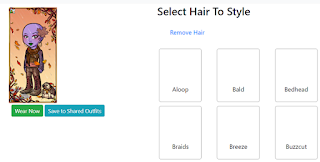
This is a new problem that just popped up today: my hair is not loading on my HA. I am wearing basic hair, not a purchased wig. I have cleared browser cache and refreshed, but none of the basic hair options even show in my wardrobe. See below.

<p>
same here I can't use any of my salon hairs and I'm hoping this gets fixed soon.

This is a new problem that just popped up today: my hair is not loading on my HA. I am wearing basic hair, not a purchased wig. I have cleared browser cache and refreshed, but none of the basic hair options even show in my wardrobe. See below.</p>
<p>
same here I can't use any of my salon hairs and I'm hoping this gets fixed soon.
I am also having this issue.
I also have an issue with a broken image icon on my top left in wardrobe as a user mentioned earlier in this thread.