☀ CW Denial / Help Thread! ☀
Replies

I have done it a few times, though with a free program before Procreate. Only my last CW was drawn at a larger resolution. I find it a bit easier just cause I am tired of having to fix how downsizing artifacts.
I should clarify I was working at 128 square for this Item’s early versions. I then resized for a item D and started working at 64 to avoid having to notice new changes when I make the final image smaller.
Thank you again!

Username --- Link to the overlay(s) --- click click
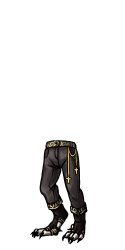
What do you need help with --- I have no idea what am I supposed to fix, the lines are wrong but I don't see where exactly
Was there a denial --- There's just a couple of spots on the overlay (like the lineart on the outer part of the leg on our left) where the lineart is a bit shaky.
Optional Can we take a look at the PSD files --- yes Can we redline --- yes
thank you in advance


I'm not 100% sure, but I think the denial is referring to the somewhat jagged long line along the HA's right thigh, and maaaybe where the toes are.

ooh okay edited that part, we'll see how it goes haha

Username --- Link to the overlay(s) --- Overlay has no issue Link to the CI --- click click

What do you need help with --- The CI I have looked at numerous bottles, vials and all sorts on subeta to draw this
Was there a denial --- Item: Issues from previous denial were not sufficiently addressed Item: Artwork does not match Subeta style, quality, or level of detail in general Notes: This item still really isn't site quality. I strongly recommend taking a look at other bottled items on site (SubetaLodge is a good place to start: https://www.subetalodge.us/list_all/mode/name/search/bottle/page/1) and really working on this, maybe just with some sketches and colors of general bottles before trying to do it as a CW.
Optional Can we take a look at the PSD files --- yes Can we redline --- yes
Two denials Username --- Link to the overlay(s) --- Overlay had no issue Link to the CI --- click click

What do you need help with --- Shading the Ci
Was there a denial --- A custom wearable item you drew, Wavy Edged Frame, submitted by Diana, was denied with the following notes: Item: Issues from previous denial were not sufficiently addressed Item: Artwork does not match Subeta style, quality, or level of detail in general Item: Flat artwork Item: Shading is too faint Item: Not enough area shaded (too much left flat and unshaded) Item: Not enough layers of shading (Subeta artwork should have 3-5 layers of shading) Notes: This still lacks the appropriate amount of shading for a Subeta-style item.
Optional Can we take a look at the PSD files --- yes Can we redline --- yes

I can't see your second one because it links to facebook.
-
I noticed that the bottle isn't symmetrical. Not sure if that's on purpose or not, but it's making the shape of it look very distorted to me. If it is a symmetrical bottle, then both sides should be the same shape and the bottom of the bottle would be either a circle or an oval depending on the angle you're going for / width of the bottle.
-
The colors you've chosen to shade with all look very similar in color except for the base shade vs the final shade. I would adjust the contrast a bit more or possibly? stop feathering / air brushing it to look smooth (not sure what technique you're using, but it looks kind of smoothed out when I zoom in), because right now unless I'm zoomed in, all I can see is base shading and one step of dark shading (and you need highlight + base + shading 1 + shading 2).
-
I cannot tell which direction the light is coming from. Some of the shading looks like it's from directly in front of the image (where we're sitting looking at it) and some of it looks top left, but I really can't tell exactly which direction you're going for.
-
Lastly the ink in the bottle being solid black with only a highlight is only adding to the flatness of this piece. I recommend shading it to add a bit more depth to the ink.
Ah sorry about that edited the second one x.x Ill look at messing with the first <3
Okay, the second one loaded!
It looks to me like the entire inside of the port hole isn't shaded? I'm not sure if you're linking the finished one, but even if it's supposed to be stylized, there should be some kind of shading on the waves / scene inside. If it's supposed to look super cartoony though, you might want to try adding more shading to make the window glass itself look shaded. The small highlights aren't really enough to portray that I don't think.
An ex of what I mean on the glass shading might be something like this; (but of course in your style x'D!!)
So you think its mostly the glass or the inside of the scene that is the issue here? I thought it was the port hole which might have been my issue XD
I think it's both the glass and what's being depicted inside but I'm also not sure what your item is, so it's hard for me to say definitively?
For example, if supposed to be like a picture frame, then maybe only the glass? But if it's supposed to be depicting what's outside of the porthole, then it's both for sure.
It is just a frame actually so Im going to try the glass and hope for the best tonight. Thank you for all your advice!
Edited the ci wanted to see your thoughts
SPOILER (click to toggle)

SPOILER (click to toggle)

SPOILER (click to toggle)

I think that's a definite improvement! It might be worth a submit again so hopefully if there is still something wrong, you can get more info on where to go next :) (Also sorry for the delayed response, I didn't actually get your ping for some reason :C)
So I decided to try a different approach on the ink ci which was the vial before. Do you think this looks ok?
SPOILER (click to toggle)

And no worries you still got back to me really fast <3
I would still probably shade the ink, instead of leaving it solid black + highlight only, but otherwise I think it looks okay, yes!
Something like this? Do I need to get rid of the highlight entirely? Or is this better since it shades as it goes
SPOILER (click to toggle)

I think that looks better, yeah! (Ps, it might help to center the item in the frame!)
I added a frosted look to the window, it had got denied again with this one
Do you think this looks any better?

Thank you again for all your help
Would you mind please letting me know what the denial was so I know what to look at? TY!
Im so sorry yes! Here it is Notes: There are still issues going on with this. Adding glare to the window definitely helps the overall look of this. However, the scene outside the window is still very, very flat. Also, you don't seem to have a singular light source going for this item. You need to pick where you want the light to come from and highlight and shade accordingly, rather than adding random highlights to create glass.