Useful Custom CSS Builder
Filter
Show Official Posts OnlyReplies

[box=#fff][box=#e5f3ff]
? Builder Version 1.4.1
- The "must edit" sections now actually need to be edited before you can add it to your generated custom CSS. Just to make sure no one accidentally tries to use my dummy code.
- Made to go with Expand Item Use menus for the best possible item using experience
- You can define specific pets as your designated Gourmand, Reader, Battler, and they will be highlighted when using an appropriate item.
- Read more about it here: ">New item Menus make it harder to mass read/boost
- Updated code, now works with stat boosters.
- Update your code!
- If you use Overhaul All Widgets, the nifty floating notepad widget can now be made to match the Luminaire, Morostide, Autumn, and even Shengui Guo site themes.
- Can now be made to match the Luminaire, Morostide, Autumn, and even Shengui Guo site themes.

the pet roles are AMAZING, tysm !!!
[edit]
hmmMMMMMMmmmm it's been a while since i've touched any coding, but this should, in theory, work, right ? https://i.gyazo.com/1f6a4b458b0739f19bf1c4217dd0a1c6.png
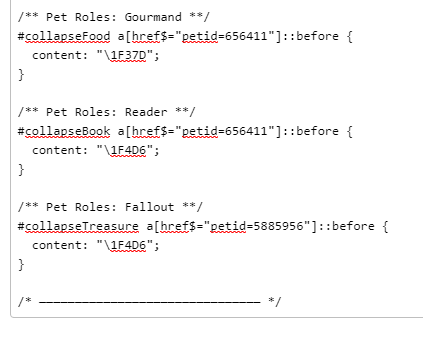
Glad you're liking it, all you have to do is change $= on the treasure section to *= and it should be good to go (the petID in those links are at the middle, rather than the end)[edit]Some options for the emoji to use on treasure :3 1F392 (?) 1F48E (?) 1F3C6 (?)
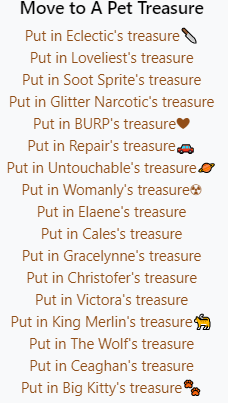
thank you SO MUCH AHHHHH i really appreciate your help! i'll probably spend the rest of morostide trying to finagle the emojis lmao - for some reason Burp shows the ❤️ emoji just fine but the purple heart emoji (1F49C) doesn't show up for Loveliest. either way, something i'll do on my own time :')
https://i.gyazo.com/0bda7ee5b519ed88aa07a48dcc346b12.png (look at how dorky it is!! i love it, it's a great lil QoL thing that i never imagined would happen sergdht)

Thank you for making this thread.
I am looking for a code thingy that I saw in the forum once that affects the shoutbox.
It made the Colours in the shoutbox almost pastel for easier reading and out the true colour beside the username.
When the shoutbox reopened recently it reverted to normal. Do you happened to have the fix for it?
Skins: Befowled, Brain Rot, Bubble Jelly, Caterkiller, Clusterflux, Creeping, Cryomorph, Deathgrip, Eau de Ceased, Escargloom, Faceworm, Flourishing, Focused, Fungus, Gummy Squirm, Hatchling, Heartburn, Ikupox, Jolly Rotter, Lotus, Magma, Moisturised, Muerte Fuerte, Naughty Nip, Paint pour, Patchwork, Pinkie Patch, Queasea, Sickura, Snack O Lantern, Stinging , Vapors, Threadful, Transmewtation, Unbothered,
You have so many icons to keep track of haha! I only use two :p
I definitely have a shoutbox muted colours code, but there are a couple custom CSS glitches they haven't fixed yet since the downtime, and I haven't used the shoutbox since it came back up either, I'll double check everything still works and get the code to you tonight!
Thank you so much for doing that for me.
I can’t get the custom css to save the changes but when I do I can’t wait to use your codes
Skins: Befowled, Brain Rot, Bubble Jelly, Caterkiller, Clusterflux, Creeping, Cryomorph, Deathgrip, Eau de Ceased, Escargloom, Faceworm, Flourishing, Focused, Fungus, Gummy Squirm, Hatchling, Heartburn, Ikupox, Jolly Rotter, Lotus, Magma, Moisturised, Muerte Fuerte, Naughty Nip, Paint pour, Patchwork, Pinkie Patch, Queasea, Sickura, Snack O Lantern, Stinging , Vapors, Threadful, Transmewtation, Unbothered,
Okay! It was a super easy fix, just had to add one line. Here's the /** shoutbox widget: overlay version **/
.shoutbox_shout {
color: !important;
position: relative;
margin: 0;
border: 0 !important;
line-height: 1.4;
margin: 5px 3px;
z-index: 0;
}
/*--submit button /
.x-js-widget-shoutbox textarea + p + .ui.icon.button {
padding: .5em;
margin-top: 5px;
}
{
margin-bottom: 5px;
}
.shoutbox_shout:first-child {
margin-top: 0;
}
textarea + p {
display: none;
}
/--transparent shout overlay, thanks Bug /
.shoutbox_shout:before {
content: "";
background-color: rgba(255, 255, 255, 0.68);
position: absolute;
right: 0;
top: 0px;
left: 0;
bottom: 0;
z-index: -3;
border-radius: 4px;
}
.shoutbox_user {
border: 1px solid rgba(0, 0, 0, .3);
border-left-width: 0;
border-top-width: 0;
font-weight: normal;
border-radius: 4px;
background: none;
top: 0;
left: 0;
color: !important;
}
.shoutbox_user a {
color: !important;
font-size: 110%;
}
/ --remove buttons */
a.small.awesome.default {
display: none;
}
.shoutbox_options {
margin-top: 0;
}
.shoutbox_options a {
color: rgba(0, 0, 0, .4) !important;
padding: 2px 0 2px 2px;
display: block;
}
.shoutbox_options a:hover {
text-decoration: none;
}
If you want to bring back a little more colour, just edit the opacity of the white overlay. Change rgba(255, 255, 255, 0.68) to something like rgba(255, 255, 255, 0.5)

Can I just say I love you?
 subeta discord server
Do things to me
[egg=pampamfannyslam]
[tp=pampamfannyslam]

How come with the adblocker I can still see user made billboards?? Thanks for any help you can give me.
[Edit] I deleted the old CSS and copied from the website the Adblock again. Worked like a charm.

Forum Art by
Signature Art by
I think billboards were broken for a while then, they changed the code, but I never changed mine, something like that? :P
Here's the /* hide user billboards */
td > img[src^="//img.subeta.net/ads"],
td > img[src^="//img.subeta.net/ads"] ~ div
Oh hey! Thanks ❤
I lied. User billboards are still there. I’ll use your code. Thanks.
[Edit] Now just the kiss user tag is there but I can live with that.
Forum Art by
Signature Art by

hi, for years I've been trying to make my own Scode pet profiles but several things make this problematic. Firstly, is there a list of ALL the Subeta specific codes to use? such as .pet_wco_info_date, etc? I've been looking everywhere!
Also how does the position: relative effect other items compared to position: absolute? I change one thing and other items swing half off the page! The only way I have of learning is reading copious quantities of profiles and even then it's confusing as some use one term for something, and another uses something completely different. As a non general coder, it does my head in.
Lastly... this general css you have, is it used in your profile to affect how you experience the site?
Thanks for any help!
[flower=Dracona]
[img align=right]https://media.tenor.com/images/54bd2e6450371a66f5ba295081c6bbac/tenor.gif[/img]
and I dance dance dance,
I dance dance dance
My Wishlistmy CWs[/font]
There's no list, but the best way to get in there and see EVERY single element of the page is to use your browser's Dev Tools feature, use inspect element. This lets you hover around the page and see how it's been put together.
Most of my code is for the general site (gets put here), and doesn't get applied to user or pet profiles.

Thank you so much for this!! There is so much useful coding. -
I'm actually having trouble with your mobile navigation menu CSS. Maybe my browser or phone isn't supported (DuckDuckGo, Android Note 9), but it doesn't work at all.
When I preview your live example, it shows as me accessing via desktop despite me actually accessing via mobile (shows blue buttons instead of green). Is there anything that can be done?
Hey! Thanks for checking it out :D
Could you check if this test turns orange when you tap on it? (hopefully it does) If not, there is a different way to do it, that's supported in more browsers.
Out of curiosity, what version of the DDG app do you have installed?
Unfortunately it does not turn orange. It stays the exact same color. ;;'
My version of DDG is 5.64.0 zr (56400). It should be the latest version, as I just checked and it was updated about 23 hours ago.
Also, I just wanted to say thank you again for trying to help me out with this!! I appreciate it sm.
Okay, in that case, we need three bits of information from this site. Let me know the "media (device-width)", media (device-height)", and "CSS pixel-ratio".
Hope I got everything you need here! I can take a screenshot too if needed. ^^ media device-width = 412px+ media device-height = 800px+ CSS pixel-ratio = 3.5
Alrighty, let me know which boxes turn orange this time, hopefully the browser supports some of these.