Wardrobe!
Filter
Show Official Posts OnlyReplies

it looks like this: http://puu.sh/kpYvB/2e06cf240f.png

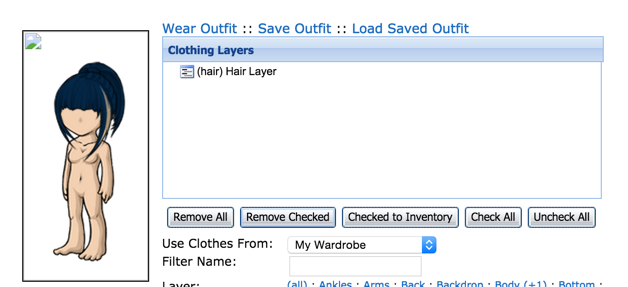
but then i removed all my clothes so i could check if it worked: http://puu.sh/kpYzh/8575f4027a.png

and in the other wardrobes: http://puu.sh/kpYAQ/d425590579.png image broken http://puu.sh/kpYC6/b34a3d6a38.png this beautiful mass of warnings http://puu.sh/kpYDG/f787de1910.png aaaand whenever i change eyes/skin on the beta, i keep getting the black thing all over my ha


i don't think this is the issue for me; the avatar section hasn't been working in forever to me now =n= and the beta wardrobe won't let me change anything

good lord well this one is going to happen now since you clicked save in v3
try resetting all your features? the black overlay happened to me too when i first tried v3 months ago. let me see if i can find the link

I'm at a complete loss. or I should say "lost"
[Center]well, it's been a slice. I'm outta here. I'm done here and I need to move on to other things. I've grown weary of forum bullies and just don't have the energy for them anymore. I am praying for my friends here, as well as the bullies... everyone needs prayer...
As for my friends, I love you immensely and you are always in my heart and in my soul. God bless each of you and I pray He blesses each of you greatly.
[/center]
no, cuz this was like that before i even used V3! i even filled a ticket telling staff about it. and then staff reseted my HA and it looked ugly. so when i tried to change it using the beta wardrobe, i got this black thing :I

I got to move my eyes and mouth to the back and it looks fine in the V3 wardrobe, but on the website my avatar still looks like it's with double eyes and double mouth. Other than that it seems good.
Navigation wise among the items I still prefer V2.
[Center]Moose's Wishlist [/center]

Go to the hair page and remove your hair, that should resolve your problem :)
💖 ✨ 🤗
Thank you for your reply, but that didn't solve my issue. What really worked was 's suggestion. I first had to reset my HA and then use v3 wardrobe. :)

It worked. saved my life xD I resetted my HA on the link and used the v3 wardrobe.
too bad I'm not being able to hide the base features on the Beta one
why don't you just remove the features on v3, save and then use the beta just for clothing?
@ Sonatine I can't remove them on the v3 one, there's no option to do that. You can only layer them behind the Base and that just won't work. I managed to find eyes and eyebrows that layer exactly behind my Delish Ser Eyedrops. Yessssss
but the fucking outfit won't save
ohman, that really sucks :I i just hope they fix the wardrobe so we won't have to have 3 of them XD

I'm still using v1 until I can't no more. The only time I might use v2 or v3 would be to put a background behind my HA. It still doesn't sort correctly. I do all my changes in newest items.

Forum Art by
Signature Art by

It's nice being able to layer them, but I'd bring back the no-eyes (and no-mouth, and no-nose) option just for ease of use. If you're flipping back and forth between options to decide what looks good, it's way more annoying now. Say you're trying to decide between default eyes 1, 2, or no-eyes: now you have to re-layer each time and it's more awkward than it needs to be, when it could just be a simple button press.
It would also be nice if the checkbox to hide items also worked for facial features and salon hair, because right now it's completely useless for those.


one thing greatly concerns me and I'm hoping you can help here - the item removal from the wardrobe. The one in Beta is really terrible. It takes forever to load and I've had a heck of a time trying to remove anything from it. I've always just used the original one for this purpose because it worked nicely. Would you please let me know, and others know, too, how this will work once the classic wardrobe is taken down? I don't want to have to face the Beta wardrobe for that lol! It's really user UNfriendly XD
Though I agree with the others, the layout and functioning/feel of the beta was lovely. Hopefully it can be very similar the newest version (though I do understand it's nowhere near finalized the layout in the newest one) ! :) Thanks for trying to make it fast and easy to use though.

ok i've tried biting the bullet on this but seriously it's getting out of hand
you took away the option to change features in v1, so i started using v2 just to adjust features (even though things like cleavage, mouth, and nose weren't available). you bring back v3 the other day and tell everyone there is finally a place to change features that you can't adjust in v2! so i change a few things and press save avatar.
well, that broke wardrobe v1 for me. there is a broken image box in my avatar preview, the default eyes i am currently wearing aren't showing up, and i no longer have a nose. click thats annoying but ok fine, guess i'll finally have to conquer v2. first thing i try to do is change my eyes in v2. but nope! now that i've saved in v3, i cant adjust them in v2. but ok i can get past that. so i create an outfit. i go to outfits to try and save mine in one of my slots and after i press save, nothing happens.
SO, now i can't use v1, i cant adjust my features in anything but v3 (and btw, layering eyes behind the base in v3 is great but it doesnt carry over to other wardrobes), and i cant even save a new avatar!
i want to enjoy this site. i really do. but its getting more and more difficult to do so by the day

SO, now i can&;t use v1, i cant adjust my features in anything but v3 (and btw, layering eyes behind the base in v3 is great but it doesnt carry over to other wardrobes), and i cant even save a new avatar!</p>
<p>i want to enjoy this site. i really do. but its getting more and more difficult to do so by the day
this i dislike the item sorting in v2, and v3 appears to (so far) be poorly laid out for my screen resolution in the same way that v2 is (too long, too wide, can't preview stuff at the bottom of the page as a result of my 1024x768 resolution) so i guess i'll just keep using v1 for as long as physically possible :c

~I have specifically not messed with V3 Alpha because of what people have been saying about being unable to remove items, or save in V2. I have to agree with what I am reading. Please bring back the no eyes, no nose options, it is just simpler.
We are the ones who remember, the ones who see what was, and is, and will be.
Me~

I wasn't going to bother but I just spent a few hours playing with the alpha wardrobe and I have to admit it works pretty great on a general level, I did not mess with saving things however.
I fiddled for ages with just making avatars with items I did and did not own with ease and little problems
-
The search worked well.
-
The base changes always worked instantly and never messed me around.
-
Layout worked fine for me on my 19:10 res. I did miss the buttons as opposed to the drop down menu for layer
-
You can definitely REMOVE items but there is a very specific spot on the X you need to click which is annoying but not hard.
-
Asking it to hide CW items made it break a little with no items showing up at all
-
When theres not many(or any) pages it adds minus pages "-1, -2 " etc which is annoying
-
Un-ticking the eyes/mouth/nose boxes doesn't turn them off so I just put them behind the base for now.. but they don't seem to stay there when saved?
I might go play with the hair layer and saving etc next but I really thought for an alpha, the wardrobe is kick ass.