Subeta CSS Compendium
Replies
Mar 12, 2012
14 years ago
Callistrea
is lonely

Hm I think I get what you mean, I just do not know if I am able to do that. XD I am new to that. >_< I have to think about this, maybe I'll do this, thank you! =D
If anyone else has an idea or something I'd really appreciate that too! c:
[[ : Wishlist | | | ]]
Mar 13, 2012
14 years ago
GAMECUBE
is a Time Lord

Dx I was afraid it might be that bad. I've looked over it so many times but I just don't see what it is. Though I will wait for because she's like, amazing at this >_< Thanks :)
[IMG]http://i1086.photobucket.com/albums/j452/lionlizzy/th_ad6bcb0b.gif[/IMG]
❤️❤️
❤️❤️
Mar 17, 2012
14 years ago
Hongske
is lost in space

: I use margins instead of paddings to keep it from jumping. Just add some to your content boxes. :3
: Huh, that's strange... Sounds to me like it IS probably an issue on your side. Can't be custom CSS, since that's disabled when viewing a pet profile. Do you have an add-blocker?
: You need to remove the "h1" from the display-none list. Pet-name is a h1, so you're basically hiding it there. :P Also, you can't resize the pet-image in the layout, because it's a background-image, unless you use the CSS3 background-size property. That's still experimental, though, so it doesn't work in all browsers.
: It's because you gave a set size, that means that the other box can't move out of it unless you use position:fixed. What you CAN do to fix this, is to make a new div in which you put the main content (the description stuff) and use that instead of . That way, pet_desc is untouched and you can move the secondary box out of it to be displayed beneath the stats. :]
Mar 17, 2012
14 years ago
zwitter
has 40 pets and counting

Assbutt
How would I do that?
And also a friend helped me out with getting the links to work but the text gets cut off and there's no scroll bar when you click the first link at the top.
I really appreciate all the help ^-^ This pet means a lot to me.
profile
code
 {position:absolute; left: 605px; top:180px; width: 300px; height: 300px;overflow:hidden;}
 div {width: 300px height: 300px; overflow: auto}
 {position:absolute;top:0px;left:200px; width: 400px; height: 300px;}
 {position:absolute; top:600px;left:0px;width: 400px; height: 300px;}
 {position:absolute;top:1200px;left:0px; width: 400px; height: 300px;}
 {position:absolute;top:1800px;left:0px; width: 400px; height: 300px;}
 {position:absolute;top:2600px;left:0px; width: 400px; height: 300px;}
body, html, div {color:; font-size: 15px; font-family: helvetica} a:link,a:active,a:visited{color:;} </style>
Lorem ipsum dolor sit amet, clita dolorem est ut, per id placerat iracundia forensibus, nostro adversarium per ea. No sed probo eripuit, harum nostrud euripidis ad usu. Eos denique erroribus ad, rebum laoreet percipit at est, dolore veritus at eam. Te ius periculis scriptorem, nominavi convenire neglegentur pri eu.
Nec tantas placerat no. Duo enim munere ei. Eu sit audire maiestatis, alienum deserunt id vix. Consetetur instructior at sea.
Sint vocent timeam no mei, voluptua repudiare mel te. Ea mea nobis definitiones. Iisque gloriatur honestatis est ut. Cum no simul mentitum, vim tale iisque voluptua ne. Graeco veritus detracto id sed, vel posse iusto consetetur cu, inani oblique ad ius.
Vide viderer legendos ei sea. Volutpat ullamcorper ex pro. Cum no elit libris minimum, ex esse delectus nam. Exerci voluptatum disputationi id sed, dico inani an eam, malis luptatum vivendum eu mel. Vidisse civibus vix at, cu ipsum partiendo per.
Te omittantur ullamcorper duo, ex mea tota maiorum urbanitas. Has an libris bonorum consequuntur. Illum mundi vix eu. Usu nobis copiosae similique at. Ea mea libris minimum, rebum nemore causae an vel, ei sed partem signiferumque necessitatibus. Eu mel eros nemore nusquam.
Silver
Shuna
Mojo
Experiment pet hoarder! 18/50 owned, have an unwanted experiment pet? check out Grendaline for what ones I need!
<3 <3
<3 <3
Mar 17, 2012
14 years ago
Hongske
is lost in space
: I just add a margin-top attribute. :]
As for the scrollbar, it's because of inner-paddings and such: You can't see the scrollbar, but it's there. Just make the inner-divs less wide (like, 300px instead of 400px or so). ;]
Mar 17, 2012
14 years ago
zwitter
has 40 pets and counting
Assbutt
I added the margin-top and it still jumps, do I have to add a px amount to it? And I made the div smaller now there's a scroll box in a scroll box. O.o
Experiment pet hoarder! 18/50 owned, have an unwanted experiment pet? check out Grendaline for what ones I need!
<3 <3
<3 <3
Mar 17, 2012
14 years ago
Hongske
is lost in space
: Yes, a px amount. And that's the wrong div, I was talking about your inner divs, the one inside the container box. :3
: You're welcome! Feel free to contact me if you run into anymore coding-issues. :]
Mar 17, 2012
14 years ago
zwitter
has 40 pets and counting
Assbutt
Which one is the inner div, I'm confused. >_< Also it still jumps.
Experiment pet hoarder! 18/50 owned, have an unwanted experiment pet? check out Grendaline for what ones I need!
<3 <3
<3 <3
Mar 18, 2012
14 years ago
Hongske
is lost in space
: Inner divs are those with the names you gave. So that'd be Suvi, Silver, Shuna & Mojo. :]
Mar 18, 2012
14 years ago
zwitter
has 40 pets and counting
Assbutt
Aaah ok.
That fixed it. :)
Experiment pet hoarder! 18/50 owned, have an unwanted experiment pet? check out Grendaline for what ones I need!
<3 <3
<3 <3
Mar 18, 2012
14 years ago
Ezekiel_161
is a skilled hooker

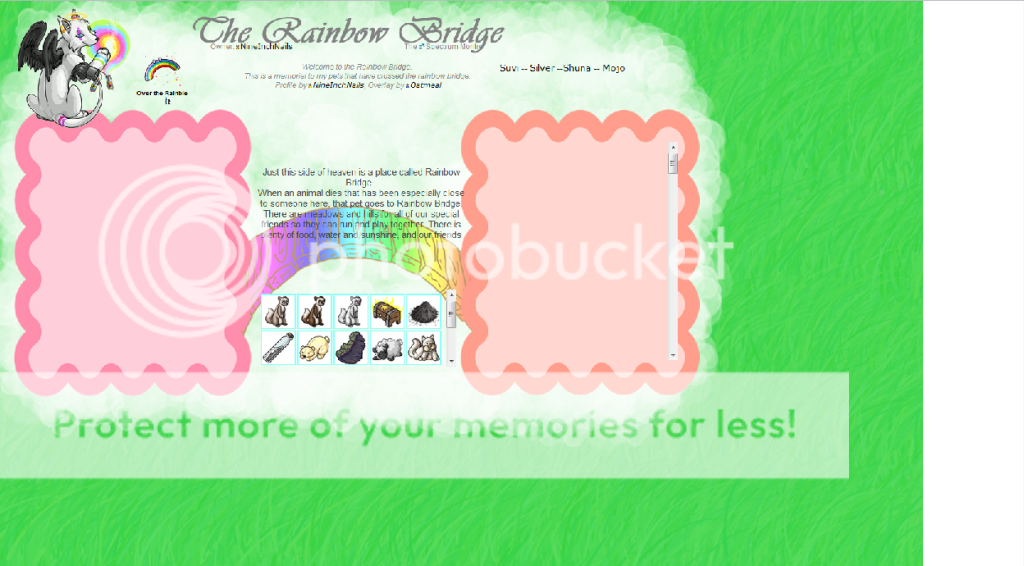
I just thought you might like to know that your background doesn't stretch all the way on higher resolution screens. I took a screenshot for you. You might want to try repeating your background? Or making it larger, I suppose. My screen is pretty huge xD It could also explain why my page jumps whenever I click on your anchor links...
Mar 18, 2012
14 years ago
zwitter
has 40 pets and counting
Assbutt
Wow you have a huge screen that's 2000px wide XD And I'm still having issues trying to figure out the jumping problem. Sorry -_-;
Experiment pet hoarder! 18/50 owned, have an unwanted experiment pet? check out Grendaline for what ones I need!
<3 <3
<3 <3
Mar 18, 2012
14 years ago
Ezekiel_161
is a skilled hooker
Yeeeah. I live in a campus apartment, which means I'm limited on space so my tv is also my monitor xD
Mar 18, 2012
14 years ago
GAMECUBE
is a Time Lord
Ohh, lol xD I missed that, thank you!
Ah :/ Oh well, the user was happy with it, I'll just remember for next time!
VampireBloods profile works properly now :D Thank you and for your help! C:
[edit]
What would I use to select the Story and Art buttons to make the cursor go to a pointer when on them? I think it's #????:hover {cursor: pointer;} but I don't know what I'm putting in after the #.
[IMG]http://i1086.photobucket.com/albums/j452/lionlizzy/th_ad6bcb0b.gif[/IMG]
❤️❤️
❤️❤️
Mar 18, 2012
14 years ago
zwitter
has 40 pets and counting
Assbutt
Ah. I'm fixing it right now so that it repeats.
Experiment pet hoarder! 18/50 owned, have an unwanted experiment pet? check out Grendaline for what ones I need!
<3 <3
<3 <3
Mar 18, 2012
14 years ago
Ezekiel_161
is a skilled hooker
You fixed the background. Looks nice (: As does the scroll bar graphic you're putting in.
Mar 18, 2012
14 years ago
zwitter
has 40 pets and counting
Assbutt
Thanks :)
Experiment pet hoarder! 18/50 owned, have an unwanted experiment pet? check out Grendaline for what ones I need!
<3 <3
<3 <3
Mar 19, 2012
14 years ago
Hongske
is lost in space
: Glad to hear that! :3 As for the jumping, I don't have any other tips other than messing around with the margin or maybe padding.
, maybe you can help? I know you have more experience with fixing the jumps.
: That'd be the buttons itself, or rather the links. So if the link has an id, use the id. :] (and if you use the id, then you can leave out the hover part).
Please log in to reply to this topic.