Subeta CSS Compendium
Replies
Mar 3, 2012
14 years ago
GAMECUBE
is a Time Lord

I found where you mean, thanks xD I didn't scroll down that far.
Would I be able to make the text of the links larger so it covered the area? I'm not sure if it'd work.
thank you! I'm glad that the clicky bit works now xD I think might be able to help with the links.
Inside the divs, does sCode not work? Cause it's all changed to something scary looking lol :P I should be able to work it out if sCode won't work but I thought I'd ask before I go to learn this.
[IMG]http://i1086.photobucket.com/albums/j452/lionlizzy/th_ad6bcb0b.gif[/IMG]
❤️❤️
❤️❤️
Mar 6, 2012
14 years ago
zwitter
has 40 pets and counting

Assbutt
I lost my coding with my anchor links, and I forgot how to do them. I've tried for like 2 hours and this is all I could figure out.
code
--Silver
--Shunamore text
Blah
blah
more Text
MainAnd here's how it looks. What did I do wrong and or what am I missing? It's driving me crazy. >___<
Experiment pet hoarder! 18/50 owned, have an unwanted experiment pet? check out Grendaline for what ones I need!
<3 <3
<3 <3
Mar 9, 2012
14 years ago
Squid
is drunk in love

Pacifist
Soooo is anyone else having a problem with there suddenly being a large chunk at the top of the page where the background of your Subeta layout shows up?
Or is that just me? Should I screencap it?
bird and bear and hare and fish give my love her fondest wish
Mar 10, 2012
14 years ago
Hongske
is lost in space

First of all, my apologies to everybody for taking so long to reply! I've been busy with homework (and the event, when the site was online). Anyway, here are some answers:
:
To make them larger, you can simply use the images instead of the text, like in this
: It's because you positioned everything over each other, so there's no jumping around. You should take out the positioning properties of the Suvi, Silver, Shuna & Mojo divs. Also, remove the overflow property from the afforementioned, they're not needed. Only container or main should have that, to hide the other sections. Hope that helps!
: I don't have that problem, even with my CustomCSS turned off. A screenshot would be handy, yes. :]
Mar 10, 2012
14 years ago
Squid
is drunk in love
Pacifist

bird and bear and hare and fish give my love her fondest wish
Mar 10, 2012
14 years ago
GAMECUBE
is a Time Lord
It's okay, I've been ages on my replies too. Doesn't help with the site being down :/
This is making the links larger, right? Sorry, I'm a bit slow when I'm tired. I'll try this tomorrow when I'm more awake.
I mean, the sCode in the actual code isn't sCode anymore. It's like this Thank you for all your help by the way :3
code
Overlay by
 Objection
Human form line drawing by  phobia
Human form (holding pumpkin) by rikee
ect...
which looks ever so slightly scary lol but I don't mind going through and changing it as it needs to be re-written anyway. Just glad sCode works lol
[IMG]http://i1086.photobucket.com/albums/j452/lionlizzy/th_ad6bcb0b.gif[/IMG]
❤️❤️
Mar 10, 2012
14 years ago
zwitter
has 40 pets and counting
Assbutt
No problem, life can get busy.
I removed what you said and it's still messed up.
Experiment pet hoarder! 18/50 owned, have an unwanted experiment pet? check out Grendaline for what ones I need!
<3 <3
<3 <3
Mar 10, 2012
14 years ago
Hongske
is lost in space
: Bizarre... Did you try refreshing after removing the free shop notice?
: Kind of, you're not actually making the links larger, simply substituting the text for an image. So you could cut up your three link-images into separate images and then use those instead of text. Because the image is larger, the link becomes larger as well.
Ah, that! No, that's normal. Subeta automatically changes sCode into HTML. sCode is actually BBcode, or whatever you want to call it, which is used in forums. The code behind the forum then changes the sCode/BBcode into HTML so that you browser can parse and display it.
With other words, you don't have to clean that. xD
(also, you're very welcome!)
: What's the complete code you're currently using?
Mar 10, 2012
14 years ago
zwitter
has 40 pets and counting
Assbutt
I got the links to work, I just can't remember the padding code to keep it from jumping when a link is clicked.
Experiment pet hoarder! 18/50 owned, have an unwanted experiment pet? check out Grendaline for what ones I need!
<3 <3
<3 <3
Mar 10, 2012
14 years ago
Squid
is drunk in love
Pacifist
It's been there since before the free shop thing.
(Also I like using that link because I am lazy and the free shop is always one click away xD)
bird and bear and hare and fish give my love her fondest wish
Mar 11, 2012
14 years ago
GAMECUBE
is a Time Lord
I'm trying to finish this simple profile first cause it's for someone else, but I can't get the pet name to show up! Here's the profile so far. Also, this isn't too important but is there a code to make the pet image a bit smaller so it fits in the box properly? I made the box the right size but forgot to allow room for the rounded corners :x
[IMG]http://i1086.photobucket.com/albums/j452/lionlizzy/th_ad6bcb0b.gif[/IMG]
❤️❤️
❤️❤️
Mar 11, 2012
14 years ago
Squid
is drunk in love
Pacifist
You could remove the image and place it with a new one. You could round the corners in the new image with PS or something.
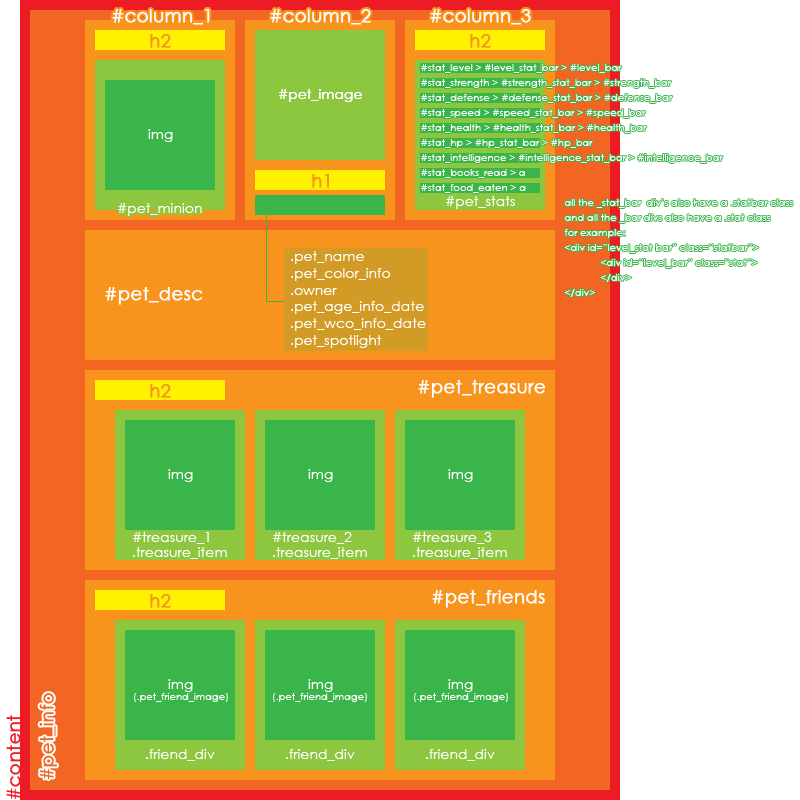
I don't have your code, and I'm too dumb to figure out how to get it but here is my favorite tool from Hongske. You need hashtag pet_desc and .pet_name
bird and bear and hare and fish give my love her fondest wish
Mar 11, 2012
14 years ago
Callistrea
is lonely

Hello there, I have some difficulties. :c
I created two textareas on my pet profile pages. I wanted them to be under the minion and the battle stats, so I used the position: fixed. I have a screen resolution large enough so that I do not have to scroll, a friend of mine told me today that the boxes would stay on the place I gave them, no matter how much you have to scroll. I didn't know that. >_<
But now I tried to gave them the attributes absolute or static and so on, but nothing worked. The boxes appear in the pet_desk (or was it content?) description after changing the attributes. D= I do not want them to be there.. so what should I do?
Both my pets have a similar layout. Click here or here.
Thank you for your help and please apologize any mistakes I made with this language. >_<
[Edit]I thought I should better ping you, . I hope that's okay. =)
[[ : Wishlist | | | ]]
Mar 11, 2012
14 years ago
Squid
is drunk in love
Pacifist
First of all, the same thing happens to Rebun's pet profile when I view it, as does with Syth. Big old black thing at the top, so maybe ... It's me.
ANYWAY
Try this one, not fixed.
{position: absolute; top: 850px; left: 700px;}
Only, you know, with the top and left where you need it.
bird and bear and hare and fish give my love her fondest wish
Mar 11, 2012
14 years ago
GAMECUBE
is a Time Lord
I'm making this profile for someone else, but I've never been able to make pet names show up for some reason. It's a good idea, but I couldn't really use another image because if the user wanted to put an overlay on, they'd have to resize it anyway. Would be easier if there was code to make it smaller but not sure if there is one.
If you can see anything I've done wrong to make the pet name not show up, that'd be really useful!
code
<style>
- {margin: 0; padding: 0;} , , , , , , {display: none;} body, , {background: transparent;} .prototip {display: none;}
/Hides the following/ , {display: none;} .pet_age_info, .pet_age_info_date, .pet_wco_info_date{display: none;} h1, h2 {display: none;}
/Moves pet image/ {position: absolute; top: 122px; left: -143px; opacity: 0.7} :hover {overflow: auto; opacity: 1}
/Moves owner and colour/species info/ .owner {position: absolute; top: 97px; left: 458px; opacity: 0.7;} .owner:hover {overflow: auto; opacity: 1;} .pet_color_info {position: absolute; top: 97px; left: 102px; opacity: 0.7;} .pet_color_info:hover {overflow: auto; opacity: 1;} .pet_name {position: absolute; top: 50px; left: 200px; opacity: 0.7} .pet_name:hover {opacity: 1;}
/Moves pet spotlight/ .pet_spotlight {position: absolute; top: 550px; left: -130px; opacity: 0.7;} .pet_spotlight:hover {overflow: auto; opacity: 1;}
/Moves Minion/ {position: absolute; top: 370px; left: -130px; opacity: 0.7;} :hover {overflow: auto; opacity: 1;}
/Background/ body {background: url('http://i1086.photobucket.com/albums/j452/lionlizzy/dbt9wz-1-1-1-1-1-2-2-1-1.png') no-repeat;} body {background-color: ;}
/Description box options including hoverscrollbar, size, position/ {position:absolute; top:125px;left:97px; width:323px; height:510px; overflow:hidden; opacity: 0.7;} :hover {overflow: auto; opacity: 1;}
/TC options including hoverscrollbar, size and position/ {position:absolute; top:125px;left: 475px; width:65px; height:510px; overflow:hidden; opacity: 0.7;} :hover {overflow: auto; opacity: 1;} </style>
Thanks for helping! :)
[IMG]http://i1086.photobucket.com/albums/j452/lionlizzy/th_ad6bcb0b.gif[/IMG]
❤️❤️
❤️❤️
Mar 11, 2012
14 years ago
Callistrea
is lonely
Thank you for your answer! c: The problem is, this isn't working. Whenever I try this the textarea-box appears IN the content-box. :c You can see this on the profile page from my pet Anna Luzia.
[[ : Wishlist | | | ]]
Mar 11, 2012
14 years ago
Squid
is drunk in love
Pacifist
Tryyyyyy adding in the semi colon after your pet name tag opacity. Something that stupid is always what fucks up my code xD
First of all, I'm not a pro like Hongske, so I don't even blame you if you want to wait for her. Also, I am leaving for work in like thirty minutes, but maybe you could send me your code and I can stare at it and pretend to be able to find something that will help?
bird and bear and hare and fish give my love her fondest wish
Mar 11, 2012
14 years ago
GAMECUBE
is a Time Lord
I'm surprised I missed that, I'm normally almost OCD about putting semicolons before the brackets xD It didn't work though :/ No idea what I've done to it lol
[IMG]http://i1086.photobucket.com/albums/j452/lionlizzy/th_ad6bcb0b.gif[/IMG]
❤️❤️
❤️❤️
Mar 11, 2012
14 years ago
Callistrea
is lonely
Oh if you can help me I'd really appreciate that, but it is okay if you cannot find a solution or anything, since you have to go to work soon. c:
[Spoiler]<style>
html { background-color: ; font-family: Arial; background-image: url(http://i1034.photobucket.com/albums/a428/Impluviatus/Subeta/AnnaLuzia/background.jpg); background-repeat: repeat;}
;)
a:link, a:active, a:visited {color: ; padding: 6px; } a:hover {color: ; background-color: transparent; text-decoration: none;}
b {color: ; font-family: Arial;} i {color: ; font-family: Arial;}
h1 { background: url(http://i1034.photobucket.com/albums/a428/Impluviatus/Subeta/AnnaLuzia/name.png); font-family: Arial; color: transparent; font-size: 50px;}
;)
h2 { display: none;}
, -right, -top, -inner {display: none;} -lrc, -ban, , {display: none;} , , , div#footer, , {display: none;}
{ background-image: url(http://i1034.photobucket.com/albums/a428/Impluviatus/Subeta/AnnaLuzia/overlay.png);}
;)
img { height: 0px; width: 64px; padding-bottom: 64px; padding-top: 0px; background: url(http://i1034.photobucket.com/albums/a428/Impluviatus/Subeta/AnnaLuzia/IceMice.png) left top no-repeat;}

{ position: absolute; top: 50px; left: -100px; width: 652px; height: 750px !important; color: ; font-family: Arial; background-color: rgba(180,180,180,0.50); border: 20px solid ; z-index:-1 !important;}
{ background-color: ; overflow: auto; border: 2px solid ; position:absolute; top: 447px; left: 10px; width: 628px; height: 340px; }
{ color: ; font-family: Arial; background: transparent;}
{ color: ; font-family: Arial; background: ; border: 2px solid ; position:absolute; left: 224px;}
{ color: ; font-family: Arial; background: transparent;}
a {display: none;} , {display: none;}
{ background-color: ; position: absolute; left: 10px; top: 15px; width: 200px; height: 124px; padding-top: 30px; border: 2px solid ;}
{ background-color: ; position: absolute; left: 448px; top: 4px; width: 200px; height: 154px; border: 2px solid ;}
.statbar{display:none;}
{ border: 20px solid ; width: 283px; position: absolute; top: -20px; left: 700px;}
.treasure_item { margin-top: 5px; margin-left: 5px; }
img {
border:1px dashed;
border-color: ;
filter: alpha(opacity=50);
: progid XImageTransform.Microsoft.Alpha(opacity=50);
-moz-opacity: 0.50;
opacity:0.5;}
XImageTransform.Microsoft.Alpha(opacity=50);
-moz-opacity: 0.50;
opacity:0.5;}
img:hover {
filter: alpha(opacity=100);
filter: progidXImageTransform.Microsoft.Alpha(opacity=100);
-moz-opacity: 1.00;
opacity:1;}
{ width: 196px; height: 243px; top: 247px; left: 10px; padding: 2px; position: absolute; z-index:1 !important; background-color: ; border: 2px solid ;}
{ width: 196px; height: 243px; top: 247px; left: 557px; padding: 2px; position: fixed; z-index:1 !important; background-color: ; border: 2px solid ;}
</style>[/spoiler]
[[ : Wishlist | | | ]]
Mar 12, 2012
14 years ago
Squid
is drunk in love
Pacifist
Okay, so I stared at your code for a bit and for me, personally, what I would do with your profile is make one giant background, much like LionLizzy has done, with the borders you like, and then ... I have had a few drinks so I don't know how to explain it, and I don't know if you already know what I mean.
Make the background look how you want, then the whole thing IS your content, you know? So you can move your boxes where you need.
Make sense?
I would start over. =/ Like it sucks, but that's what I would do. Keep a copy of what you have right now. But start over, change one thing at a time. Try to figure it out from there.
Of course, for both of you, I'd wait and see if Hongske has better ideas.
bird and bear and hare and fish give my love her fondest wish
Please log in to reply to this topic.