Testers Needed: "New" Wardrobe!
Filter
Show Official Posts OnlyReplies

Just voicing what others have already said - there is no save outfits button that I can see. Also very confused why Masq started today when the wardrobe needed to be fixed first. It seems like doing both at the same time is only causing more issues.
[edit]
Cleared cache. Still no save outfit button in the outfit section for me

Ok! Things I like: -So fast! -The table of items expands to have as many columns as my window has space for. I like it. -The nul drawer works now! Thanks, I use that a lot to see my newest items. -Bouncy face is appreciated
Issues: -Wardrobe ate my HA. I and a couple other users are broken images now. I'm using Chrome. I tried clearing my cache. It's the same on my other devices. Here's the URL for my broken image: https://sapi.subeta.net/avatar/626243.png?x=1585092000 It says the encoding format is not accepted. -Disappearing the left foot disappears the torso and head -Putting on a skin that's supposed to have transparent parts (Dream Rhino, Experiments 0101, 164, 2285, etc) whites out your avie
Things I have opinions on: -I'd prefer an option to pull my right hand out from behind myself. We do have those skin sleeves, so that'll work for now, but it would be more convenient to do it in the same place as all the other body parts -Lines for fem cleavage are super dark on one side and super light on the other? Looks a little off -Maybe put the Wear and Clear buttons beneath the HA preview so people see them immediately even if they're wearing a lot of items? Maybe not for mobile, though. Mobile layout needs some work, although I feel for ya'll trying to fit all of that nicely on a phone screen... -If I go to page 3 of a drawer, then switch drawers, it loads page three of the new drawer, even if that drawer only has 1 page. I'd prefer that it go to the first page each time I change drawers.

Three things!
-When sorting from "Your items" to "All Items" and a layer isn't selected, I noticed it gave non-equippable items. Tested it by searching "spectrum" as I was looking for items specific to that, and it came up with equips and non-equips.
-When making/saving a new outfit, then attempting to "try on" the outfit does nothing. Previous outfits saved before the update seem to load and save just fine.
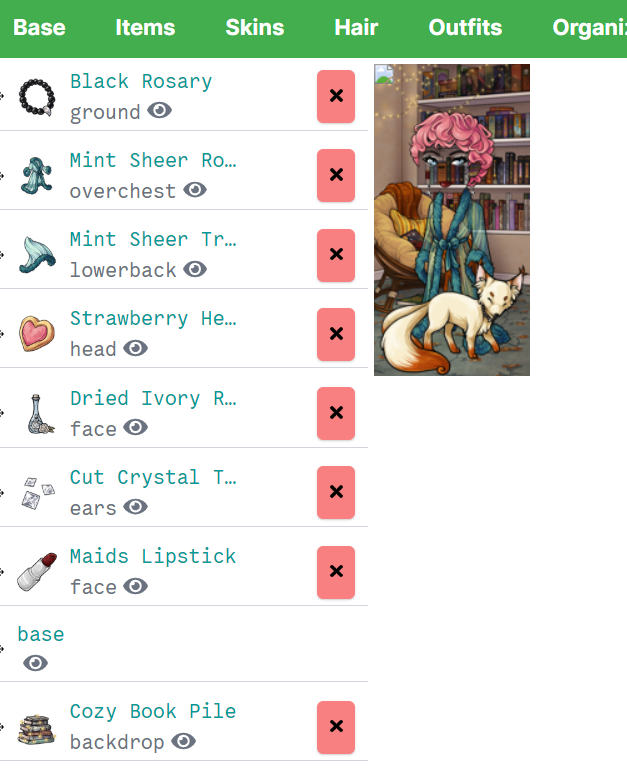
-When trying an item then deciding you no longer want it, clicking the red "x" to the right of the item name either does not remove it OR if it was moved, it shoots it back to the top of the list and then still doesn't remove it.
Otherwise loving this so far, hope this helps. |D
[Edit] Oof, forgot to mention I'm running the latest version of fire fox. o wo

Using Firefox 74.0 64 bit on a Windows 10 1099. Found a bug with left leg, not sure if its just me or if someone else has said anything yet, but if you remove your left leg the whole body (not the other removable limbs more like hips up) disappears. When removing a item it seems to jump to the top of the list, but if I click on the item picture it disappears (where it has the page numbers is where you need to click for it to disappear.) Other than that I noticed yesterday that it showed wishlist items and guess the green check boxes are items in wardrobe which I really like. So far, I like it, salon still allows me to pick a color for hair even if I can't add different strikes of color to my hair. Has what looks like finding items with similar color but haven't seen it work yet. Outfits seem to be lagging but refreshing works because I think its more likely due to Masqueraded, which seemed to work yesterday without a lag. Overall compared to Wardrobe v3, I'd give it about a 6 or 7 do to somethings needing work like limb removing (which I kinda want to try figuring out what to do with the whiteout pens now compared to before), skins didn't allow for removal which seemed weird that the switches there (which I guess might be a bug) and would love to see it work on cell phone like v3 did without it being cluttered which can wait until later.
|[egg=Amborella]|[tp=Amborella]||||

Why was the sort by name option removed??
My biggest gripe with the new wardrobe is that, you have date added to wardrobe and site, but no alphabetical. Hoping this will be added back in along by picking ascending and descending order.
 [font=book antiqua]—
<p>My biggest gripe with the new wardrobe is that, you have date added to wardrobe and site, but no alphabetical. Hoping this will be added back in along by picking ascending and descending order.
Not a big fan of how thin the base lineart is either, but that's just a personal gripe and I can live with that too
[edit] The Create New Outfit button on the Outfits page is where you save your current HA to an outfit. That's. not at all intuitive and I found it out by accident.


I'm using FireFox
Here are the following bugs that I am coming across. I have gotten frustrated and taken 2 breaks in between trying to put together a masquerade outfit.
- There is a lag with trying to load and refresh the page, right now the wardrobe will not load, it is stuck with the face saying "loading your avatar"
- I cannot delete items, I try to and they jump up to the top of the list but do not disappear
- The items I tried to delete and hid still show up on my avatar when saved
- Not all previews of items are loading in the wardrobe. When you hover over an item and a preview should appear over your avatar nothing shows up, just a blank box in the left hand corner
adds: my avatar is a mess right now. That black dress should not be there, I deleted it but it still shows up on top of everything...

Ok, not sure if it has been mentioned before! The only issue I'm having right now (aside from the lag and all of that) is that my current hair and color combo are not being loaded on the new wardrobe!
When I open it, I do have the original hair but not the color. If I try to open it using the outfits option, it doesn't load the hair at all!
(Keep up the good work, I know you guys are working hard to make everything be prim and proper!)

So after several hours, I've been able to finish an HA.
Most of what I came here to say has already been said; just noticing bugs here and there. I understand the lag. I know it's not all done either.
I didn't see if this was addressed or not, but when you switch from one layer to another, the page of the layer stays the same. So if I'm on page 3 of Head items and switch to Hat, I'll still be on page 3, but in Hats.
Browser: Chrome, latest version.
[edit] Okay I can't read, someone did bring this up.


I can't seem to search for items I try to delete an item, it jumps to the top of the list. I have to double click it and then it deletes My whole wardrobe isn't loading in the new one
🌹 Beloved Brother 1989-2018 (10/17 - 02/19)
Grammy 1937-2021 (11/14-10/28) 👼


I'm sure these errors have been identified already, and as much as I appreciate that using the New Wardrobe will help with the site lag, it's totally unusable.
99% of My Wardrobe is taken up by Tree Decorations, which makes it hard to find what I'm looking for. Drawers aren't working. I was trying on the new Menagerie Wearables, and now I can't for some reason. I keep toggling between All Items/My Items, but sometimes it just doesn't want to load anything at all.

How do I save an HA to my outfits? I like to make multiple HAs in one sitting, when I get inspired, and I love it, it's fun for me to create here but I don't see how to save them? Sucks that this rolls out during an event, when making HAs is even MOAR fun. I had to wear the new HA or lose it, because I couldn't figure out how to save it for later. If I am super dumb and missing something obvious please pleeease let me know anyway!

I am using google chrome Version 80.0.3987.149 (Official Build) (64-bit) and my wardrobe items wont even load... so i am unable to test it. sure hope it'll get fixed to where it'll start loading before you shut the old one down


I've got a lot of feelings about the new wardrobe as is (I've found a ton of bugs/usability issues I will write up later some time), but chief complaint for me is that the new wardrobe has entirely given up on loading for me and I can't find a way to fix it from my end. I cleared tabs, cleared my cache, tried a different browser, and restarted my computer. Nothing.
During the brief window earlier today that it DID work, I accidentally switched to an unfinished outfit that had mostly items I don't own, so now I'm stuck half naked and with no mask for the event.
I tried to switch back to the old wardrobe to at least slap a mask on, but the avatar there doesn't load and there are no longer any of the buttons that would be right below it. So while I was once able to get far enough to put on a mask in the old wardrobe, I had no way to save it because the save button no longer exists for me.
The new wardrobe, when it did function, was frustrating and about unusable for me as it was due to that long list of bugs and usability issues I need to type up when I have more time, but for the past 4 hours I have been unable to use either wardrobe at all, with the new one not getting past the cute loading smiley.
I am incredibly frustrated with what I'm experiencing on my end. :(
My regular browser is Firefox version 74.0, and I've attempted to use Google Chrome version 80.0.3987.149 and Microsoft Edge version 80.0.361.69. Edit: Forgot one, also tried both wardrobes from the firefox browser app on my samsung android phone.

My base isn't working? Using Chrome Version 80.0.3987.149 (Official Build) (64-bit) Windows 10
[img align=right]https://media.tenor.com/images/54bd2e6450371a66f5ba295081c6bbac/tenor.gif[/img]
and I dance dance dance,
I dance dance dance
My Wishlistmy CWs[/font]

I found a bug with the mass add from Shops. It can add the same item multiple times if you have more than one - IE one to feed to your pet and one to go in wardrobe.
[Kiss=Phantomhive]
Biting for: SPOILER (click to toggle)
All Strains 2009 - 16, 2020 - 26
SPOILER (click to toggle)
Ant (Sporous) 17, Love Sucks (Dry) 18, Muerte (Fortitude) 18, Fevermore (Song) 18

Feedback;
Loving most of this, just a few things of note.
-
Removing an item from your avatar is awkward right now. If it isn't at the top of the list clicking the red x will move it there and I have to scroll up and click it again to remove it. The workaround I've found so far is that if an item is hidden by clicking the eye and then I hit the red x it will be removed all the time. Not sure if that's an intended feature, but if it is please no because equipping something, moving it to the right layer in the load order and then having to do the above is not ideal and one click removal should be a thing.
-
The search seems to work only part of the time right now. I knew the dress on my current avi had 'kit' in the name, for example (blue sewing kit) and I searched kit but it just refreshed my entire wardrobe. Same thing happened when looking for the art prints, but other times when I searched (such as the color 'blue' trying to find this darned dress because I couldn't remember the full name of it) it loaded just fine.
-
Limited number of items per page. Old wardrobe had a dropdown for how many items we'd like to display per page. Please bring that back, if possible. If it's not viable for loading/lag/strain/whatever at least up it a little bit please.
-
On pages; if I'm in my say head section and I'm on page 6 and I go up to my hand section which only has 1 page it will show me a blank page and I have to click the little 1 that shows up to get it to load. If I go from head page 6 to chest, which has like 8 pages, it will start on page 6 instead of on page 1. Again not sure if this is intended, but please no.
-
Sorting options are not being kept from load to load, unlike in the last wardrobe. Every time I go in I have to tell it to sort by added to wardrobe vs added to site, for example, whereas in the old wardrobe it stayed added to wardrobe once I selected that option. Please make this a thing again.
-
When I exit the wardrobe it loads a new tab for Subeta as a whole. I'm not sure why the previous wardrobe did this or why the new one does it; if I hit 'exit to Subeta' I want to leave the wardrobe, not have it open a new tab and have to close the wardrobe tab.

Feedback
1, add a scroll bar for the items on the avatar for easy previewing and comparing item on the avatar and item in the inventory.
2,  here are two things notable here, one is the overflowing Lang styles, second is one cannot tell which page they are on if they are using 'previous' and 'next' instead of clicking pages.