Wardrobe+Avatar Problems: FIRST POST UPDATED 5/9
Filter
Show Official Posts OnlyReplies

I looked into your problem and it looks like you don't own those items and they're not in your account (if you account search)
Make sure you own the items you are trying to wear and they are in your wardrobe! After obtaining the items and putting them in your wardrobe, you may need to click "Wear Now" in the wardrobe to force the image to update.
🐝 ☕ bug (he/him) | your friendly neighborhood code wrangler. stay in the loop! join and check out the latest admin post highlights
Well this is just weird. I just bought a Suave Smokin Fedora from a user shop and used the "Add to Wardrobe" button to stick it in there. I went to my wardrobe and it was there. Put it on my head, clicked "Wear Now" and I am seeing it show up immediately.
So... I'm really not sure how to proceed with this. I double-checked all 3 places in the code too (quick stock, move from inventory, move from button) and they all have the same cache clearing code.
[edit] Look how suave I look now.
🐝 ☕ bug (he/him) | your friendly neighborhood code wrangler. stay in the loop! join and check out the latest admin post highlights

@ Bug haaahaaaaaaaaa you is a smoooooth criminaaaaal busts a move
ok on a more serious note, let me try something else, i will buy the same item as you, do the same thing, and i will also buy a newer item from the menagerie again, wear it too, see if there is any difference, brb!
[edit] Ok so bought the hat from user shop, added directly, it showed up right away in the Wardrobe, it also showed up right away on my HA. Went to Menagerie, bought Rift Queen Traffic Cone and added directly, did not show up in Wardrobe, had to leave wardrobe, come back, search for it by name for it to say I own it, HOWEVERRRR when I put it on, it did show up immediately this time... I am a bit at loss hahaha. It has a mind of its own (my theory was that maybe it was just for recent/newish items, but truly IDK what's going on anymore T_T)
Well on the bright side, we both look very suave and smokin now
🐝 ☕ bug (he/him) | your friendly neighborhood code wrangler. stay in the loop! join and check out the latest admin post highlights
All right so... I tested quick stock.
- Bought a couple new items, including this snazzy feline mask CW
- Quick stocked them into wardrobe
- Items showed up immediately in wardrobe's item search
- I stuck the feline mask CW behind my HA, clicked "Wear Now" and I'm seeing the image has updated immediately
I am also at a loss lol, this is just bizarre. If it happens again, let me know? And just describe with as much detail as possible what you did, like the exact method of putting it into the wardrobe, etc. The only thing I can keep is that maybe it only happens under a VERY specific set of circumstances so we have to try and pinpoint that?
[edit] Hm, I do notice that while the items show up with "Only show items you own" checked, and show up on my avatar, the wardrobe still shows them with the "Search Shops" button as if I don't have them.
🐝 ☕ bug (he/him) | your friendly neighborhood code wrangler. stay in the loop! join and check out the latest admin post highlights

I just switch mask on HA in wardrobe it shows my HA is wearing the mask. But outside of wardrobe it’s not showing even though I got message wearing on subeta. Plus it won’t allow me to dance now and mask doesn’t show in my wardrobe!
What mask item is it?
[edit] If you're referring to the Amethyst Mask, that's because you don't own the item. Please make sure you own the item and that it's in your wardrobe.
In the future, please read the first post before posting! I ask that you read it even if you've read it in the past, because it does get updated regularly. It has important information on what to check and what information to include in your report.
Please try the following steps in order:</p>
<ol>
<li>Account search the item to confirm that it is in your wardrobe.</li>
<li>Go into your wardrobe and click "Wear Now" (this will force the image to update.)</li>
<li>Clear your browser cache and hard refresh your avatar image.
If it is still not showing up, please post here. Verify that you have tried the steps above, and specify exactly which items are not showing up.
🐝 ☕ bug (he/him) | your friendly neighborhood code wrangler. stay in the loop! join and check out the latest admin post highlights
thanks I thought it was in my wardrobe. Definitely plan on using show items owned only option permanently

The wardrobe suddenly doesn't seem to want to load. I get my list of items worn. Then blank space where the preview should be. Then on the right, I get the wardrobe text information. If I click on Items, base, etc, nothing happens. I was able to make a new HA this morning.
wardrobe
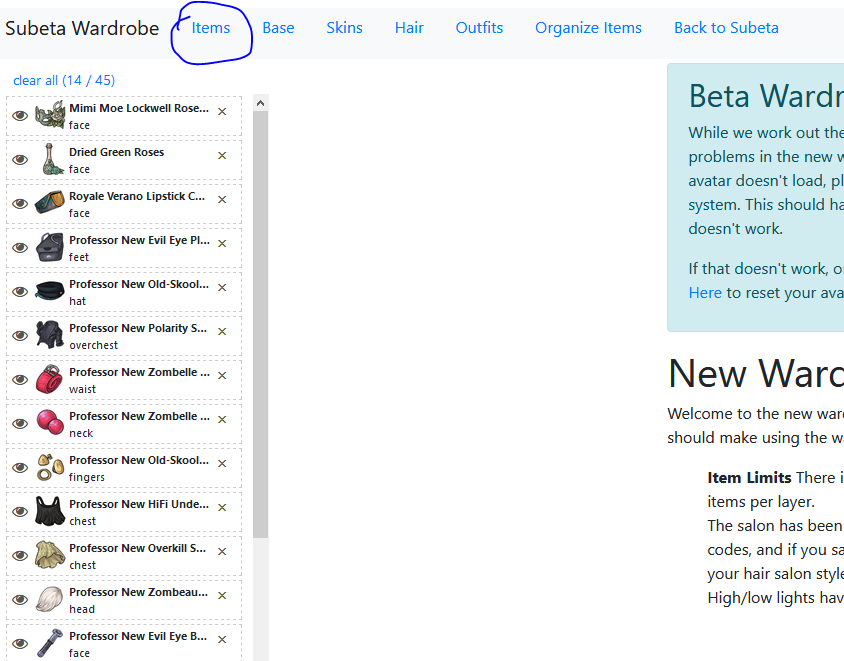
I tried to go in the V.4 wardrobe and it loaded, but as soon as I clicked an item to put in on my HA, everything disappeared and I had a totally blank page.
Well, literally, the moment I posted this the blue bar across the top of the site showed up. Guess its site wide and not just me.
In loving memory of Need posting achievements?Then join Posting Frenzy Achievement Items - searchable list List of Borders and cutouts New at Fresh and Flavorful Ping Group

This should be resolved now!! I was pushing a super awesome feature for the new V4 wardrobe and it broke the current wardrobe ? I pushed out a fix!
💖 ✨ 🤗
Thanks! :D
In loving memory of Need posting achievements?Then join Posting Frenzy Achievement Items - searchable list List of Borders and cutouts New at Fresh and Flavorful Ping Group

I'm having problems making any HA appear on site, and any new outfits I make also have broken images. I have attempted to wear previously saved outfits (whose outfit images DO work in the wardrobe), and they don't show up on site either. I cannot get any HAs to load currently, and I tried clearing my cache. The problem is with every outfit I try, but a current link of one is: https://sapi.subeta.net/avatar/697388.png?x=1554519259

Demiboy (He/They) ALWAYS LOOKING FOR: | or similar | any magpie-looking wings | Cool Ears

I am also experiencing the same issue as Crow. I can view all of my outfits in wardrobe, but my avatar is not showing on my screen. My friend mentioned it's a broken image during our Masquerade dance too.


[edit]
blep, nevermind. being an aries. the wardrobe just takes a little time to update thats all!
update! My HA is showing up fine now! I have no idea if this means it was just taking time or someone fixed it, but either way I no longer have a bug
Demiboy (He/They) ALWAYS LOOKING FOR: | or similar | any magpie-looking wings | Cool Ears

I am having the same problem is having. Most previously saved outfits don't show up on site when I change them and even when I switch back to the one I was wearing, it isn't showing up either. Showing lot's of broken images.
It looks like some of 's recent work on wardrobe v4 has inadvertently broken features in the current wardrobe. He's been made aware of the issue, and we'll be back with an update (and fix) as soon as we can. Since it's the weekend, it may be a day or two before he's able to hop online and take a look.
[edit] It's been looked at, and we think it may have just been a cache issue! avatars should be good to go now :)
🐝 ☕ bug (he/him) | your friendly neighborhood code wrangler. stay in the loop! join and check out the latest admin post highlights
Are you still experiencing avatar problems?
🐝 ☕ bug (he/him) | your friendly neighborhood code wrangler. stay in the loop! join and check out the latest admin post highlights