The saga of Bug vs. the Wardrobe
Filter
Show Official Posts OnlyReplies

<p>Originally I was thinking, start at 30 and then raise it if we can, like we did with the shop limits. But actually you guys are right. That doesn&;t make sense, because then people have to delete and then remake drawers... So now I think it&;s better if we start a bit higher, and then lower it if necessary. It&;s my bad for not thinking that through better before making the announcement.</p>
<p>I&;m thinking that I can revise it to 50, with the caveat that it&;s subject to decrease should we feel the need. (Of course, any adjustment will also be announced with ample time and warning.) All in favor, vote aye?
 ❤
❤🎉 | | | 🎉

I had 30+ and managed to reduce my drawers down to 25 D: (that said super happy about the new limit and ♥ to for all the hard work he's put in)
edit: is there a reason drawer names have suddenly been limited to 15 characters now? with the drawer limit being upped i was going to put my Skull Candle and Deceased Partner items into separate drawers again, and whereas before I had a drawer name of 'Deceased Partner' it's now too long - even though just two days ago I made a drawer 'Skull Candle & Deceased Partner' as well as a longer one of 'Gizmo, Grand Waltz, Vernea & Ziara'. ♥

I thought they were always limited to 15 characters, based on the older code I saw. I simply copied that over.
It's a little ridiculous, I agree. I will increase it :D
🐝 ☕ bug (he/him) | your friendly neighborhood code wrangler. stay in the loop! join and check out the latest admin post highlights
Tagging sounds like a great suggestion, one that warrants its own thread in Suggestions & Ideas! Why don't you make a topic there, and it can be discussed/fleshed out more? It's the kind of thing that would take discussion with all the other site admins too since it's such a huge change (big new feature!)
Right now my focus is on improving existing features and bringing back old features people want (like color search!) No major changes to drawers or other features - just major fixes/revamps perhaps, but that's all :)
🐝 ☕ bug (he/him) | your friendly neighborhood code wrangler. stay in the loop! join and check out the latest admin post highlights
I didn't even know there was a character limit lol. and tyvm :)

I don't think I'll ever need 50 drawers, but thank you!

Layers and Drawers have nothing to do with items being CW or normal items.
Layers group the items together based on where on your Human Avatar you can wear the items. These groups are the same for every user on Subeta. There is a "body" layer, and an "arms" layer. CWs are listed within the layers, and so are normal items.
Drawers are a way to CUSTOMIZE how the items are grouped. That way a user can organize their closet in a way that makes sense to them.
The drawers are helpful, because some items are grouped in confusing ways. Purses, for example, could be in the shoulder area (because they go over the shoulder), or they could be in chest (because the strap crosses the chest), or they could be in held. Some hair decorations are listed under head, and some under hat.
Drawers let users sort their items, making it easier to find items they like. You could make a drawer for all the purses in your closet. Or you could make a drawer for the pink items in your closet it you wanted. Or you could make a drawer for eye makeup. Or a drawer for your favorite wigs.
Does that make sense?
Drawers don't affect what items users have or buy, however, so there is really no way for users to ABUSE the drawers. It's only a way to make the wardrobe easier to use for people with many items in their wardrobe.
If you reply to me, please ping me so I see it!
Check out my HA event, Subeta
s Next Top Designer
(The Spectator
s group is always open!)

THANK YOU BUG!! i love the idea of more drawers. I admit that i only have a few (less than 10) but knowing this, makes it easier for me to feel ok, about making more drawers. :D
ANOTHER HUG TO THE BUG!! :D


I just saw the message in the drawers section about backing them up befor converting...I converted somme time ago so ofc now I'm freaking out. hahha I don't even know what the possible issue is or what I should be looking for if anything happened? halp D:
If your drawers are working fine right now then you've got nothing to worry about.
🐝 ☕ bug (he/him) | your friendly neighborhood code wrangler. stay in the loop! join and check out the latest admin post highlights

welp my descriptions must be so shit lol I'M SORRY XD i had just woken up so maybe trying to write something was a bad idea!
ok so i've been having heaps of difficulty even replicating what was happening last night. finally managed it! probably took too many screenshots woops (or maybe not enough i dunno). in the meantime i also encountered these things:
- i've had to convert my drawers again tonight - twice. should this only have to be done once? they keep switching back to 'old' drawers - i think i've had to convert them about 5 times since this was implemented?
- had to refresh my wardrobe to get my drawers to show up in the drop-down (after converting drawers and ha). they don't appear in the drop-down every time the wardrobe loads. is this just a timing out thing? it happens even with only 25 items per page.
i hope you're sitting down, and if you are then sit down some more
omg i hope these don't just confuse things more XD and jeez i'm pretty sure i got the right description to the right screenie!
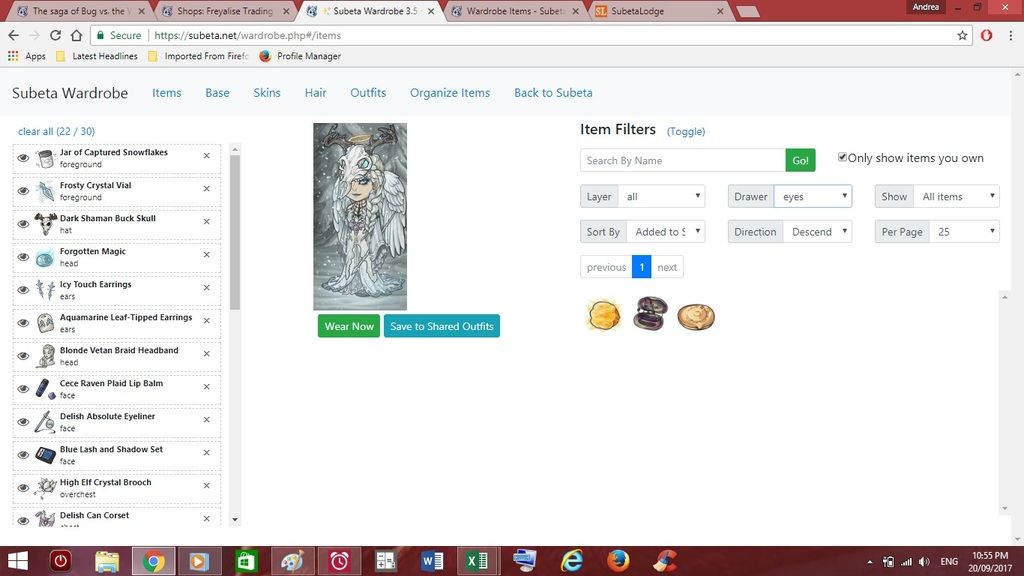
drawers not showing up in wardrobe. although i'm sure you're already aware what that looks like :P

empty drawer which should have items still sorted in it from months ago?
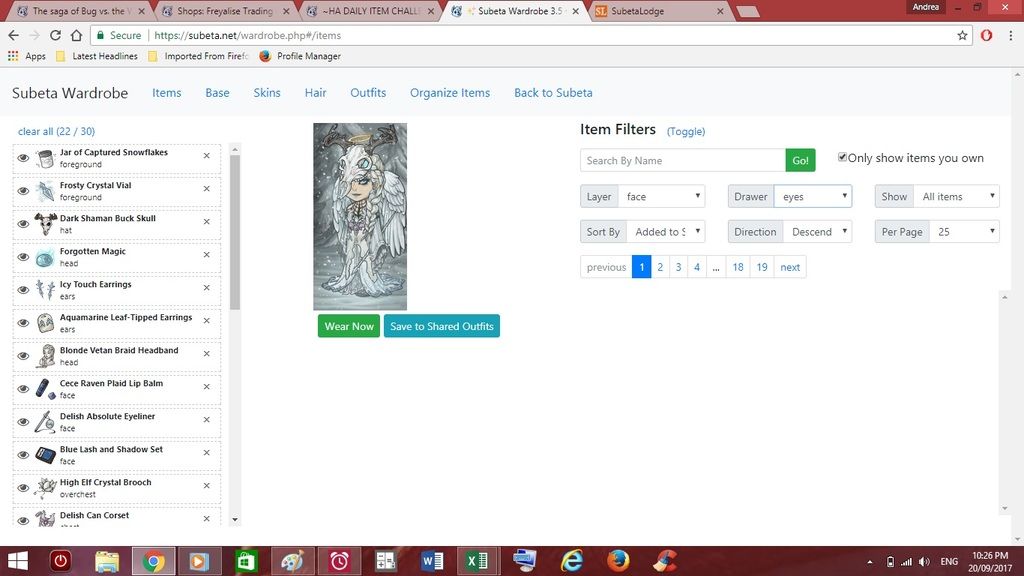
my eyes drawer is seemingly empty even though before i had items sorted in there
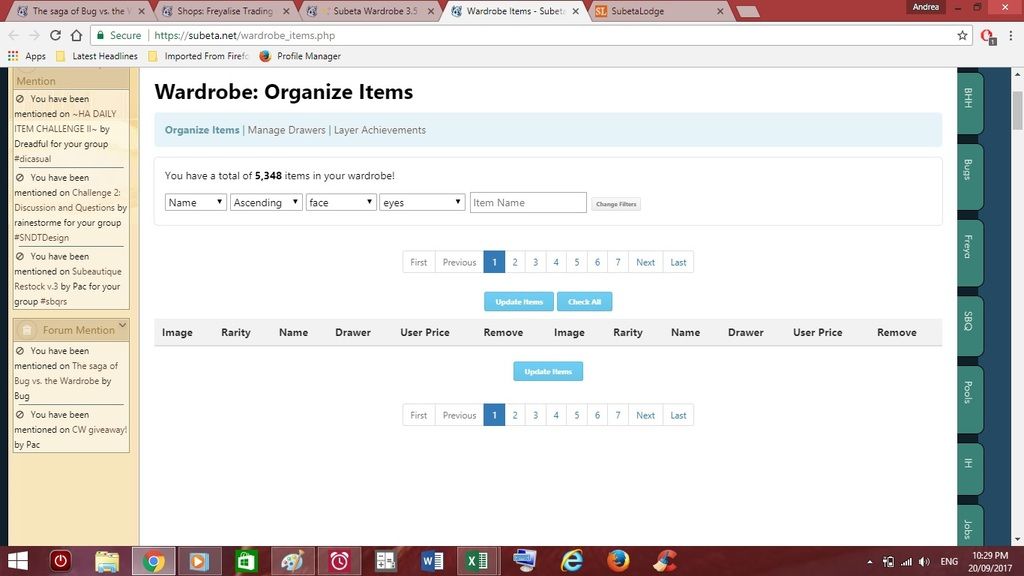
sorting page showing face layer items showing 'none' in the drawers drop-down, when most should show the drawers they had been sorted into months ago? no previously sorted item shows the drawer they had been sorted into in that drop-down.
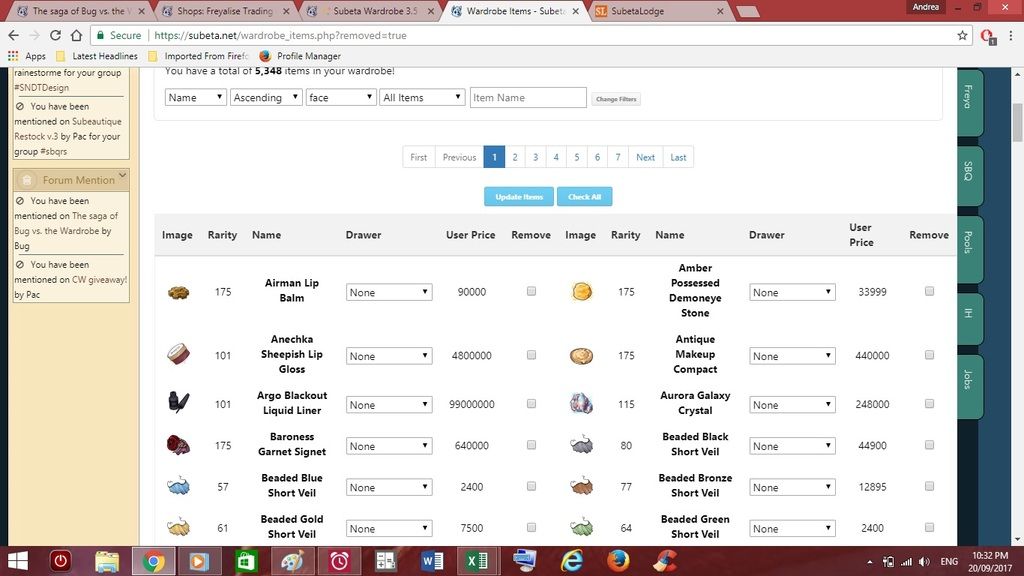
item recently added into wardrobe the only one to show up in 'not sorted' category, even though the drop-downs in above screenie suggest all the other items aren't sorted? soooo they must still be sorted, just not showing up in those drawers?
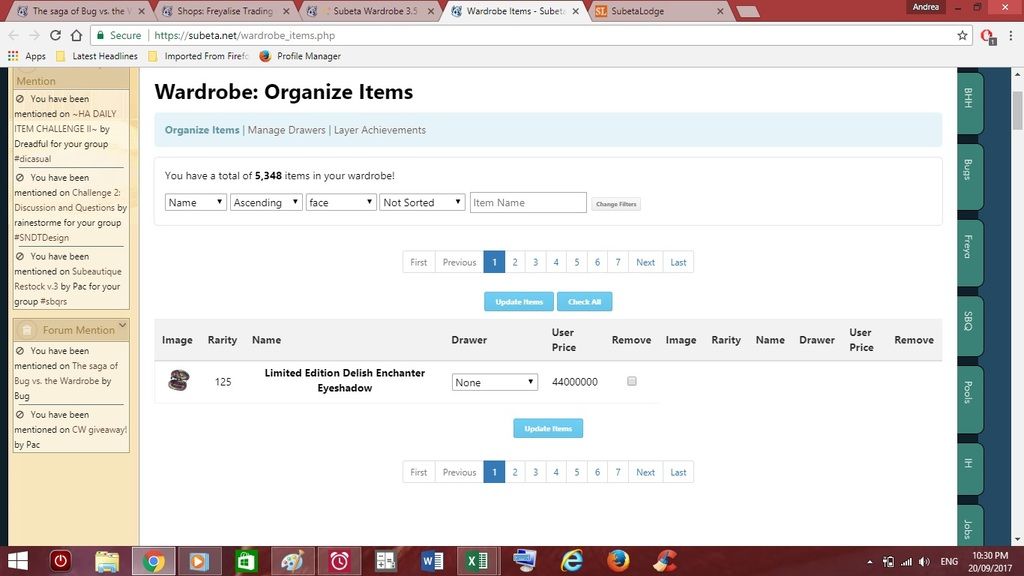
only the eye items i sorted into there tonight showing in the eye drawer - none that i had sorted months ago. also, when sorting items from the face layer (organise page filters= layer:face drawer:all), the items that had been left on the default 'None' in the drawer drop-down were transferred to the 'none' category (which they hadn't shown up in before). which i guess has undone any sorting that i had done ages ago? so in the wardrobe they now show up when 'none' is selected in the drawer drop-down when previously no items would load when i selected that filter option. fuck i hope that all makes sense D: i have read this about a thousand times...now i just hope my images work! considering i have spilt food onto two separate shirts today, i don't trust my luck rn
 lovely art by
"grey would be the colour if i had a heart" ~nin ❤️
lovely art by
"grey would be the colour if i had a heart" ~nin ❤️

I thought there was another "bug" masterlist, but I can't find it. This effects the wardrobe, too, though. I use puffin on an android tablet. I keep having items that don't show up, mostly animated ones. If it's a wardrobe item, it does show if I hover or click it and it shows fine when I wear it, just a blank for a picture. It's all types of items though, ex: Blue Snowman Lights,Luminaire Old Wizard Doll, Hyperactive Love Sticker, Bottled Lightning and Luv Panda. There's more if you need more examples tell me. I keep thinking it's fixed because, some of the pictures will pop up, but then they go again. Let me know if it's a known deal or if I should post this elsewhere. As always, thank you for your fine work "lord of the code" bug.
[center] [egg=storm42] [tp=storm42] [center]

I stopped at 27 drawers and doubt I would need more unless something changes, new items, etc. But it's nice to know I could make more if I need to. Thanks.
CWs for Sale or Trade https://subeta.net/user_shops.php/shop/24266
Hm, I'd check your internet connection, because that sounds like a connection issue rather than an issue on Subeta's end. The images do work correctly, they're just not loading completely for you. If you load the item's image on another page, that might help it show up in the wardrobe too, because your browser should cache the image so it doesn't have to reload it once it's loaded it recently.
Okay a lot of confusing stuff yeah. I have no clue why your drawers would unconvert themselves. The only thing I can think of, is that if you converted your HA again, that would cause them to unconvert. The unfortunate news is, since all of those things happened to you, it's not likely that your items are still sorted into any drawers. (There's just so many ways the data could've been messed up - Like when your drawers got unconverted, or when they were reconverted - however many times) I'm sorry >_<
The glitch with the drawers dropdown inside the wardrobe app is a known issue that I'm working on a fix for. So that's some good news at least "^^
Do drawers work for you if you use the Create Drawer thing to make a new drawer, and add stuff to that? Because it sounds like your issues have been with conversion, and the easiest way to move forward may be to just make completely new drawers since your old/converted ones seem very uh.. rebellious. If you want to do this, I can manually clear your unconverted drawer data so that they do not pop up randomly again.
🐝 ☕ bug (he/him) | your friendly neighborhood code wrangler. stay in the loop! join and check out the latest admin post highlights
eep sorry for still being confusing lol i tried! i tend to over complicate things ;-; if they keep unconverting because i keep converting my ha then that would explain it. i guess my reasoning behind doing that is flawed so i will stahp! the drawers i converted last night are still converted tonight, and the few items i sorted into them are still showing up in the wardrobe in those drawers, and everything else is now loading in the wardrobe when i select 'none' in the drawer filter drop-down (which they weren't before which was what suggested to me that maybe they were still sorted somehow and just not loading correctly idk). i made a new drawer and that is working perfectly as well. at this stage i think i will just convert my drawers again, and if they unconvert all by themselves then i will let you know and you can clear it and i'll just start afresh. thanks for the help! sorry again for being a pain XD
lovely art by
"grey would be the colour if i had a heart" ~nin ❤️
Because of how the drawer conversion works, and how HA conversion works, the drawers you have now are likely not your original drawers at all... since you converted both multiple times. That's not to say it was your fault, of course, just that I think your drawers may no longer have items in them because of everything that's happened D:
and no no you're not being a pain! It's literally the wardrobe being a pain for us both x_x
The drawers were left in a weird in-between state when the move to wardrobe 3.5 happened. (I explained it in more detail a bunch of pages back but... it's complicated.) So that's been the source of a lot of the problems with them; once we get past this bump though they should be good! (Or at least you know... not much worse than the rest of the wardrobe lol)
🐝 ☕ bug (he/him) | your friendly neighborhood code wrangler. stay in the loop! join and check out the latest admin post highlights
yeah i'm pretty sure they have nothing in them anymore but i don't mind having to re-sort stuff into the drawers i have now, so if they behave then i'm happy to keep them. but if they continue to do weird things then i'm also equally happy to get them cleared - unless you think there's no point in waiting to see if they will play up, then we can just go ahead and clear them? it really doesn't phase me either way :)
lovely art by
"grey would be the colour if i had a heart" ~nin ❤️
Ah, sorry! Now it's my turn to apologize for being unclear. By "clearing" the drawers, I only meant clearing the OLD ones, so that if you convert your HA again, no more unconverted drawers pop up.
So basically, right now, there's still a thing in the database that knows what unconverted drawers you had, like prior to wardrobe 3.5, and when you convert your HA, it makes new drawers with the same names as the very old ones (and tries to move the items over too) So clearing that data for you may be a good idea because it means you won't have weird old drawers show up in the event that you convert your HA again. It shouldn't affect any of your new drawers at all :)
🐝 ☕ bug (he/him) | your friendly neighborhood code wrangler. stay in the loop! join and check out the latest admin post highlights
i've only got the drawers i created aaages ago though (which i have now converted again), except for the one brand new one i made earlier to test it out... if i don't no need to convert my ha again, then i just won't do that and my drawers will be safe from myself and my meddling XD
lovely art by
"grey would be the colour if i had a heart" ~nin ❤️

Am concerned as I put most things in a drawer and even though it says updated all my items are showing as unsorted. Also under organize I can not search any drawers as they do not list. In the wardrobe under items my "managed" drawers do not show up and I still only have layers to work with.
Just checked in organize for a particular drawer and the new item I put there is showing up but nothing else. Yet I am still told that I have x number of items in my wardrobe. If so can I remove items from the wardrobe to my in inventory to replace them in the newly created drawers.
Give a flower!