Item previews not working again
Filter
Show Official Posts OnlyReplies

90% of all clothing items everywhere. Hair and shoes are usually fine; handhelds are usually fine. With backgrounds it differs. I have never not once been asked whether I want to see a male or female preview. It was literally not a thing I knew was ever supposed to happen.

Slotting | CW Shop | Owned List | Releases
[KISS=Valiska] * [DANCE=Valiska] [Flower=Valiska] * [tot=Valiska] * [egg=Valiska] * [tp=Valiska]

Okay! I'll take a look today and see if I can figure it out (or pester one of the other programmers if I get stuck) <3
I bet hasn't been asked if she wants a male or female preview either, We're friends, and we've talked about this.
Slotting | CW Shop | Owned List | Releases
[KISS=Valiska] * [DANCE=Valiska] [Flower=Valiska] * [tot=Valiska] * [egg=Valiska] * [tp=Valiska]

- Hover previews should* use the gender you have set in your wardrobe. If you visit the wardrobe and go to the "base tab", which gender option is selected? Or is it neither? Since this seems to be happening to newer players, I wonder if the setting isn't initialized and that's why hovers are broken for you guys.
*There's actually another bug where it's only using the male preview for everyone, even if they have female selected. But that's another issue.
Hair, shoes, and held items are usually gender neutral, which makes sense with what I said above. It doesn't need to look up your HA's gender to show those images. Other layers would be hit or miss.

-- this is happening to me and I have female selected.
This happens to most of my friends though. Do people know that they have to select a gender for this feature to work?
Because I don't mind picking female but I can think of a lot of people who would not be happy with having to choose one of those two options.
Slotting | CW Shop | Owned List | Releases
[KISS=Valiska] * [DANCE=Valiska] [Flower=Valiska] * [tot=Valiska] * [egg=Valiska] * [tp=Valiska]
- There have been debates about the gender sex labels before, and I don't want to get into that here. :P They've been left alone because you can dress up your avatar however you want to express yourself. The options just determine whether you have boobs or not.
So anyway, you already had "female" selected before I asked you to check? And you still have broken previews?
Let's run a test: I've picked some neutral items and some items that have separate m/f overlays. For each of these, can you tell me whether A) the forum preview is broken (the image that appears in this post) and B) whether the hover preview is broken (the image that shows up in the tooltip when you hover on the item image).
Neutral: [preview=Delish Dignity Gift] [preview=Junko Entropy Shawl] [preview=Ominous Red Fabric Burlap Doll]
M/F: [preview=Pentagonal Pasture Tile] [preview=Sapphire Cat Paw Print] [preview=Pearl Galaxy Tights]
[edit]
- I know you were having problems with previews back in February. Did that ever get resolved?
<p>So anyway, you already had "female" selected before I asked you to check? And you still have broken previews?</p>
<p>Let&;s run a test: I&;ve picked some neutral items and some items that have separate m/f overlays. For each of these, can you tell me whether A) the forum preview is broken (the image that appears in this post) and B) whether the hover preview is broken (the image that shows up in the tooltip when you hover on the item image).</p>
<p>Neutral:
[preview=Delish Dignity Gift] [preview=Junko Entropy Shawl] [preview=Ominous Red Fabric Burlap Doll]</p>
<p>M/F:
[preview=Pentagonal Pasture Tile] [preview=Sapphire Cat Paw Print] [preview=Pearl Galaxy Tights]
The gender-specific hover previews are totally broken. Everything else is fine. It's always been hover previews that don't work at all for me except for shoes, hair, etc.
I wasn't so much intending to start the debate so much as asking if people have been made aware that they have to make a selection for the feature to work, because if they're not aware, they might not do it.
Slotting | CW Shop | Owned List | Releases
[KISS=Valiska] * [DANCE=Valiska] [Flower=Valiska] * [tot=Valiska] * [egg=Valiska] * [tp=Valiska]

I see all the inline images but the gendered popup previews are all broken.
I'm really not sure how it works, because I haven't been a newbie in a very long time. :P I would expect it to have one of the options selected by default when you first create your account, but if that's not the case then there could definitely be a problem like you say.
But if that isn't even what's causing the hover previews to break, then it might not even matter.

Weirdly, the forum previews have been working somewhat normally for me. Outside of the forums, though, my HA appears to have no base. I can't hover over any wearable lmao
I can confirm that both my wardrobe gender and my profile gender are set to 'female'.
What browser are you using?
(like I'm on a female base and all the examples Sperio used show up fine for me)
Broken identically on Chrome, Firefox and IE. I'm normally using Chrome though.
(eta) I also tried switching to male wardrobe gender, behavior continues identically.
(eta2) I disabled all Chrome extensions and it makes no difference.
I'm on Chrome on Windows 10. At work I'm on Chrome on Windows 7 and it's also broken. Glad Anhelia tried it with all extensions disabled, I hate doing that...
Slotting | CW Shop | Owned List | Releases
[KISS=Valiska] * [DANCE=Valiska] [Flower=Valiska] * [tot=Valiska] * [egg=Valiska] * [tp=Valiska]
If it's the image itself, it shouldn't be browser-specific right? It's not like a CSS or javascript issue. It just seems like somehow Subeta doesn't have the m/f value set for some people (especially newer accounts from what I've seen).
And then for most (all?) of the rest of us, it's locked to the wrong value. A lot of people (myself included) are seeing male previews on hovers while our HAs are set to female.
It's always good to check though about browsers, like gathering any information I can is helpful. A lot of your questions helped out too, and I plan on looking through a lot of lines of code soon to try to fix this (so many projects to finish, so little time).

I have also been having item preview problem. I can confirm that both my wardrobe and profile are set to female and it is still broken. >.< It has been making buying items a whole lot more harder as I can't preview them to see if I like them.

All the in-line previews (actually IN the post by ) are working fine for me, but when I hover over the items I get three different reactions:
- Delish Dignity background - I get the whole image with no body outline
- the two other neutral clothing options show the broken image link and the clothing item
- ALL the gendered items just show a broken image link
It's the same on the latest update of Chrome and Firefox. My friend and I sometimes use the same computer and she hasn't reported any problems to me. I had to log in and show her my issue. I pinged her so she could check on this post specifically.
EDIT: I've noticed a difference in the image links for items that at least show UP and items that just show a broken link Broken link: https://img.subeta.net/avatars2/_bottom_vesnalinewmaxiskirtgreen.png https://img.subeta.net/avatars2/_chest_masqstripecroptopbrown.png https://img.subeta.net/avatars2/_chest_whiteblossombrocadedress.png


Item shows up w/ no avatar background: https://img.subeta.net/avatars2/b_chest_tigerbikinitop.png https://img.subeta.net/avatars2/b_face_sleepmaskeyegreen.png https://img.subeta.net/avatars2/b_feet_basicpurpleflats.png
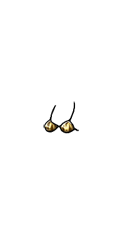
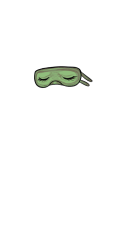

What is the "b" before the underscore in the link for? I tried to put a "b" in the link but still got error messages.

I can actually answer a couple of your questions! The Delish Dignity BG won't show an HA cutout because new backgrounds have no cutout. You can move the BG below the HA now. The b in the links are for both genders, meaning that there is no difference to the item for either gender. Like hair, and face items and basically items that aren't near the waist or chest.
Dexter by ❤
- To add on to what said, the alternative to "b" is the male/female flag which is "m" or "f". So the correct URLs for those broken images you posted are like this:
https://img.subeta.net/avatars2/m_chest_whiteblossombrocadedress.png https://img.subeta.net/avatars2/f_chest_whiteblossombrocadedress.png
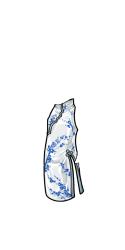
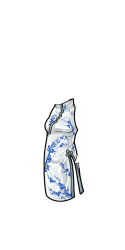
But for some reason Subeta doesn't know what gender to use for some people, and it's leaving a blank.
- Have you made any progress with this?