☀ CW Denial / Help Thread! ☀
Replies

certainly looks like it has more contrast!!

Yay! And thanks for the 'Hey, you can do this thing' info. I tend to only stick to a few different features in whatever program I use, so I don't do a lot of things.
Is that thing I just did more along the lines of something that would be accepted on Subeta? :D
Harry Potter inspired dresses! !!
--- [tot=oragami] --[tot=oragami]--

you're welcome!
to me it seems like it has lot more contrast, but i can't really tell if it would be accepted or not since sometimes there's a bit of inconsistency on approvals! but try submitting if you are happy with it and see if it goes through :D
:D Do you think the top trim might be part of it too?
And I think the CI is part of the denial too, so I need to wait to see what Mesmer does with it since she made it, but that just means I can tweak the other colors of this for when the slots on them fill up :3
Harry Potter inspired dresses! !!
--- [tot=oragami] --[tot=oragami]--
you could maybe lighten the highlight on the golden part if you wish! but i think it was mainly the green area :P
I figured it was the main area too that was part of the denial, so I didnt bother with messingwith the trim- in the submitted version it'll be a gray/silver-ish sort of color
Harry Potter inspired dresses! !!
--- [tot=oragami] --[tot=oragami]--
oh okay ^o^ well it's up to you to make it shinier or not :P
And now the Firefly fan in me busts out.
Shiny...lets be bad guys.
But since sleep might be hitting soon, maybe I have a reply from Hamlet when I get back.
Harry Potter inspired dresses! !!
--- [tot=oragami] --[tot=oragami]--
haha ok, there's also luminosity layer mode which you might be interested in :P
writes that down and tapes it to desktop computer monitor instead of laptop since the desktop screen is bigger
If I dont write it down, I might forget it
Harry Potter inspired dresses! !!
--- [tot=oragami] --[tot=oragami]--

I've been meaning to reply! I've been so narcoleptic this past week, it's ridiculous. I'm literally fallings asleep at 9:30am at work. x.x
I was planning to play with the advice I got first, but if you want to add in your pennies, that would be ❤️!
❤️ design shop ❤️ release thread ❤️ ping group ❤️ foodgram ❤️

Username --- Link to the overlay(s) --- click click and click click Link to the CI --- click click (Will make this a gif before submitting)
What do you need help with --- Before posting this for slots I'd like to know if it meets the requirements for acceptance, so much as can be determined. I've only had one successful CW and need better eyes than my own lol
Was there a denial --- Haven't submitted yet
Optional Can we take a look at the PSD files --- yes, though I will need to figure out where to upload them Can we redline --- yes
Currently selling:
So I switched up the coloring style to one that I might seem to be more comfortable with? (I'm no trained artist, so I really don't have a "set" style xD)
(Left is "original", right is with another layer of dark overlay.)


in a different color


Still working on the cloak...if someone has a "how to shade fluff" tutorial, that would help a bunch. It got a little weird when I searched that on google...
❤️ design shop ❤️ release thread ❤️ ping group ❤️ foodgram ❤️
this cw is adorable !!! the only thing i'd do would be changing the shading color of the ball a bit, so the yellow part shadows don't look too grayish. you can add more magenta/red there :)
it looks a lot better!!! especially when we look at the lighter version! this is how i color fluff:


So I had a CI rejected for not representing the item well enough (although I've fixed that and am ready to re-submit), and the CW for 'non-black lineart'. The item is a glowy crescent moon for the foreheard, hence the color of the lineart. I've seen plenty of items around site in a similar style, and I'm just trying to figure out who to emphasize the name and description to be able to put it through. Any advice?
- - -
Signature art: Original pencilwork by , digital lineart and coloring by

Username --- Link to the overlay(s) --- malefemale Link to the CI --- click click
What do you need help with --- I was gifted this CW by the generous (thank you so much!] and I really want to release it. This will be my very first release. I have a few questions, however:
I want to release 3-4 batches. I would like to only slot the first batch and place the other 2 or 3 batches in my CW shop. Would I fill the bubble for unlimited or the bubble for a set amount of batches? It says I must submit it as unlimited if it ends up in my CW shop at any point, but I don't want it to be unlimited, just 2-3 batches in my shop after slotting the first one.
Next, if I submit more than one batch, do I need to pay for each batch that I add? Say I choose the category "Shirts and Tanktops", I would pay out of pocket 1,500csc if I decide not to slot it. Is that the final price, or do I need to pay 1,500xNumber of Batches?
If I choose a set amount of batches to be placed in my shop, will it just require a password? Instead of choosing "unlimited batches"?
To slot one batch and place the other batches in my shop, does that mean I need to submit the first batch as 1 batch, then resubmit the item after it is accepted by staff to be placed into my shop?
Please let me know if my question are hard to understand. I just don't want to make a mistake.


When you submit as unlimited; when you go to your shop you can just choose the number of copies you want to make available.
When you submit a batch directly to the shop, you only pay for the submission cost and receive a copy when it's approved. When you send out invites to people to grab a copy from your shop and make them available to anyone who wants to buy, you do not have to pay for anything else.
Passwords can be added to either unlimited or limited cws.
If you submit as only 1 batch, it will be 1 batch forever. The number of batches you submit will be the number of batches existing in the website and you can no longer change that later.
You can either:
-
Submit directly to the shop with unlimited batches, and then control the number of copies you want on the website. This means you pay the submission cost and receive one copy.
-
Fill slots and submit a limited number of batches. This means other people pay for their own copy of the first batch and you can either slot yourself and the artist or not. You can later on move the remaining batches to your shop.
Hopefully this was useful!?
Sometimes staff can be pretty inconsistent with colored lineart. Some things will go through and some will not even though they have both the same concept/execution. In your case, I'd personally maybe add a black lineart and then add a glow on top of the whole thing;; as for name and description, I don't know what you picked when submitting so I can't really help D:
I choose the name Moonlight Aura, and used a description like 'This glowing moon carries a lot of love, a bunch of justice, and only a little dignity'. And it was black line-art with a glow, and in the changes for the tribute I even mentioned it was supposed to be glowing. On the other hand, though, at the time, I submitted it as jewelry. I'm going to try it as an accessory and hope for the best.
- - -
Signature art: Original pencilwork by , digital lineart and coloring by

Hi everyone, once again! :D My Morostide Piggy Tights were denied for the second time, oh well xD
Username ---
Link to the overlay(s) --- click click

Link to the CI --- click click

What do you need help with ---
I don't completely understand what it means that it is not Subeta quality. Is it only the level of detail of the CI? Or maybe it refers to other thing(s) too? o:
Where should I add more shading? Probably in the piggy's face, right? o:
As to the lineart, should I make all the lineart thicker? Or perhaps only the nose and mouth, that are the thinnest parts (compared to the rest)? o:
Was there a denial --- (paste denial here if any)
Yep, here it is:
• ITEM: Issues from previous denial were not sufficiently addressed • NOTE: Unfortunately all of the previous issues with the item still exist. The lineart is still thin, it is still not shaded enough, and it is not Subeta quality.
Optional
Can we take a look at the PSD files --- I can take screenshots!
Can we redline --- Yep! :D
Thank you very much in advance!! :D 👍

I want to start off with the customary "By all means what I say isn't the only advice you should listen to" as well as the "You do not need to follow my advice if it doesn't look pleasing to you!"
That said, I have done a rough / quick breakdown to help you. LINK TO VISUAL HELP
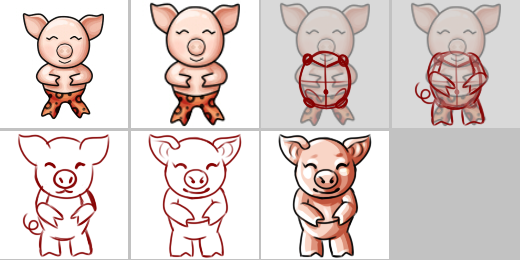
Picture one: Your item with no alterations.
Picture two: I would recommend making your item fit the square better! This not only gives you more room to work detail into, but generally speaking I think it looks better. If your item is supposed to be small and not fit the space entirely, simply ignore this ;)
Picture three: The main problem I am seeing here with the 'subeta quality' is that there are some anatomical errors with the torso and body of the character. While I understand this is supposed to be cartoony and cute, that doesn't exempt it from being anatomical! Here I have shown a general layout of the torso. Top circles connected with a v are the shoulders and collar bone. Bottom circles are the hips and the dot in the center is the belly button! Hopefully this gives you a better idea of what goes where!
Picture four: A general idea of what the torso might look like. This was done quickly and in my style, so yours will probably not look like this and I'm sure you'll have a better idea of what you want in mind! Please keep this in mind for the next couple steps (that it is just a general idea to show you, not meant to be the end all, be all for your item!)
Picture five: Just showing the sketch with the addition of the head. I've noticed you appear to be missing nostrils, and that the head is really segmented from the ears and body. Reducing some of the lines so it's not a perfect circle will really help.
Picture six: This by no means is line art, but just a more detailed version of the sketch just to show you details you might want or might not want, just to add some extra detail to your item! Subeta item artwork is typically not super simply, and have lots of nice little details such as the ribs in the ears, etc just to make them look more complete.
Picture seven: A run down of shading. Right now, your shading is very soft. I am not sure what program you're using exactly, but I suggest picking a pretty hard brush and making exaggerated shading. As you can see on mine, it looks pretty blocky in spots, but a lot of this smoothes out on resize. I typically make my base color layer then make three layers above it. Shade 1, Shade 2, and Highlights. This gives you an easier time to play with all the details if you resize and see something you don't like.
And that's it! Please ping me if I wasn't clear, or you need further clarification! C: GL on your item, it's super cuteee!