☀ CW Denial / Help Thread! ☀
Replies

Username --- Link to the overlay(s) --- click click
What do you need help with --- This is very much still a WIP!
I'm specifically having a lot of trouble with the left strand of hair - I feel like something should be there in general to balance the wig better but I can't get it to look right somehow? D:
If any of you lovely people out there could maybe help with strand placement/a reference/ words perhaps I'd really greatly appreciate it! Thank you! :)

I personally feel like the left single strand of hair is too thick and...harsh?? Angled?? Haha I'm not sure what work I'm looking for here. I think if you can thin it out and smooth the curve a bit, it'll be fine!

Username --- Link to the overlay(s) --- HA size-Working size Link to the CI --- click click
What do you need help with --- This is the first custom item I have ever done and I would like to fix the denial issues as soon as possible so as not to disappoint the people I slotted. =( The item I did sharpen before I resized it to 64x64 from my original working size to avoid fuzziness, but the overlay I did not sharpen at all. I am wondering if it looks too sharp because I chose highlight/shading colors that produce too much contrast? I am also baffled as to why the save quality was an issue, as I did not notice any dithering or stray pixels. If anyone has any ideas as to how I can fix these issues I would be very grateful. Thanks so much! <3
Was there a denial ---Yes: • ITEM and OVERLAY: Over-sharpened artwork • ITEM and OVERLAY: Dithering and/or save quality issues


yooooo guys
Username --- Link to the overlay(s) --- click click
What do you need help with --- denial help pls
Was there a denial ---
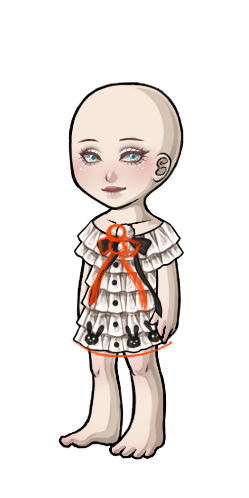
• OVERLAY: Overlay perspective conflicts with the 3/4 angle of the avatar base • NOTE: Although I get that this is supposed to look a bit asymmetrical, our avatars just really aren't working well with it! It really looks like it's just face-on, so I do think you'll need to shift some of this asymmetry to help.
Optional Can we take a look at the PSD files --- since it's a commission, no sorry D: Can we redline --- yes ofc, much appreciated
thing is, i don't understand the denial LOL what asymmetry are we talking about? D:
Ah I hope it's okay if I give my interpretation of what they mean ~
I feel like if you just move the pompom/ribbon to the left so that the bottom pompom lies directly above the buttons it would fix it? They probably just mean like the ribbon is asymmetrical compared to the buttons so it throws off perspective? (I dunno this was such a strange denial honestly >>)
The dress is 110% cute though!!
I think Pika's right! The pom poms/ribbon just looks too far off to the side, not centered on the dress. I also think the right side (our right) is too high up, giving the impression of an asymmetrical skirt. The ruffles are sooo cute, though! This dress will be darling when it gets accepted. ^^

Hello im back again, Thanks to cathii and all the wonderful artists who help me out everytime. much <3 to all of yaw'll.. This isnt a complicated denial but some reason my mind is drawing a blank.
Username --- Link to the CI --- http://imgur.com/WF9iAVU.gif
What do you need help with --- I am having a hard time visualizing the right perspective! Was there a denial --- yes A custom clothing item you drew, Heart of Eros Ring, submitted by PaisleyAnn, was denied for the following reason(s): • ITEM: Anatomy or perspective issues • NOTE: The perspective on the ring is very off -- it looks like the heart portion is bent/broken and not flush against the ring itself.
Optional Can we take a look at the PSD files --- yes Can we redline --- yes
I drew a diagram for you!! Hopefully it helps (sorry it's so sketchy!)
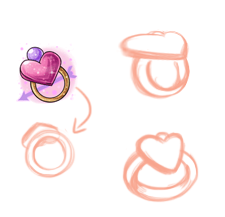
Basically, the way your ring is now (facing head on), you wouldn't be able to see the heart piece on top hardly at all. To be able to see the heart, you'll have to put the ring into another perspective. I drew a couple of examples to get you going.
edit: lmao I just noticed that the size of the heart vs. ring is vastly different in my two different examples :') but you get the idea

I'd love to see what the CI looks like without sharpening. I think part of the reason the overlay looks over sharp is because of the stark differences in colors (and the high contrast with the highlight layer !). Maybe working with slightly altered colors ? Or fading a bit between the colors, here and there, to make them blend in with one another ?


cwhelp
-- Link to the overlay(s) --- click click Link to the CI --- click click
What do you need help with --- Confused as to why mine was denied when & exists. Perhaps if i added a little tint of blush? Note: the item itself does NOT include eyebrows.
- I also submitted this under the Makeup category, would it be something else??
I could also rename it: Dusty Dreaming Bottomlash Kit
Was there a denial --- Your custom clothing Dusty Dreaming Eyelashes was denied for the following reason(s): • OVERLAY: Artwork replaces features and/or edits the avatar base • NOTE: We do not allow eye makeup that could act as a replacement for the eyes (In this case, closed eyes). This is especially true in this particular overlay, as the lower lashes are so thick and obvious and there are no top lashes. Something will need to be added to make it clear that this is makeup.
Optional Can we take a look at the PSD files --- yes - but i dont have it on me i can get it later today Can we redline --- yes
 [BR]
[BR]


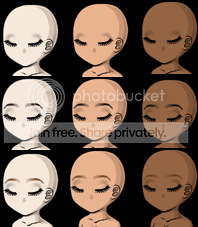

Unfortunately, staff has been a bit inconsistent with this type of item in the past, so this denial will feel confusing. You'll need to add top lashes or otherwise make this item look like it's intended to work on top of a set of eyes to enhance the eyes as eyeshadow/eyeliner/mascara, rather than create the look of closed eyes.
So if I were to drag the dusty shadow part out a bit more to outline where the eye would go - you think that would work?
Also. It says "OVERLAY: Artwork replaces features and/or edits the avatar base" Should I throw it into the "all base edits" category instead?
Maybe! I would recommend doing a screen shot of a popular eye shape (like the Argo Blackout Liquid Liner), and then fiddling with the eyeshadow until it looks like it could feasibly work with that eye. That's what I did to get a similar makeup on site, and it eventually worked.
As for the layer, you should keep this as makeup, since base edits are not allowed for face items. (Staff won't let us create lips or eyes).
Okay! I will try that, thank you so much <3 I will ping you again when I'm finished!
How about this? click donna eyes
extended the top shadow and added a smalll shadow under lashes
ps. i dont llike it with the donna eyes/argo eyes - but it would fit i believe.
sorry if i pinged 2x

Username --- Link to the overlay(s) --- (its fine though) Link to the CI --- old (full working size in my forumset) / newer (full size linked with PSD further down)
What do you need help with --- i submitted this once and it got denied for the CI so i tried to reshade it, but it kinda... seems to be getting worse T_T im not sure how come im having so much trouble with this particular CI... OTL
Was there a denial --- yes!!! but i accidentally deleted the denial T.T this should more or less what it says though, from what i remember!
- item: blotchy shading
- item: pillow shading
- notes: shading too close to the lines that it looks pillowy/plasticy
Optional Can we take a look at the PSD files --- use the download link! Can we redline --- if necessary!
p r e s a g e .[/font]
I can't say for sure they would accept it, since it's still kind of a mystery to me. XD but it looks good as far as I can tell! I would maybe think about changing the name too to - maybe something like Dusty Dreaming Lash and Shadow Kit, just to emphasize that it is meant to be a makeup and not a closed eye replacement.
I think the new one looks a lot better! I think the shading/highlights were just not contrasting enough in the original, and were getting lost in the shrunken version.
Thank you, I was thinking that may have been the problem. =) I have altered the colors a bit to make them less harsh, and I also did a little blending. On the CI I adjusted the colors to be exactly the same as the overlay, and I also did not sharpen it this time. I am not, however, certain what the saving issue is. =X Here are the adjustments I have made though: New CI/Old CI New Overlay/Old Overlay

