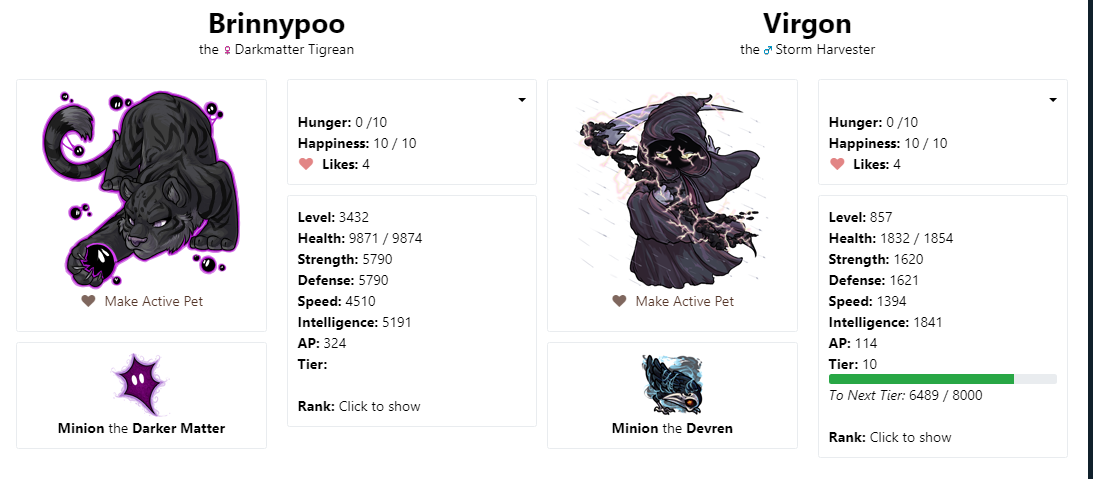
"Rank : click to show" not working on pet pages
Filter
Show Official Posts OnlyReplies

I am using google chrome I have tried clicking on the link but..nadda happens
Here is a pic of my pet page.
Note that my tier is also missing from Brinnypoo....
Love may not always be destiny, But a Gift.


On Chrome, also not working for me. :/

I am also using chrome and it is not working for me

Same here. Also my pets are appearing "single file" on the page instead of next to each other. :( Also using Chrome!

Looking into this :)
@Cresenta What is your screen resolution?
What is your pet Brinnypoo's tier? [edit] I think I have identified the tier issue actually, it was a small issue with T13 pets and a fix has been pushed.
🐝 ☕ bug (he/him) | your friendly neighborhood code wrangler. stay in the loop! join and check out the latest admin post highlights
@Cresenta That's odd, and they show 1 pet per row? Can you check if there are any errors in the console? (Ctrl+Shift+J) Are you viewing it maximized, and is your browser up-to-date?
It should go to 1-per-row only when the screen width is small, so I'm not sure what could be going on. If you could provide a full screenshot as well that would be helpful too.
🐝 ☕ bug (he/him) | your friendly neighborhood code wrangler. stay in the loop! join and check out the latest admin post highlights
Pretty sure my browser is up to date. Yup just one pet per row. This is what it looks like:

With each pet being single file.
Getting this after checking for errors:

@Cresenta Are you using any custom CSS, and could your adblocker or other browser extensions be interfering with it? I'm not able to replicate your error.
🐝 ☕ bug (he/him) | your friendly neighborhood code wrangler. stay in the loop! join and check out the latest admin post highlights

I have no CSS and can confirm that disabling AdBlock Plus for Subeta corrects the failure of 'click to show' button for me with Chrome OS and Chrome Browser.
I tried with the Adblock turned off and it still appears single file. The rank is showing for me now though. I don't have much custom CSS, haven't changed anything on that front in years. Only thing I have it for is to force floating items to the top corner of the page. Not sure what's wrong. x_x
ty! the link works now and yay my tier is back!
Love may not always be destiny, But a Gift.
@Cresenta I don't know either.
Can you try inspecting the element? Right-click on one of your pet's images, and choose "Inspect Element". In the Inspector, you'll see a bunch of HTML and CSS. Click on the div highlighted in this screenshot: https://i.imgur.com/jjf11Rq.png
It would be great if you could screenshot the result for me, especially what it says in the "Styles" pane on the bottom there in my screenshot.
(I'm sorry to ask you to do all this debuggy stuff for me. But since I'm not able to reproduce the error, this is the only way we can get some clues about what's causing the problem for you.)
🐝 ☕ bug (he/him) | your friendly neighborhood code wrangler. stay in the loop! join and check out the latest admin post highlights

@Cresenta You did! Now can you select the line div class="row" right above that, and take a screenshot of what that one says?
🐝 ☕ bug (he/him) | your friendly neighborhood code wrangler. stay in the loop! join and check out the latest admin post highlights

@Cresenta Yes. Does it highlight anything on the page when you hover over it?
Also, could you try viewing this page on another browser (like Firefox) and see if you have the same issue? That might shed some light.
🐝 ☕ bug (he/him) | your friendly neighborhood code wrangler. stay in the loop! join and check out the latest admin post highlights

?
Tried on firefox and it appears single file there too x_x
@Cresenta Okay, I see where the issue is. But I still don't know what could be causing it. However we are close to finding out!
I drew a red box in your screenshot at the part that's causing the problem: https://i.imgur.com/D7JeBFU.png
Do you see where it says "pets.php:85" (it is underlined)? Can you please click on that, it will jump to a different panel in the inspector with more code, and screenshot what it says there? That should tell us what line of code is causing it.
The "box-sizing:border-box" has been crossed out in your screenshot because there's another CSS rule overriding it. That's what is causing the weird layout problems. My screenshot shows how it's supposed to be https://i.imgur.com/IfiAOzi.png
I highly suspect it is due to custom CSS, would you mind pasting your custom CSS in a pastebin (https://pastebin.com/) just so I can double-check it's not doing something weird?
🐝 ☕ bug (he/him) | your friendly neighborhood code wrangler. stay in the loop! join and check out the latest admin post highlights


