Useful Custom CSS Builder
Filter
Show Official Posts OnlyReplies

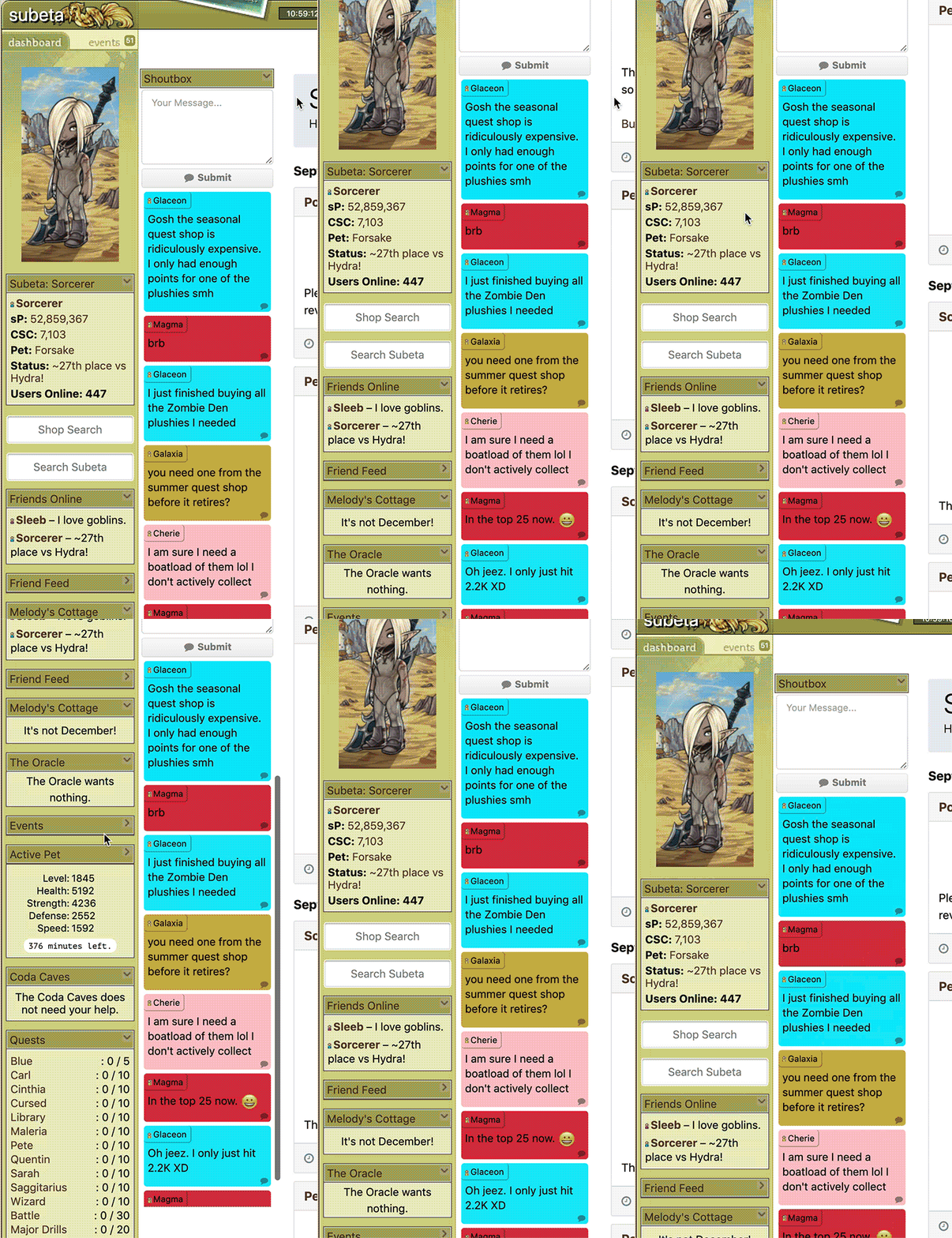
Thanks for the split sidebars! My screen is quite big so I feel this uses the space better. However, is it possible to swap the position of the dashboard and events bar? It feels odd for me to have events on the right part xD

This should do it!
/** dual sidebars - flipped **/
 (min-width: 1250px) {
 {
float: none;
overflow: initial;
z-index: initial;
width: unset;
top: 0;
padding: 0;
position: relative;
}
-inner {
width: unset;
padding: unset;
background: none;
border-right: none;
}
-inner-events,
-inner-events.sidebar-inner-active,
-inner-dash,
-inner-dash.sidebar-inner-active {
display: block !important;
width: 176px;
padding-top: 37px;
background: url(https://img.subeta.net/layouts/default/images/left_widgt_bg.jpg) no-repeat 0 26px, url(https://img.subeta.net/layouts/default/images/left_bg.jpg) repeat-y;
}
-inner-events,
-inner-events.sidebar-inner-active {
float: left;
}
-inner-dash,
-inner-dash.sidebar-inner-active {
float: right;
max-height: 3000px;
overflow: auto;
border-bottom: 1px solid ;
}
-btn-dash,
-btn-dash.sidebar-btn-active {
position: absolute;
right: 0;
background-position: 0 26px !important;
border-right: 1px solid ;
}
-btn-events,
-btn-events.sidebar-btn-active {
position: absolute;
margin: 0;
border-left: 1px solid ;
background-position: -2px 26px !important;
}
-inner-events .sidebar-widget:last-child {
margin-bottom: 5px;
}
-top {
height: 0;
}
-counter-wrapper {
left: calc(100% - 170px);
top: 3px;
height: 20px;
line-height: 18px;
right: unset;
}
}

Finally got to try it out and I love it so far! Just for aesthetic purposes I was wondering if you could help me out with two things:
- Getting the sidebar top to have the same background color as its tabs.
- Getting the event sidebar to go at least as far down as the dashboard sidebar.
In case that's not clear, I've included an MS-Paintified picture:

The tabs that say dashboard/events are rounded so they have a bit of color around them, and I'd like to make the whole sidebar top that color. I know the color is but
-top {background-color: !important;}
does not work.
Also, I'd like the events sidebar to at least go down as far as the regular sidebar, even if I don't have enough events to fill it. Is there a way to do that?
Thanks for your help!
This is the full code with the changes added in.
The min-height is 100% of your window's height. You can increase that if you want, there's no way to make it perfectly match the dashboard though.
The tab backgrounds are done with two 87px wide borders.
I also added a slight background-position change at the very last line, that's a fix for the autumn theme specifically. The dashboard tab image has some stray pixels on the right edge.
/** dual sidebars **/
 (min-width: 1250px) {
 {
float: none;
overflow: initial;
z-index: initial;
width: unset;
top: 0;
padding: 0;
position: relative;
}
-inner {
width: unset;
padding: unset;
background: none;
border-right: none;
}
-inner-events,
-inner-events.sidebar-inner-active,
-inner-dash,
-inner-dash.sidebar-inner-active {
display: block !important;
width: 176px;
padding-top: 37px;
background: url(https://img.subeta.net/layouts/default/images/left_widgt_bg.jpg) no-repeat 0 26px, url(https://img.subeta.net/layouts/default/images/left_bg.jpg) repeat-y;
}
-inner-dash,
-inner-dash.sidebar-inner-active {
float: left;
}
-inner-events,
-inner-events.sidebar-inner-active {
float: right;
max-height: 3000px;
min-height: calc(100vh - 142px);
overflow: auto;
border-bottom: 1px solid ;
}
-btn-events,
-btn-events.sidebar-btn-active {
position: absolute;
right: 0;
background-position: 0 26px !important;
border-right: 1px solid ;
}
-btn-dash,
-btn-dash.sidebar-btn-active {
position: absolute;
margin: 0;
border-left: 1px solid ;
background-position: -2px 26px !important;
}
-inner-events .sidebar-widget:last-child {
margin-bottom: 5px;
}
-top {
height: 0;
}
-counter-wrapper {
left: calc(100% - 170px);
top: 3px;
height: 20px;
line-height: 18px;
right: unset;
}
}
/*--dual sidebars theme: autumn */ (min-width: 1250px) { -inner-events, -inner-events.sidebar-inner-active, -inner-dash, -inner-dash.sidebar-inner-active { background: url(https://img.subeta.net/layouts/autumn/images/left_widget_bg.jpg) no-repeat 0 26px, url(https://img.subeta.net/layouts/autumn/images/left_bg.jpg) repeat-y; } -inner-events, -inner-events.sidebar-inner-active { border-bottom: 1px solid ; } -btn-events, -btn-events.sidebar-btn-active { border-right: 1px solid ; border-left: 87px solid ; box-sizing: content-box; } -btn-dash, -btn-dash.sidebar-btn-active { border-left: 1px solid ; border-right: 87px solid ; box-sizing: content-box; background-position: -2px 26px !important; } }
Thank you! That looks much better. :) I had to fix the "user not found" part to make it work properly though. Are you the artist formerly known as "media"?
LOL didn't think of that, can't post media queries because of the @ x_x

Is there any magic that can make the Make Your Turn and See Results buttons on the Battle page stick to the same place on the page? Mine keeps moving up and down the page because of different-length weapon names (and getting frozen), and those extra mouse movements get annoying during Jelly War.
useful threadsThe Giant List of Usability and Random Improvement 2.0 Comprehensive Guide to Battle Opponents (v2) [topic not found]
|
[topic not found] |

My left sidebar, once I come to the end of the widgets I have no css, just the site theme. How do I extend the background color, please?
Can you put your current custom CSS on Pastebin for me to test with? sMail if you want to :)
Don't worry hahaha! You're using the Darkside site theme too, right?
Oh crap. You know what? I started out with darkside and it actually works there with it but the top is messed up...the repeat on the baqnner doean't work, IDK, I have it all messed up. The event toggle buttons sit on top of each other, the text links at the top of the dashboard page are nearly unreadable. Maybe I need to just go back to the old one haha.
It seems to be busted, I cleaned the formatting a bit, no real changes, looks like this now. Got an older version to compare against?
I'm sorry, what seems to be busted? The top banner displays correctly when using the default layout but then I have the side issue. And the side issue goes away with the darkside layout but the top is busted. Okay, it is all busted.
I don't have an older version so much as I was using the one I have up on subetalodge and changed out the banner and added a bit for the forums at the bottom of it all. I asked myself if it was alright to alter it and I said yes. :D
I'll take another look tonight, it was all kinds of weird for me, I'll take a screenshot.
Lol I'm glad you gave you permission ;p
Oh hey. I have made a completely new one since this. But of course, I was starting with the same code so I still have the same issue. PLus I used some of your code for games and stuff. https://pastebin.com/aaUmaPxe
Edit: I meant to ask, is there a way to change the color of the buttons for games? The play or start or whatever. Also, I was trying to change the background color of the new bar to submit coding, ince I used your code to make the box bigger, etc. Never figured that out. But thanks so much for having these resources available to us!
[box=#fff][box=#e5f3ff]
? Shengui Guo (Night Mode) Theme
- Collaboration, and a fully-built theme, both firsts for Useful Custom CSS!
- Please read more on the theme's thread, join NModeCSS, and thank .
- (Note: compatibility with my code varies, though some is built in! Ask for help if things break.)
- Always visible shoutbox, follows you when you scroll.
- Definitely try this one out if you like the shoutbox.
- (Note: not compatible with/alternative to Dual Sidebars)
- For mobile users, prevents accidental widget rearrangement.
- Unofficial fix for this Site Feedback thread.
- Makes the game easier to speed through on a daily basis.
- Good luck with the achievement!
- Added a minor fix for the Luminaire site theme, which I've just unlocked!
- No need to update your code if you use other themes.
[box=#e5f3ff]
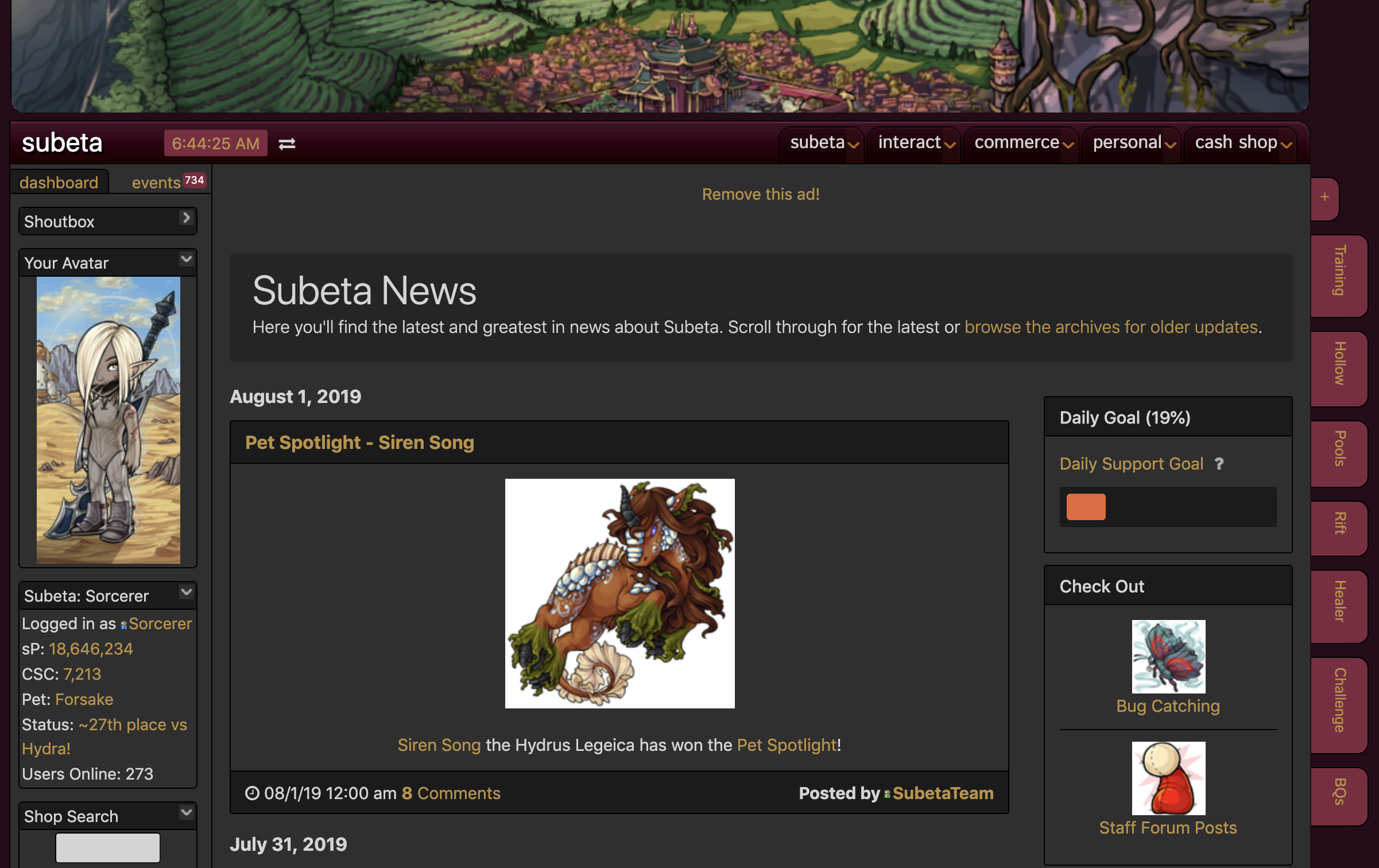
Sticky Shoutbox in action: