The giant list of usability and random improvement
Filter
Show Official Posts OnlyReplies

well, i figured there's likely some shenanigans going on, on the backend. if i remember right, the recycle shop wasn't lowest-to-highest 'cause it was ordered twice, and for whatever reason alphabetical ordering took priority. that sounded like an easy thing to fix (& it sure felt like a quick one, since amber changed the ordering right after i posted), so hopefully this is similar. either way i had the thought yesterday and i figured i'd better post before i forgot about it again since i left the crystal shop off the last time i complained about shop ordering p:

It would be great if someone could make an option to turn off the sidebar notice about discounts or discount wearing off, since it already tells you while you rs? It fills up my sidebar but I like having other notifications there
Collecting minions , weapons, rainbow and evil things now, PM me if you are selling!

Not sure if this is the correct board to post (I can make a separate board if not), but...
Is there any way to differentiate in the Quest Shop what items are seasonal? As of right now, they're all listed at the bottoms of the lists, but it's not actually clear which are going to be cycled out come Fall.
I would absolutely love if on the specific Quester pages, there could just be a light line at the bottom saying seasonal, with those items beneath it. Or potentially a new tab that has them all listed out.

When multiple pets are done training at the Training Center at Riverside, I think it would be really useful to have an option to click 'done' for all of them at once, instead of individually going through all of them. It is especially tedious when you have a lot of pets and are wanting to put them all back in training.
Also when you select how you want to train your pet, if instead of taking you to a separate page that says, "Your pet has been put in for a lesson of Level!" or what not, if the status of training of the pet could just change on that main page, it would also make things go quicker and easier.
[center]

The new TC sorting stuff is wonderful, but the items resizing if you go over 10 displayed ends up causing eyestrain and headaches. Large resolutions can handle more than 10 displayed items. .-. Headaches are not fun when you're using a 1920x1080 screen and you need to lean your face in close to tell the items apart.
The X remove button would benefit from a splash of red colour, for those of us used to colour associations.
Ugh, yesplease! I have no idea which items are seasonal and it gets irritating if you're buying just before the season ends. I don't want to use my wishlist as a memo for these things. x-x

If you're on a larger resolution, you can just zoom in. The X remove button is going to remain gray because red draws attention a bit too much (people have complained about clicking on red buttons because they're noticeable...) but this button might be a good place for a confirmation dialogue since it's such a hassle to put the item back in its place if you accidentally remove it from a TC.
As for the quest shop seasonal stock, they are always the items priced 40-60 quest points at the bottom, and they're usually seasonally themed and mentioned in news posts.
🐝 ☕ bug (he/him) | your friendly neighborhood code wrangler. stay in the loop! join and check out the latest admin post highlights
@ Bug Default item image size appears to be the same as ~110% zoom at 10 items per row. I have to zoom in to about 200-210% to get the same size images on the previously mentioned resolution if I want more than 10 items per row. Zooming in makes everything look so much worse because the items "float" off to the right of the page toward the site's bookmarks. That's both unpleasant to look at and irritating if you're using Subeta's bookmarks feature.
Not sure on the confirmation button? We have those in spades already and people just tend to auto-hit Enter or Space to get the popup outta the way.
[edit]
Good catch on the seasonal quest shop items prices! Some other kind of way to tell them apart would still be nice. Maybe a note in the description could work instead of adding another coding nightmare?
Ex: Beach Ready Ghost
Rarity: Game Prize (160)
Description: This ghost is so excited to go to the beach with you! [Seasonal - summer]
Official Price: 50
Price Today: #
Overall Price: #

Can we get the 'set alert' link on the ice fields after failing to get through? Right now you have to go back to the Arctic Frost map and click on the ice fields again to set an alert.
[tot=ravenclaw] 🎃

<p>Is there any way to differentiate in the Quest Shop what items are seasonal?
As of right now, they&;re all listed at the bottoms of the lists, but it&;s not actually clear which are going to be cycled out come Fall.</p>
<p>I would absolutely love if on the specific Quester pages, there could just be a light line at the bottom saying seasonal, with those items beneath it. Or potentially a new tab that has them all listed out.
 [font=monaco]« I don't know where I'm going from here, but I promise it won't be boring. »[/font]
🍂🍁🪭
🍭🍬 🥚[egg=Selphina]🍳 🧻[tp=Selphina]🗞️
💋💕 🌸🌻 💃🕺
[font=monaco]« I don't know where I'm going from here, but I promise it won't be boring. »[/font]
🍂🍁🪭
🍭🍬 🥚[egg=Selphina]🍳 🧻[tp=Selphina]🗞️
💋💕 🌸🌻 💃🕺

Sort by rarity in user shops. Bulk search for wishlist items in other peoples' shops.
Art blog | Custom Wear Wishlist More items for sale here | [flower=RNA]
Can you elaborate? You can already do a wishlist search in other peoples' shops :)
🐝 ☕ bug (he/him) | your friendly neighborhood code wrangler. stay in the loop! join and check out the latest admin post highlights
Bulk search for wishlist items in other peoples&; shops.
Can you elaborate? You can already do a wishlist search in other peoples' shops :)
Huh, I didn't know that was possible.
Art blog | Custom Wear Wishlist More items for sale here | [flower=RNA]

Since I can't see the first post, I hope this also goes here?
With the Yaherra added to the Pet Zapper, I feel like there's a lot of text and buttons on the page, before reaching just the zap button. I would suggest moving the zap and alert buttons to right below the "Choose Your Pet" box, and have the Experiment box and the adopt buttons under those? Personally, I go to the zapper every 2 hours to zap pets, but I don't need to see the experiment and adopt buttons every single time, or having to scroll down in order to get to the zap button?
<p>With the Yaherra added to the Pet Zapper, I feel like there&;s a lot of text and buttons on the page, before reaching just the zap button. I would suggest moving the zap and alert buttons to right below the "Choose Your Pet" box, and have the Experiment box and the adopt buttons under those?
Personally, I go to the zapper every 2 hours to zap pets, but I don&;t need to see the experiment and adopt buttons every single time, or having to scroll down in order to get to the zap button?
Pinging for this one :)
🐝 ☕ bug (he/him) | your friendly neighborhood code wrangler. stay in the loop! join and check out the latest admin post highlights

With the Yaherra added to the Pet Zapper, I feel like there&;s a lot of text and buttons on the page, before reaching just the zap button. I would suggest moving the zap and alert buttons to right below the "Choose Your Pet" box, and have the Experiment box and the adopt buttons under those?
Personally, I go to the zapper every 2 hours to zap pets, but I don&;t need to see the experiment and adopt buttons every single time, or having to scroll down in order to get to the zap button?
YES THIS
I keep accidentally clicking on the Qrykee button and nearly morphing my pet instead of zapping it. D: So glad it's a two-step process.
🔭🐢

I'm going to move some things around for the zapper when I go to fix a few things on the backend next week for our sprint! <3

We do have a space on the map for the extra One True Zapper operation to take over. Maybe Euclid expands out to that spo and offers 'special services' to users and pets who walk through that door.

Minor thing but when you do an account search for an item already in your wardrobe if you click the "Wardrobe" link (the one here) it takes you to: https://subeta.net/wardrobe.php#/editor:wardrobe Which is the older, now unused, editor page.
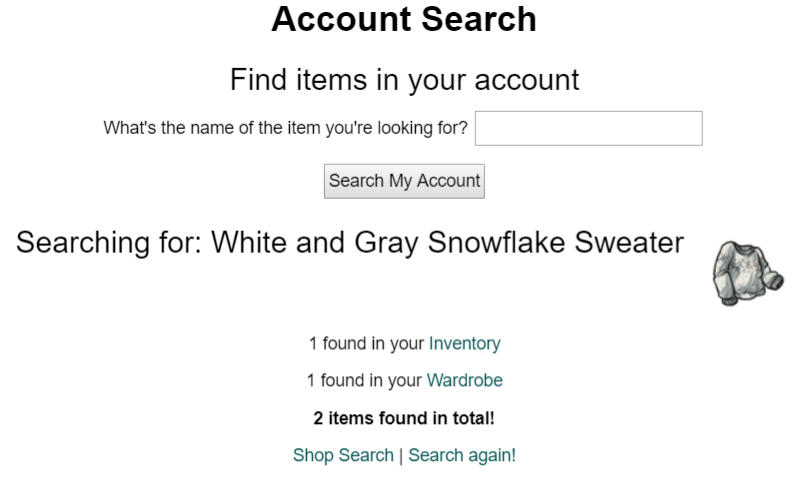
The link now should ideally be one of these two: https://subeta.net/wardrobe.php#/ (for the wardrobe itself) https://subeta.net/wardrobe_items.php (for the page where you edit what items are in your wardrobe)
wanted: any pet with a March 22[sup]nd[/sup] 2019 birthday
event clickables
❤ ❤ [egg=shark] ❤ [tp=shark] ❤ ❤ ❤ ❤
I would love if the number of TC items you pick on the pet TC page is what is displayed on the pet page. I choose 8 on the TC page and it's 10 displayed on the pet page.
Paramnesia
The unmatched power of the distortion of memory, arcane magic, and artisanal cheeses!
when you like an avatar- it just says added to likes. theres no likes page or back button or redirect
edit to add, in windows 10 IE, when you try to update pet headshot it almost never works right. I dont know if its high enough priority to check why it doesnt work correctly (skews off and does what it wants and takes a phot of a wing or random thing not the face despite the face being highlighted is a good example). I have given up and open firefox when I need to edit it. I prob should just switch back to firefox but one of my other sites only uses ie so Im lazy haha
Collecting minions , weapons, rainbow and evil things now, PM me if you are selling!