Subeta CSS Compendium
Replies

Okay, I need Positioning 101. I do not understand how to move things around at all. Basically, I want to switch positions of Columns 1 and 2, put pet friends where stats were, and put pet treasure on the right of pet description. Please help me, , or anyone else!

Let's see if I can help you out a little ^^
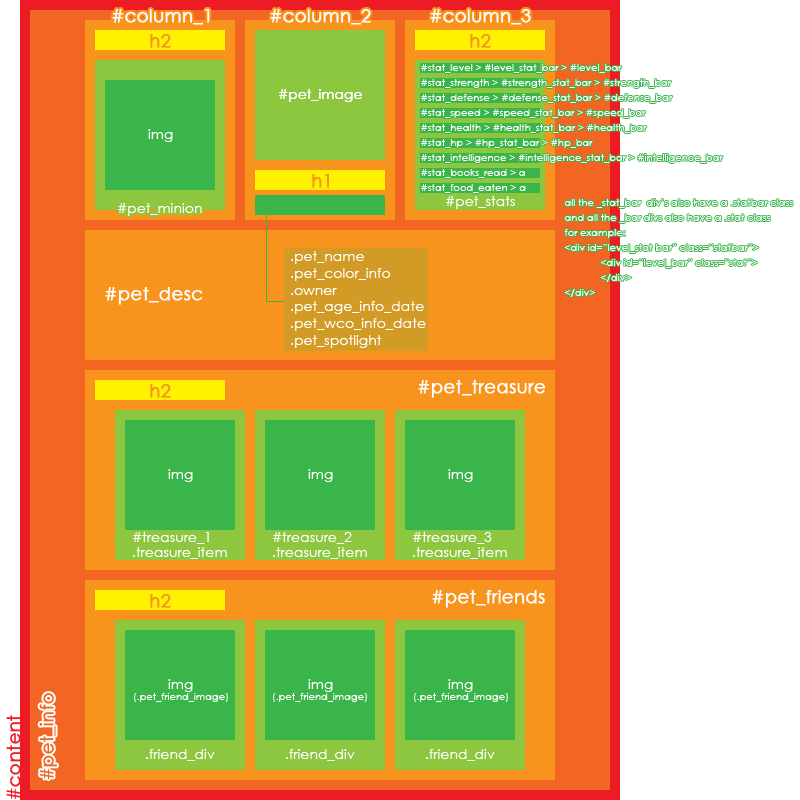
In the first post there is an image linked, this one here. What you need to do is, use a code like this to put things where you want them.
{position:absolute; top 100px; left 100px;}
You can position everything where you want it, the names of the divs and columns are all on the picture, which helps a lot.


I'm currently coding my profile and I was wondering if I could add two buttons in the space above my HA. Here is what I wanted, I have the buttons saved separately and uploaded to imgur. I tried adding them to - the column with my HA - but it annoyed me because the hover transition triggered both the buttons and the HA as it's part of the same column.
Also, why does all my text looked squished together? I've used paragraphs and breaks in the right places.



-
you mean sort of like buttons on my profile? c:
-
Paragraphs don't work like line breaks, text has to be inside
tags
Looking to adopt a December 31st, 1969 glitched date pet
Sorry if I'm saying something redundant. c: You simply have a new blank section above your ha and put two new divs that are also links in there......
And in the profile coding section specify their parametres, bg image (button image) etc...
{background-image:url(URL); width: px; height: px; opacity:0.8;}
:hover{opacity:1.0; ...
{blahblah...
:hover{....
Annd you can modify each of them separately this way without treating the rest of the profile to the same effects.
Should work I guess? ^_^;
Looking to adopt a December 31st, 1969 glitched date pet
@ sapphira I'll see if that works, thanks! ^^
[edit] It seems to work, thanks :) Just one thing though, any idea why the mail button is below the friend button, rather than next to it? I've widened the column, the're should be more than enough room for them to be next to each other. Also, is there any way I can move each div individually?

{overflow: hidden;} :hover {overflow: auto;}
EDIT : N/m I got it xD

, I have a question. I used your code for the spoilers in Lavii's profile. But i have a blank space under the spoiler bar before the text begins when i click the spoiler to see the text it is hidding. You can go to his profile to see what I mean.
if you know where i can credit to them now, please let me know
[tot=ibook]

Okay, question time! I'm trying to code a profile and I was looking at the example on display in the OP. It appears to be a main image in which all the information is contained and then a background color that fills in what would otherwise be blank space. What's the code for that, and how do I get the 'main image' to be centered like it is in that one? Because basically that simplistic layout is exactly what I need right now, I'm just not sure how to do it >>
Edit - Forgot to add a link just in case. This is the pet I'm talking about - http://subeta.net/pets/Aemilius+Lepidus

-Starbell
That specific profile seems to have the sized (to make the body's background color show behind it) and then positioned with margins.
Ah, that actually makes a lot of sense. Thank you so much.
Sorry to bother you, it's been quite some time since I've done this. I made the background a specific, solid color then tried to put an image in as well using the following code:
{image: url(''); position:absolute; left:0px; top:0px; }
With the url for the image in question being in the ('') space. Now, when I don't have a background color the image shows up just fine but when I try to make it show up with the background color in place it doesn't show up at all, only the color does. I'm not so much worried about where it shows up at the moment as getting it to show at all, because I know I can tweak the left and top positions later to fit it where it needs to go. Is something up with my code? Because I can't imagine there's no way to put images on top of a background color ><
-Starbell
Well if the image is going to be a background image you'll want to go about it like this:
{background: url('') ; }
I think that was the first thing I tried, but I tried it again and it really didn't work. The background just goes back to white as if the code doesn't work at all. What I'm looking for is a way to keep the background a solid color then inserting an image over top of it rather than making the image the background. I'm sorry if I'm being confusing ><
-Starbell
Now this is really basic, but it's something like that right?
Oh and with what I posted before. You'll need to exchange the part for whatever you're applying the background to. body or or something along those lines.