Testers Needed: "New" Wardrobe!
Filter
Show Official Posts OnlyReplies

Google Chrome
Positives:
Overall layout is nice, loving the remove a limb feature. I like how easy it is to select skins. I like that we can remove base features instead of having to hide them behind the base. Base removal is great too. Adding/removing pecs is good.
Issues:
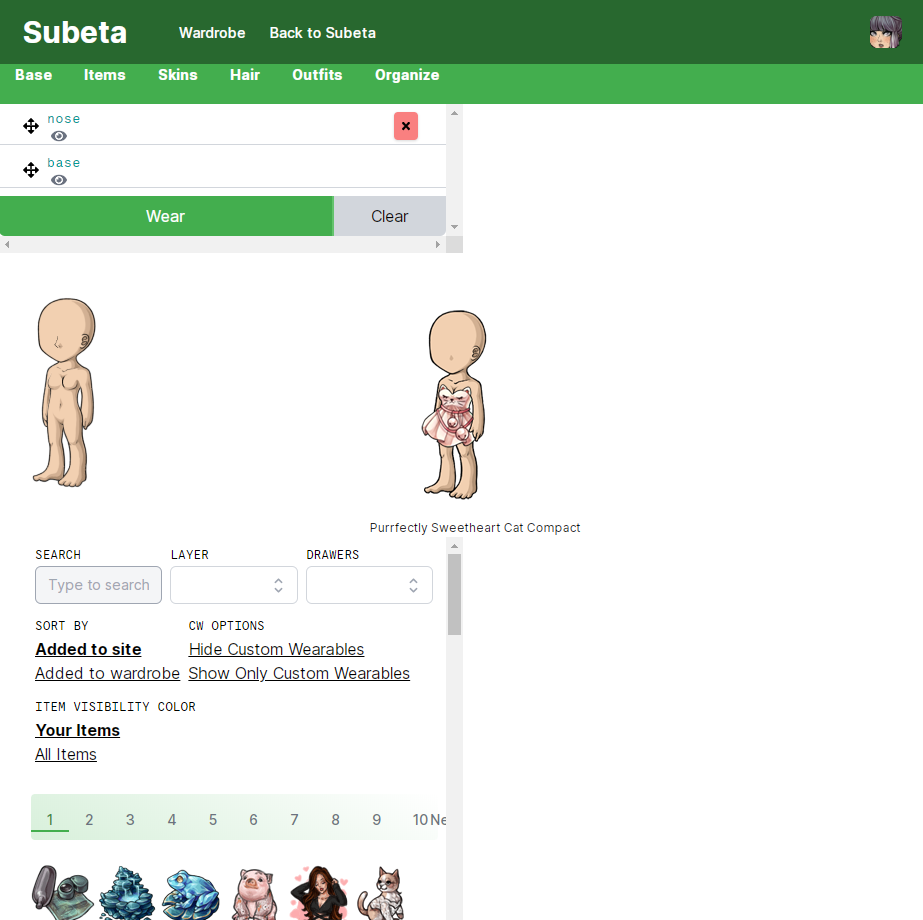
I'm getting some issues with outfits not loading or loading slowly. There is no save HA to outfits option. The descending and ascending items in wardrobe option is missing. New items that are not wearables are showing up such as the Endeavor plushies. Left foot for limb removal is whiting out the entire chest region. The item feature avatar has thicker lines than the one we would have for wearing. Sometimes when I try to remove item it just switches the items place on the base instead of removing? Clear button is being a bit buggy. It's not clearing all
Ideas
I kind of miss the color feature where Items were categorized by matching colors.
[box=#CCFF99]
Tree

A bunch of ornaments are showing up in the wardrobe, the examples listed are only some of them.
Also a book
[edit] Okay, played around a bit more. Basically EVERYTHING is showing up - plushies, beanbags, minions, etc, when using the "search" field (even when limiting to items in my wardrobe) and not selecting a layer.
In loving memory of Need posting achievements?Then join Posting Frenzy Achievement Items - searchable list List of Borders and cutouts New at Fresh and Flavorful Ping Group

Updates
- Reduced the number of items per page (that was a bug, oops)
- Filters coming soon: -- items page: amount per page, order by name, order newest/oldest (desc/asc) -- organize page: amount per page, order by name
Yes! Colors are back (and built in) but it's going reallllllyyy slow in the background to color code all of the items on the site. I'm going to give that a look later today to try and speed up
(Going to get to all of your other feedback and bugs too!)
💖 ✨ 🤗

Also, when I clear all the items from my av, my avatar's hand is stuck behind the hip. Is that normal? Will we have to use the glove items from now on?
What are the checkmarks on the items for? To tell me that I already own the items that I put in my wardrobe? Cuz.. I know that lol. Being told I own something that's in the "my items" view seems redundant. It would be better (in my opinion) if the checkmarks only appear in the "all items" view. And maybe an X mark on items you don't own.
he/him / 31 / EST |  | My best friend is |

Also, I tend to use my internet browser as only half of my screen and the wardrobe looks really stupid and is hard to use when I do that.
Save Outfit
I'm noticing a few people mention this, the "save outfit" button has been moved to the outfits page. You have to go there to save a new saved outfit.
There are a few reasons for this, but the usage on that button is too low to be present on every page, mostly!
💖 ✨ 🤗
@ Keith That is glorious news, I miss the color matching so much even if it has been gone for a solid like 8 years.
Turning the limbs on and off is a wonderful feature but now the whiteout items are redundant. Are there any plans for those or are they just going to be relics of the past now?
One thing I did notice is that when I saved my outfit after deleting a limb, the preview of the saved HA shows the limb, as shown below.
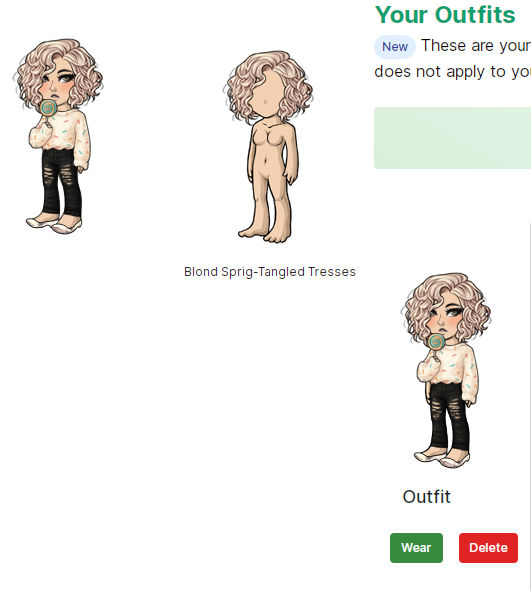
(Good lord, I didn't realize I had so many outfits saved ...  )
)
[edit] Unrelated to this, but about half the time I try to load the forums, I just get the loading page and it never loads. It's driving me crazy.
Just wanted to add something positive: I'm stoked about being able to wear more than one hair salon style at once. :D And the in-wardrobe organization looks like it will be better than currently.
he/him / 31 / EST | | My best friend is |

Outfits tab: It will only load up outfits that are older than my most recent 4 outfits, not sure why! The previews appear just fine but the clothes won't show on my avatar. The older ones load really nice and quickly (awesome!) but no matter how many times I click on Wear underneath one of my newest 4 nothing happens lol.
Potential hair salon bug:
- I'm wearing Creation but it doesn't have my custom colors from the old regular wardrobe, just shows as default red.
- Since you can wear more than one salon style at once I clicked on another I own, and it overwrote Creation as well as added another hair to the worn list. Example: I'm wearing Creation, I clicked wear on Bebe, my Creation became Bebe and a second Bebe appeared on the list. If I toggle the second Bebe I can see the first Bebe that overwrote Creation. Hope that makes sense.
Firefox 74
edit: actually, this is probably because the new wardrobe didn't properly import my custom hair from the old wardrobe and doesn't know how to react.
edit 2: Also, when I'm in my "owned hairstyles" view I don't actually see the default styles, just ones I unlocked.
edit 3:
It stays on the page number you were on when you go to a new layer instead of snapping back to page 1.
Example: Go to the third page of chest layer, switch to the head layer and it loads as page 3.
edit 4:
I add items to wear, move them around, then delete them and they appear at the top of the worn list instead of removing from the avatar. Deleting the ones that reappear deletes them from the list for good.
he/him / 31 / EST | | My best friend is |

A couple more things:
If we could get a counter added back on the "organize" section that tells us how many items we have in our wardrobe, or even on the items page or wherever, that would be nice. (unless it's already there somewhere and I've just completely missed it)
Also agree that the hairstyle organization needs to be fixed. Default styles are showing up in the "unowned" section, which doesn't really make sense. I think the "owned" and "unowned" sections should be only for the redeemable wigs and the styles that were purchasable during the councilor's cruise event. Put the default styles in their own section, perhaps.
Testing the new wardrobe has killed the old one :(
In loving memory of Need posting achievements?Then join Posting Frenzy Achievement Items - searchable list List of Borders and cutouts New at Fresh and Flavorful Ping Group

I hope all of these thoughts are helpful. :) It looks really cool and I'm excited for the update! <3 Thank you for all your hard work!
My Thoughts Are Lengthy
First impression: Ooh! Pretty! ^_^
I liked the green shades. The layout seems to divide things a bit more, visually. Making it easier to navigate. Sometimes when things are too similar visually it takes me longer to get things done due to having to Focus more on the part I want to work with. (I hope that made sense..)
First Thoughts I Love the obvious red X buttons on the items being worn. And how it gets darker. It's less likely to accidentally take something off you didn't mean to. I don't have a touchscreen right now (rip old laptop), but I bet this is useful to those that use touchscreen. :) Wait, just tried clicking the red X's and it just puts that item at the top? After playing with it, sometimes it puts it at the top and sometimes it takes the item off? Love the smooth movement of dragging the items to different layers though. When you hover over an item to see it next to your avatar, it overlaps with the writing in the section you're in. Right now I'm in the Hair Salon and hovering over Blue Plastic Frame and the border of the item is cutting over the text.
In the Outfits section it says for me "These are your saved outfits. You have a 250 limit on the number of saved outfits that you can have. You have 505. This is a new limit, and does not apply to your legacy outfits." Now, I Know I need to cut out a bunch of outfits. I've been meaning to. I'm just curious on the 'this is a new limit and doesn't apply to your legacy outfits' part. Does that mean you can create 250 More outfits above what's already there? So that I could potentially have 750 outfits? (Not that I want or Need that many..) I just wanted some more clarity on that.
In the Hair Salon: It says "The hair salon is for updating the hair on your avatar ????????♂️." I just figured those two little squares were supposed to be something? [I'm using Chrome btw.]
I love the possibility to wear multiple hairs from the salon and layer them. I've wanted to do that for so long and have just stayed away from the Salon because it seemed easier to pick a wig similar to what I wanted.
Right now it just has the options of Primary, Shadow and Highlight. Will there be the other highlights from the current wardrobe? If I remember, depending on the hair, there were anywhere from 3 to 8 highlights you could choose. It makes it a little more fun. :)
[Oh! Clicking the red X on the hair layers I added worked. And the X worked on Some of my items, but not All. :/ ]
Skins I like being able to see more of what your choosing from at a time. Ex. I can see more skins at a time before needing to scroll. :) Right now, I can put say the Angelic skin ON, but I don't see a way to take it OFF? Like, to go back to normal skin? I think I like the option to just take off the eyes/nose/mouth completely so as to use another item.
Items section: How will the Drawers work? I was having trouble with that on the other version and just gave up and started memorizing my wardrobe. It would be nice to section some things I use often. (By that, I mean I don't know how to Create new drawers.) ...Found the Organize section. I like the ease of being able to take it out to your Inventory. I assume 'drawers here' is where a small dropdown for which drawer you want it to go in will be?
The links for 'Sort by', 'CW Options', and 'Item Visibility Color' (that last color part doesn't make much sense?) anywho, the links seem a little crowded together. The check marks next to each item are nice, but they don't seem to DO anything. When I click an item it has the square around it which fine too. I just couldn't figure the point of the checks if they don't fill in/change color when you select an item? If you click 'Show Only Custom Wearable' and then 'Hide Custom Wearables' no items show up, but there are the buttons ''Show Custom Wearables' and 'Show Regular View'. I just think it would make more sense to go straight to Regular View if you do things in that order? (Hope that made sense..) Instead of having a blank space in the Layer Options at the top, could it say 'All' or something similar?
More Items Oh..OH! I just noticed. When I went to 'All Items' and had it set to 'Added to Site' it shows ALL ITEMS. Not just wearables, but Everything. Plushies, stickers, books, beanbags, etc. O.o" I know there are some items that are both, but these are certainly not. [...the 'report any bugs 'here'' doesn't link...]
Last bits When clicking the little avi icon in the top right it gives the options 'Keith', 'Settings' and 'Sign out'. I assume the 'Keith' would be changed to Our username. But what would settings do? (And I assume the signout is so you can straight sign out w/o having to go back to site?


The endeavor plushies and new spring items that aren't clothes are showing up in the wardrobe.
On the outfits page, saved avatars are unable to be renamed. Also, could you change Create New Outfit to Save Current Outfit? Create gives the impression of starting with a blank base. Edit: I found where to rename outfits but could it be moved to where it was before?
Having the same left foot problem as others.
There's phantom broken image in the top left of the avatar.
And a question: What are legacy outfits?
You click the skin again to take it off.
Items that aren't wearables... Yup! This comes from weird bugs over the years where sometimes you could accidentally quick stock into your wardrobe, or somehow other magic items to your wardrobe but they'd never show up in the wardrobe because they weren't wearable.
I made them show up now so that you can manage them on the organize page, and remove them if you want! The tree decorations are stored in the same system, so I need to just.. filter them out.
Legacy outfits
A few things:
- The limit listed on the page is not enforced right now. It's 250 for regular accounts, 500 for GAs.
- When the limit is enforced all of your existing saved avatars will be marked "legacy". This means they won't be counted against your limit at all, and you can add 250/500 more. However, if you delete a legacy outfit and save a new outfit, it will count against your limit.
💖 ✨ 🤗
:) Thank you! And I think by 'Legacy Outfits' it means that the outfits created with the Old wardrobe would be considered Legacy. Edit: :P woops, Keith got it before me. Haha!
Something else: the skins that go over the base like Freckle Fever, get rid of the base completely.
Thank you for the legacy outfits! I can, and will delete, a lot of them. But many are also in forum posts and I hate deleting those and leaving blank posts.
But I can't find a save/create outfit button if my life depended on it. I thought I didn't have one because I'm so over the limit.
In loving memory of Need posting achievements?Then join Posting Frenzy Achievement Items - searchable list List of Borders and cutouts New at Fresh and Flavorful Ping Group

Since you are working on the "New Wardrobe", I was wondering if anything has been considered for the Transformable items.
Like, currently we have to take the item out of our wardrobe, transform it, and place it back in the wardrobe.
Are you able to add some sort of functionality that with Transformable items we can use all forms in the wardrobe? Or would that be a bit too complicated...I dunno..I don't code..lol :D
For example:
has 4 different forms.
Love may not always be destiny, But a Gift.


