Wardrobe+Avatar Problems: FIRST POST UPDATED 5/9
Filter
Show Official Posts OnlyReplies

Those items aren't in your wardrobe. Before you can wear an item, you have to own the item and put it in your wardrobe. (When an item is in your inventory, you can click on it and choose "Add to Wardrobe") While you are in the wardrobe, you can play with just the items you own by checking the box next to "Only show items you own". I hope this clears things up :)
🐝 ☕ bug (he/him) | your friendly neighborhood code wrangler. stay in the loop! join and check out the latest admin post highlights

Hello!
I learning english so if you can't understand something, please tell me.
I have a problem with some drawers of my wardrobe, when I click in specific drawers, it's don't show up the itens that I specificaded to that drawer, but show a lot of random itens (all mine) that's don't in there! When I wanted use an item in that drawer, I have to click in ''Organize Items'', see what item I want, take it's name and search by name in the wardrobe. I tried delete the drawer and create again, don't work.
Prints:
-
Print of my wardrobe, vision of one of the problematics drawer: https://i.ibb.co/kQwPYgT/Drawer1.png
-
Print of the page ''organize itens'': https://i.ibb.co/7yJC9QR/drawer2.png


(You can see that are items that aren't meant to be there and those that should just don't appears.)
Thanks!

I'm not sure if this belongs here, but it concerns my avatar and cache. If needed I'll post it somewhere else.
On my profile, I'm using a picture of my avatar in html
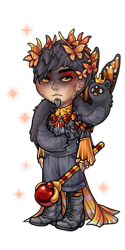
But the avatar that it shows is not my current avatar, it's an old avatar from around Feb 10. I've tried clearing my browser's cache and hard refreshing but I'm still seeing the old av. I'm having this problem on my computer and my phone.
My avatar is correct on my posts and sidebar etc, only wrong on my profile.
he/him / 31 / EST |  | My best friend is |
Due to how various avatar caching layers work, the raw URL is not guaranteed to be up to date and we always pair it with a timestamp around the site. On your profile, you can use the user avatar sCode or the avatar profile section :) If either of those are out of date, let me know.
The sCode is just
[avatar=Luck]
🐝 ☕ bug (he/him) | your friendly neighborhood code wrangler. stay in the loop! join and check out the latest admin post highlights
I am investigating your issue. The next time this happens, could you try clicking the green "Go" button next to the item name input? You don't have to type or change anything, just press the button and wait a few seconds for it to load, does this make the correct drawer items load?
🐝 ☕ bug (he/him) | your friendly neighborhood code wrangler. stay in the loop! join and check out the latest admin post highlights
Oh, that makes sense. Yep, the avatar widget is updated properly! Got rid of the html avatar, ty :)
he/him / 31 / EST | | My best friend is |

I'm not sure if this is where I should post this but the pop-up overlay previews of all wearable items show up as broken images for me. It started happening today. I have done a hard refresh of the site and cleared my browser cache but it's still happening. And I checked the wardrobe and they work fine in there. It's just the hover previews that are broken scratches head
Thanks for the report. They should be working again now ^^
🐝 ☕ bug (he/him) | your friendly neighborhood code wrangler. stay in the loop! join and check out the latest admin post highlights
It is! Thank you ^_^
Hello!
Unfortunately there was no changes.

I switched to using the the user avatar sCode on my profile to display my avatar, but it seems like that sCode is still making it show the link without any extenders/timestamp things:
https://sapi.subeta.net/avatar/522091.png
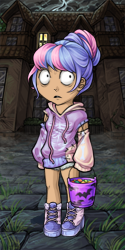
I've tried clearing my cache and the HA on my profile remains the same even while using the sCode, but the avatar image from my username hover updates immediately when I change something in my outfit.
Hm, I see it matches now though, do you know how long it was stuck for? I will look into why the sCode doesn't have the timestamp though.
Thank you for giving that a try! I'll keep looking into the issue. Would you be able to list which drawers have this problem, or do all of them not work for you?
🐝 ☕ bug (he/him) | your friendly neighborhood code wrangler. stay in the loop! join and check out the latest admin post highlights
These are the drawers with problems: Acessories Low, Acessories Mid, Acessories up, Background Cha and background Modi.
I changed it sometime this afternoon after seeing your reply here to . And it's actually still stuck for me, on my profile it's showing my HA with stage 7 of the metal virus (which is what I had at the time when I updated my profile and cleared my cache the first time). But since then, clearing my cache won't make it show up correctly for me on my profile, even though it shows up correctly in other places.

@ Bug Do you want to know at least one source of broken avatars? Toss a "Mouse" snowball at somebody (I'll do), and voila! If you then try to see the resulting non-avatar by "View image", instead of an image you'll see a looong sheet of 404 error and the stack trace you're welcome to peruse.
(The "broken" effect wears off with snowball wearing off, it seems)
[tot=Snowwall] | [egg=Snowwall] | [tp=Snowwall]

sorry to bother but a few of my items aren't showing up properly under "none" again -_- I have no memory of making a fish tail drawer but I guess I must have at some point??

I don't know if it's me but I can't make my avatar "transparent". The link in one of the main forums for survival never worked for me :(

What do you mean transparent? There is currently no option like that. You can hid it behind a background like mine.
Dexter by ❤
Hello, I mean "without the eyes and mouth" avatar. Not actually transparent, but I can't hide the eyes nor mouth, else I don't know how to do so.
What do you mean transparent? There is currently no option like that. You can hid it behind a background like mine.