free pet profile templates by Lea (updated 1/10/21)
Labels
Replies

oooh i see. It's all perfect now! Thanks for the help!!

No problem, I'm glad it was an easy fix! Let me know if anything else comes up!!


What if my pet name is too long for the code ;-;

I'm back..... xD I'm hoping you can help me again? This issue seems to be based on web browser so I'm not sure.
On my pet Kirari I'm using your tabbed with circle template, and the second tab ("Miracles") looks freaking wonderful on Google Chrome, but in FireFox, the alignment goes all wonky.
This is how it looks in Chrome. This is how it looks in FireFox... I use FireFox as my primary browser. Is there anything that can be done to make them match, or do I just have to deal? I made a few attempts myself but was unsuccessful.
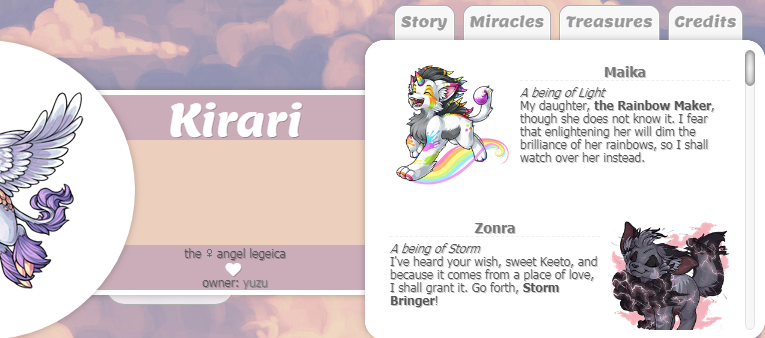
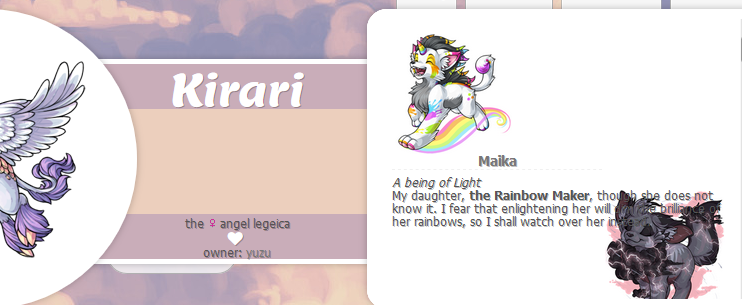
Please and thank you. ;w; ♥
Hi, I'm sorry for the belated reply, it looks like I accidentally deleted the event orz; It looks like you figured out how to fix the pet name length issue, if your leashed pet is any indication! As a little tip, one other way you can make the name look shorter is to remove the bit of code in the .pet_name section that adds 'letter-spacing: 2px' to the pet name -- that will remove some of the spacing between letters so that the pet name isn't quite as long, without having to necessarily make the font size itself smaller, so it might make things fit a little better overall! If you have any other issues, let me know. I'll try to reply in a more timely fashion aha ;;
After looking at it in both browsers, I think it's an issue with the scrollbar size, since Firefox doesn't allow the custom scrollbar I use! This layout is pretty minimalist in some ways and I tried to use as much space as I gave myself in the text areas. Anyway, what you should try doing is finding in my code where it says ' .friendright a h3, .friendleft a h3 ' and has the width listed. Reducing the width from 210px to something smaller, like 200px or so, should do the trick!

I used your new card layout for Lupine! Such a nice and neat profile style ahh! I'm still working on styling it! :) I hope you like the progression so far!
art by
Aha! That's exactly what it needed. Looks perfect now! Thank you so much!! ♥
I'm glad you think so! Oh, I love what you've done with it, and can I just say that I adore Lupinus's character design? What a cool monster girl 'u'
You're welcome! I'm glad that was easy to solve. C: If anything else comes up, lemme know and I'll try to help!

Thank you so much for these codes! My codes that I wasn't using got lost when my hard drive died x_x They're much more organized than mine lol
I'm using one of yours for here and I'm having an issue with the tc. it's supposed to stay like column 2 but its still tabbed. If that makes sense?
<3 <3
Sorry for taking so long to get back to you, it's been a busy week And I'm sorry that you lost all your code, that's a real pain. :c The reason for it staying tabbed looks to be an unclosed div tag! Just add another div closing tag to the end of the profile and you should be good on that. Do you need help with anything else?
No problem and that worked! Thank you :D
<3 <3

Hi Lea. Thank you so very much for the work you're doing here ♥ I've been working with your anchor link layout for Grabby Hands and I think once I get a pillow/blanket fort built so I can snap a pick for the background it'll be done..maybe :p
I ran into something that confused me though and I wondered if you might have an idea as to what's up. The bare bones is that if I resize the font in the first tab (for Grabby it's "Cheeya") it moves the pet spotlight space down into the top tab link space and cuts into the top of the box. I changed it in the fonts section using p as an identifier because that first tab was the only section that used the paragraph tag: SPOILER (click to toggle)
td, body, div, a{font-family: Gochi Hand;
font-size: 15px}
p{font-family: Gochi Hand; font-size: 17px}
SPOILER (click to toggle)
td, body, div, a{line-height: 13px}
p {line-height: 14px}

Hello ! I'm "new" here, but I came to tell you just as your work is amazing!
I love the pages you put together, they are beautiful!
Your profile is amazing too.
I wish you the best .
~ ♡ ~
I invite you to join my game: > Reply with a GIF <
What a cute profile! I look forward to seeing it finished. 'u'
That's... really weird, hah. To be honest, I'm not completely sure -- my best guess would be that it has something to do with the margins of the pet spotlight div that Subeta has by default, because I just checked and apparently my CSS for this profile does not have anything to remove that, and that's the one other thing I can think of that could change the positioning of the box... and once I added margin-top: 0px, then changed the positioning, it stopped changing when I would add that font size changed. So that's probably it, I guess!
What I would recommend doing if you want the font size for that div to be increased would be to add this: , p{font-size: 17px}
So that the first div, and any paragraphs within it, will have that increased font size, but not the rest of the profile. c:
What a sweet comment! Thank you so much, I really appreciate that. Also, it's always great to see newer people here (or not-so-new people that went inactive and then came back.) C: I really like the colors on Blue Snow's profile!
Aww! Thank you. His story came in a flash..the color scheme took forever lol. I love how playfully colored he is but using those brights is hard on the eyes O.o
Thank you so much for thinking on that, and for writing a fixer for me. I'm definitely way behind the learning curve here. Years ago I learned HTML through practice but that was, 3..I think lol, back when it was recklessly used all over the place. My God I'm old. HTML was the base so everything I did was done to build from an empty slate. Trying to learn how to use CSS here has me hung up on not knowing what all is in the coding that's already being used on the original pet page and not knowing what I need to practice to be able to alter that. That probably doesn't make any sense at all lol, or maybe it does and I just haven't had enough coffee.
Thank you so much again! I'm off to W3 to see if I can learn to make round divs :p
Hello again !
Glad you liked my comment. ^^
Glad you liked it! This makes me happy. :) It took me a few hours to leave as I wanted, but I did it! ^^
Have a good game!
~ ♡ ~
I invite you to join my game: > Reply with a GIF <

I'm sorry if this is a dumb question but this is my first time attempting to code my pets profiles (or code at all really) I'm using your first code on my pet Blooxura and I am trying to make the backround a galaxy photo to fit his Galaxy skin and I just can't seem to figure out how to do it.

Hi there! I'm very sorry for the delayed reply to your question, I've fallen pretty behind on Subeta things unfortunately and am just now trying to catch up. You actually have the code for the background correct, the problem is just the URL for the image! The way things seem to work on the website you found the image on is that you're supposed to download the image and reupload it somewhere else, rather than using a direct link - or at least that was what I had to do to get the background-sized version of the image, hah.
I reuploaded it to ImgBB, so just replace the URL you have currently with this: https://i.ibb.co/gV5n6wZ/2474215.jpg
If you would like to have the background sized more to the screen, you can use this code instead of what you currently have: body{background-image: url(https://i.ibb.co/gV5n6wZ/2474215.jpg);
background-size: cover}

;)
Hope that helps!

Quick question...is there a way to add just the pet job code somewhere? Like preferably on here
Do you mean to add the pet job to the first content box? The pet job is linked to the pet stats, so it would be difficult to try to work around that. If you just want the pet job itself, I would honestly just recommend copying and pasting the job information and link into the first content box; it would be a lot easier and less confusing!