Guide to CW art-Critiques,Sticky threads,and Tut's
Replies

the one thing I can notice is the lack of overall shading - which may explain the reason why they mentioned the 'lack of depth'.
On the right of each column, the depth suggests that the window is pushed back a little - it isn't directly aligned to the columns. Therefore you should have some larger shadows that enhance the depth. The same could potentially be applied to the archway, who seems to have the same volume as the pillar at the moment.
I'm having a very terrible time explaining with words, but if you'd like, I could wip up a quick example of what I mean by overall shadows qq
Cathii's CW shop ❤️

bows down ahh yeah, im having a terrible time understanding, so id love a quick demo how to process that. Thank you so much <3

YEAH YOU TOTALLY GOT WHAT I MEANT /PHEW <3 and it sounds like cathii is going to throw down some mad skills to help so i won't bother elaborating with more of my word salad, LOL!

There you go! Left picture is where I put the shadows, right picture is the appropriate colors (I used multiply bblending mode with various opacities). I think this illustrates better what I was trying to (very wrongly) explain earlier haha ;;
Ohhh I forgot, I also added sharp highlights at some places, especially the metal looking structure.

- picture cropped due to size. Right click to see the full-size of the image!
Cathii's CW shop ❤️
---thank you so much for the sample! it helped a lot <3
here is my newest attempt with some suggestions mentioned above- not at all sure how this looks- they mentioned dark lined areas so not sure about that now since i darkened it some so what do you think?


<3 I really appreciate the help,time,and effort everyone has given!
that looks absolutely stellar! <3 the only potential place where they might've thought the lines were a bit thick is in the columns? that's the only spot i can see/think of that might've been behind their reasoning! otherwise, forreal, it's just friggin' beautiful.

Hey everyone, I just received denial on a CW I did the art for, and it'd be great if I could receive a little critique to fix the problems. :( I'd like to get this fixed up asap so any help would be appreciated.
Is this a denial?if yes-include the denial and the images of the overlay/ci
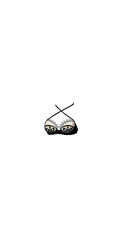
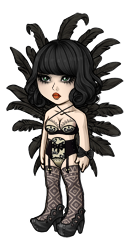
This is the item image, where it seems most of the problems lay. I'm going to redraw the entire thing but any advice on what would fix these denial reasons? This is the transparent overlay and how it looks on a base.

SPOILER (click to toggle)
• ITEM: Artwork does not match Subeta style, quality, or level of detail in general
• ITEM: Sharp and/or pixelated lineart
• ITEM: Not enough area shaded (too much left flat and unshaded)
• ITEM: Not enough layers of shading (Subeta artwork should have 3-5 layers of shading)
• ITEM: Anatomy or perspective issues
• NOTE: Overlay artwork is a bit hard to make out right now; it's not clear how the bra is meant to be designed!
--
List your working sizes,what program you use,what brushes you use and any useful info you may wish to include I used both photoshop & SAI, the icon's working size was 256px, and the overlay was 500x1000.
If you need a red line at all,etc If someone would be willing to help me with placing shadows/the issue that's making the overlay hard to make out, that'd be amazing. <3
im sorry, wasnt aware of this post since i didnt get pinged but its probably too late now. what strikes me the most is how does the item relate to the overlay? Usually when I pair an item with an overlay, like a dress and i have a dress box, i try to get the same colors,patterns,etc to tie it together...
the next thing that is troublesome is the perspective,its at a weird postition for me. Im thinking you might have to redesign this as perspective issues and all. but the flat areas is the top,crown,and overall the whole thing. if you have more layers of shading it will take care of 'not enough area shaded' and 'layers of shading' and i think the working size for item can be the reason why its resizing sharp/pixelated. i think personally its far too big for a 64/64. I would do at least 128. or at least shade in 256, then resize to 128 for the lineart.
im not sure on the note-when i can clearly see its for a bra and i can see the details. personally i think the item image is probably throwing them off but im not too sure.
[im sorry if this is a wrong group,if im pinging in error im sorry OTL ...can someone read below and give me feedback?]

Your custom clothing Traditional Hanbok was denied for the following reason(s): • OVERLAY: Shading is too faint • OVERLAY: Color bleeds and/or stray pixels • OVERLAY: Overlay perspective conflicts with the 3/4 angle of the avatar base • ITEM: Typo or grammatical error in the item name and/or description • NOTE: "Comfortable" does not need to be capitalized in the description. • NOTE: The color bleed is along the entire edge on our right and the sleeve on our left. • NOTE: The chest portion of the overlay is a bit undershaded.
[I know how to fix the shading issue, just the perspective is confusing to me. what is throwing it off the angle? is it the shirt only? is it just the ribon part of the shirt? If I can repaint over vs total redraw, id perferr to repaint..but i dont want to make major changes when im not sure..can someone help???]

I did a little bit of red line for you, hope you don't mind 'w'

I think it's just the edge of the skirt, so hopefully not much change is needed!!

i think the perspective issue may be about the collar, and in addition the bow and hanging ornament are both pretty flat-on
thank you guys for your tips/help on this <3
would something like this work? i tried looking at other asian style outfits to get a better idea on the perspective...not entirely sure if this sketch takes care of that

Can somebody help me with the denial of a dress please? :C

Your custom clothing Demure Fabric Bundle of the Dancing Maiden was denied for the following reason(s): • OVERLAY: Overlay perspective conflicts with the 3/4 angle of the avatar base • NOTE: The top is fine, the 3/4ths issue are mostly stemming from the actual skirt portion!

Sorry I misunderstood you so here I am. :D

Can someone help me with this denial please?

• OVERLAY: Issues from previous denial were not sufficiently addressed • OVERLAY: Sharp and/or pixelated lineart • NOTE: This still looks like hair under the hat, rather than a part of the hat itself! • NOTE: Changes made to the lineart of the 'hair' part are now resulting in some lineart gaps
I have no idea how to make the feathers to not look like hair, since it looks really feathery already. I shade hair in a complete different way. If I want to make it look like hair it would look like

I have worked on my piece. (Had a break because of exams)
 I added darker colors and I also redrew the CI.
Do you think it would be accepted or do I need some changes?
I added darker colors and I also redrew the CI.
Do you think it would be accepted or do I need some changes?
------❤️
actually, i did a similar item. except it was a full length outfit. it got denied at first for lack of shading and perspective,after my denial, i fixed it and it got approved. here is the item- so seeing that may help you. if not we can do a colab, let me know if you still need help
ps/
i think you should try to resubmit. it looks alot better!
Okay, I'll try. :)
Also, wow it's a great item. I love hanboks and finally there is one on site. ^^
------❤️

I've been working on my first piece. It seems I've still got some work to do. Any and all advice will be appreciated. ^-^
Is this a denial?if yes-include the denial and the images of the overlay/ci
Yes, this is a denial.
Your custom clothing Lost Sedge Hat was denied for the following reason(s):
• ITEM and OVERLAY: Suspicion of unoriginal artwork
Full Reason
Your custom clothing Lost Sedge Hat was denied for the following reason(s):
• ITEM and OVERLAY: Suspicion of unoriginal artwork
• NOTE: Before this can be accepted, we need to see proof of its originality. Please submit a ticket containing your original .psd files to a site like DropBox, and be sure to include any and all references. Do not submit this or any other CWs until told to do so via ticket.
After sending in wip files:
Hi Jeheace- So while I believe these are in fact original, the issue is going to revolve around the fact that because you are using programs like Gimp, these items are just nowhere near site quality. That is why they were denied in the first place - often when items are this far from where they need to be, they raise suspicion. If you compare your item to both official and other CW items on-site, you'll see it is very non-conventional and the art is just not where it needs to be. You are free to submit CWs once more, but I would suggest seeking help from other CW artists first to improve the overall quality, because it will not be accepted without significant changes.
Good luck!
Overlay and CI


List your working sizes,what program you use,what brushes you use and any useful info you may wish to include
My working sizes are 250x500 for the overlay and 125x125 for the item. I primarily used Paint.net but switched to Gimp to do smudging and touch ups. I'm still just getting started with the Pixel Arts, so I stuck with the basic brushes... Pencil, Line, Paintbrush...
If you need a red line at all,etc
As mentioned above, I just need advice and critiquing. ^-^ If it's as far from finished as Jessi says, then redlining just might turn the entire overlay into one full box of red lines.
sadly, smudging will not do as cell-shading is the accepted art form. it has to be 3-5 layers. to be honest the fact you went that far with that program is amazing but still unacceptable. If gimp could produce celshading like the items on site then you should be able to do that but im not sure if gimp will, i have not used so i cant say for sure.
I know a few people have used painttool sai pretty well,i think it is free? not sure again as i use and recommend photoshop. even in the old photoshop is capable of doing celshade as that is where i first started. tablet is best recommended,mouse is hard,kudos to you if your a mouse user.
im afraid most of your issues is due to the limited uses of gimp,as people mainly use photoshop,paintshop pro, and paint tool sai. however that being said once you find a program where you can cel-shade instead of smudge you will fare better.
however when you start this again, you need to re do it completely..
https://goo.gl/cYI2dv - copy and paste this in the url box...its google search of asian cone hats.
find a good reference first, with similar angle,size,and light direction([B] please note to find a reference through an actual photostock as using google search contains copyright images..I have mentioned google search just to see how they vary in angles that might be better and light direction,so make sure when you find something it isnt copyrighted..i didnt want you to think to use google as a resource,but to see in comparison of your cone hat[/b])
. you need 3-5 layers,yours right now looks too greyed out,and the ci shouldnt have flat grass like that nor be cut off(the bamboo) so basically when you redo your ci, you can have tuffs of grass around the hat and maybe a tiny bamboo stick in the bg of the ci..
that is my advice to you, but its abit limited due to your current program as i have no clue about. feel free to send me new wips or efforts along the way. you post here and ping me or smail. up to you. if you have any questions, feel free to ask

Sai isn't free, but there is a 31-day free trial for it before you buy. I believe Adobe has released an old version of Photoshop for free. It's like a decade old, so I don't know if it does cel shading, but hey free is free, and it's probably still better than Gimp.